

Sometimes the Apple TV Remote or Siri Remote can become unresponsive or lose its connection to the ‌Apple TV‌ for no obvious reason. This article outlines what you can try to get it working again.
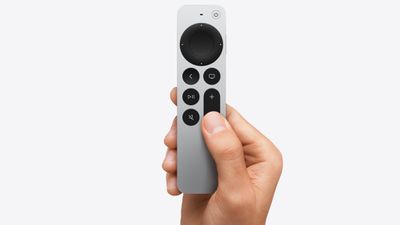
apple tv 4k siri remote
Usually when the remote that comes with Apple's set-top box stops functioning properly, it's either due to a hardware fault and the remote needs replacing, or the battery just needs recharging via the supplied Lightning or USB-C cable.

Occasionally though, some users run into persistent connection issues. It's an annoying bug that rears its head now and again, but there is a way to restart remotes for ‌Apple TV‌ devices which can sometimes fix the problem.

The following steps show you how it's done.

How to Restart Siri Remote and Apple TV Remote

  1. Press and hold the TV button and the Volume Down button at the same time. Keep holding both buttons for about five seconds, or until the status light on your ‌Apple TV‌ turns off and on again.
  2. Release both buttons, then wait five to 10 seconds for a Connection Lost notification to appear in the corner of your TV screen.
  3. Wait while the remote restarts. You should see the Connected remote notification appear on the screen, after which you can use your remote again.
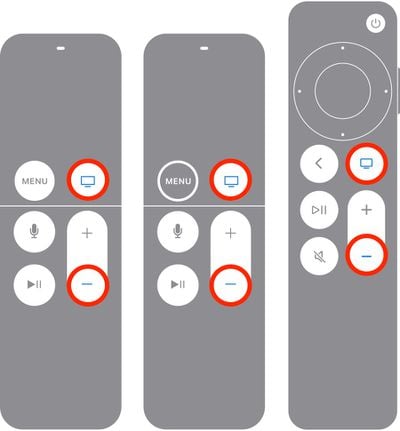
apple tv restart remote

That's all there is to it. If the restart process doesn't fix connection issues experienced with your ‌Siri‌ Remote or ‌Apple TV‌ Remote, it's time to contact Apple support.

Related Roundup: Apple TV
Buyer's Guide: Apple TV (Don't Buy)

Popular Stories

imac video apple feature

Apple Unveils First New Products of 2026

Monday January 26, 2026 1:55 pm PST by
Apple today introduced its first two physical products of 2026: a second-generation AirTag and the Black Unity Connection Braided Solo Loop for the Apple Watch. Read our coverage of each announcement to learn more:Apple Unveils New AirTag With Longer Range, Louder Speaker, and More Apple Introduces New Black Unity Apple Watch BandBoth the new AirTag and the Black Unity Connection Braided...
Apple Logo Black

Apple Just Made Its Second-Biggest Acquisition Ever After Beats

Thursday January 29, 2026 10:07 am PST by
Apple today confirmed to Reuters that it has acquired Q.ai, an Israeli startup that is working on artificial intelligence technology for audio. Apple paid close to $2 billion for Q.ai, according to sources cited by the Financial Times. That would make this Apple's second-biggest acquisition ever, after it paid $3 billion for the popular headphone and audio brand Beats in 2014. Q.ai has...
iPhone 5s

iPhone 5s Gets New Software Update 13 Years After Launch

Monday January 26, 2026 3:56 pm PST by
Alongside iOS 26.2.1, Apple today released an updated version of iOS 12 for devices that are still running that operating system update, eight years after the software was first released. iOS 12.5.8 is available for the iPhone 5s and the iPhone 6, meaning Apple is continuing to support these devices for 13 and 12 years after launch, respectively. The iPhone 5s came out in September 2013,...
Apple Creator Studio

Apple's Next Launch is Today

Tuesday January 27, 2026 2:39 pm PST by
Update: Apple Creator Studio is now available. Apple Creator Studio launches this Wednesday, January 28. The all-in-one subscription provides access to the Final Cut Pro, Logic Pro, Pixelmator Pro, Motion, Compressor, and MainStage apps, with U.S. pricing set at $12.99 per month or $129 per year. A subscription to Apple Creator Studio also unlocks "intelligent features" and "premium...
apple silicon 1 feature

Apple Responds to Skyrocketing RAM and Storage Chip Prices

Thursday January 29, 2026 2:40 pm PST by
On an earnings call with equity analysts today, Apple CEO Tim Cook responded to fast-rising RAM and SSD storage chip prices in the supply chain. Cook said that rising memory chip prices had a "minimal impact" on Apple's gross margin in the fourth quarter of the 2025 calendar year, but he does expect a "bit more of an impact" on the company's gross margin in the current quarter. Cook added ...











