ios camera app iconIn iOS, the Portrait mode in Apple's Camera app uses the dual cameras of your iPhone to create a depth-of-field effect, allowing you to compose a photo that keeps your subject sharp with a blurred background.

On ‌iPhone‌ X and later, and ‌iPhone‌ 8 Plus, Apple also includes a Portrait Lighting feature that you can use to apply studio-quality lighting effects to your Portrait mode images.

And with iOS 13, Apple added a new adjustment tool to Portrait Lighting effects that allows you to further tweak the intensity of the lighting, which can drastically change the look of a Portrait image. This article shows you how to access the new tool.

Before you follow the steps below, bear in mind that these Portrait Lighting adjustment tools are only available on ‌iPhone‌ XS, XS Max, and XR devices.

  1. Open the stock Camera app on your ‌iPhone‌ (tap the Camera icon on the Lock screen, open the app from the Home screen, or launch the Camera from Control Center.)
  2. Select Portrait mode and take a picture, then tap it in the preview box at the bottom-left corner of the screen.
    How to use portrait lighting adjustment tools ios 2

  3. Tap Edit in the bottom-right corner of the screen.
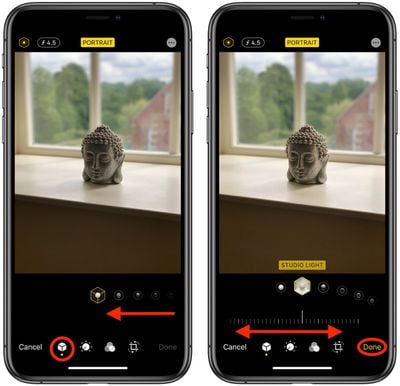
  4. With the Portrait icon selected in the bottom row of tools, select a lighting mode by sliding your finger along the icons below the photo.
    How to use portrait lighting adjustment tools ios 1

  5. Once a lighting mode is selected, you'll see a slider appear below it. Slide your finger along it to dial down or ratchet up the intensity of the selected lighting mode.
  6. Tap Done when you're happy with how the image looks.
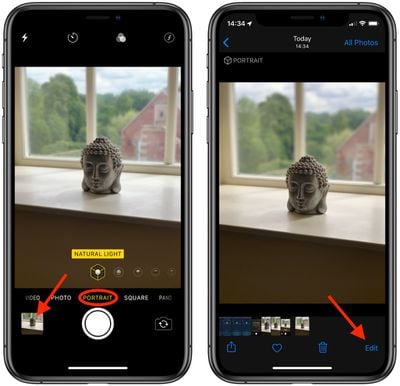
Remember, you can access the same lighting adjustment tool from the Photos app – simply select a photo captured in Portrait mode from your collection and tap Edit to bring up the editing interface.


Related Forum: iOS 13

Popular Stories

Apple Logo Black

Apple Just Made Its Second-Biggest Acquisition Ever After Beats

Thursday January 29, 2026 10:07 am PST by
Apple today confirmed to Reuters that it has acquired Q.ai, an Israeli startup that is working on artificial intelligence technology for audio. Apple paid close to $2 billion for Q.ai, according to sources cited by the Financial Times. That would make this Apple's second-biggest acquisition ever, after it paid $3 billion for the popular headphone and audio brand Beats in 2014. Q.ai has...
14 inch MacBook Pro Keyboard

Apple Changes How You Order a Mac

Saturday January 31, 2026 10:51 am PST by
Apple recently updated its online store with a new ordering process for Macs, including the MacBook Air, MacBook Pro, iMac, Mac mini, Mac Studio, and Mac Pro. There used to be a handful of standard configurations available for each Mac, but now you must configure a Mac entirely from scratch on a feature-by-feature basis. In other words, ordering a new Mac now works much like ordering an...
apple unsold web store

Retail Accessories Apple Won't Sell You Now Available via New Site

Friday January 30, 2026 8:46 am PST by
A newly surfaced resale operation is seemingly offering Apple Store–exclusive display accessories to the public for the first time, potentially giving consumers access to Apple-designed hardware that the company has historically kept confined to its retail environments. Apple designs a range of premium MagSafe charging stands, display trays, and hardware systems exclusively for displays in ...
Apple Creator Studio

Apple's Next Launch is Today

Tuesday January 27, 2026 2:39 pm PST by
Update: Apple Creator Studio is now available. Apple Creator Studio launches this Wednesday, January 28. The all-in-one subscription provides access to the Final Cut Pro, Logic Pro, Pixelmator Pro, Motion, Compressor, and MainStage apps, with U.S. pricing set at $12.99 per month or $129 per year. A subscription to Apple Creator Studio also unlocks "intelligent features" and "premium...


imac video apple feature

Apple Unveils First New Products of 2026

Monday January 26, 2026 1:55 pm PST by
Apple today introduced its first two physical products of 2026: a second-generation AirTag and the Black Unity Connection Braided Solo Loop for the Apple Watch. Read our coverage of each announcement to learn more:Apple Unveils New AirTag With Longer Range, Louder Speaker, and More Apple Introduces New Black Unity Apple Watch BandBoth the new AirTag and the Black Unity Connection Braided...