safari iconIn macOS, Safari's pinned tabs feature lets you better organize your tabs, especially if find you have too many open at the same time. It's particularly useful if you have certain websites that you tend to visit frequently throughout the day.

The neat thing about pinned tabs is that they stay in place, even when you open a new Safari window or quit and reopen Safari. And when you click a link to another website from a pinned tab, the other website opens in a new tab, ensuring your pinned tab always shows the website you pinned.

Keep reading to learn all you need to know about using pinned tabs in Safari.

How to Pin Tabs in Safari

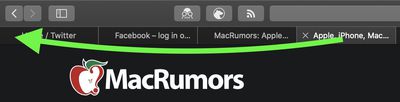
  1. In the Safari app on your Mac, drag the tab of the website you want to pin to the leftmost side of the tab bar.
    safari

  2. When the tab shrinks to show just the website's favicon, drop it in place.
    safari

You can also select Window -> Pin Tab from the menu bar, or right-click (Ctrl-click) a tab, then choose Pin Tab from the contextual menu.

How to Rearrange Pinned Tabs in Safari

Pinned tabs aren't fixed in place. If you have multiple pinned tabs, you can rearrange them in the Tabs bar as you please.

move pinned safari tab
To do so, simply drag a pinned tab before or after another pinned tab in the tab bar.

How to Unpin a Tab in Safari

To unpin a website tab, just drag the pinned tab to the right side of the tab bar and it will expand to become a normal tab.

safari
You can also select Window -> Unpin Tab from the menu bar, or right-click (Ctrl-click) a pinned site, then choose Unpin Tab from the contextual menu.

How to Duplicate a Pinned Tab in Safari

To duplicate one of your pinned tabs, right-click (or Ctrl-click) it, then choose Duplicate Tab from the contextual menu.

safari
The pinned site will open in a separate tab.

How to Close a Pinned Tab in Safari

To close a pinned tab, simply right-click (or Ctrl-click) the tab, then choose Close Tab.

safari

Tag: Safari

Popular Stories

iphone 16 apple intelligence

Apple Aiming to Release 'Breakthrough' New iPhone Accessory

Wednesday February 18, 2026 12:43 pm PST by
Apple is looking for a "breakthrough" with its push into wearable AI devices, including an "AirTag-sized pendant," according to Bloomberg's Mark Gurman. In a report this week, he said the pendant is reminiscent of the failed Humane AI Pin, but it would be an iPhone accessory rather than a standalone product. The pendant would feature an "always-on" camera and a microphone for Siri voice...
Multicolored Low Cost A18 Pro MacBook Feature

Low-Cost MacBook Expected on March 4 in These Colors

Wednesday February 18, 2026 5:42 am PST by
Apple will announce its rumored low-cost MacBook at its event on March 4, with the device coming in a selection of bold color options, according to a known leaker. Earlier this week, Apple announced a "special Apple Experience" for the media in New York, London, and Shanghai, taking place on March 4, 2026 at 9:00am ET. Posting on Weibo, the leaker known as "Instant Digital" said that the...
iphone 17 pro green

iPhone 17 Pro Max Curiously Becomes Most Traded-In Smartphone

Wednesday February 18, 2026 9:13 am PST by
New trade-in data indicates that Apple's iPhone 17 Pro Max has rapidly become the single most traded-in smartphone. According to a new report from SellCell, Apple's latest flagship iPhone has quickly risen to the top of the independent trade-in market, accounting for 11.5% of all devices appearing in the top-20 trade-in rankings just months after release. The analysis is based on SellCell...
CarPlay Liquid Glass Dark

iOS 26.4's New CarPlay Video Feature Shown in Action

Wednesday February 18, 2026 9:29 am PST by
Back at WWDC 2025, Apple revealed that it was planning to allow CarPlay users to watch video via AirPlay in their vehicles while they are not driving, and the first beta of iOS 26.4 suggests the feature may be nearing availability. There are several new references to CarPlay video streaming functionality within the iOS 26.4 beta's source code. The feature is not yet visible to users, but...
Dynamic Island iPhone 18 Pro Feature

10 Reasons to Wait for Apple's iPhone 18 Pro

Wednesday February 18, 2026 5:12 am PST by
Apple's iPhone development roadmap runs several years into the future and the company is continually working with suppliers on several successive iPhone models at the same time, which is why we often get rumored features months ahead of launch. The iPhone 18 series is no different, and we already have a good idea of what to expect for the iPhone 18 Pro and iPhone 18 Pro Max. One thing worth...