In iOS 18, Apple has added a powerful new feature to your iPhone's Calculator app: Math Notes. This integration between Calculator and Notes offers a versatile tool for all your calculation needs. It's particularly handy for splitting bills, calculating group expenses, or working through more complex mathematical problems.

Math Notes allows you to type equations directly into a note, with automatic solving when you add an equals sign. You can perform a wide range of calculations, including defining variables for more complex math. For example, if you're planning a night out, you could write "dinner = $57" and "movies = $24" in a note, then simply type "dinner + movies =" to get the total cost.
Here's how you can start using Math Notes in the Calculator app in iOS 18:
- Open the Calculator app on your iPhone.
- Tap the calculator symbol at the bottom left of the screen.
- Select Math Notes from the options.

- Tap the new note symbol in the bottom right corner.
- Start typing your calculations.
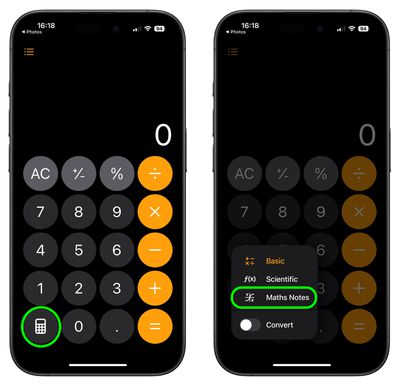
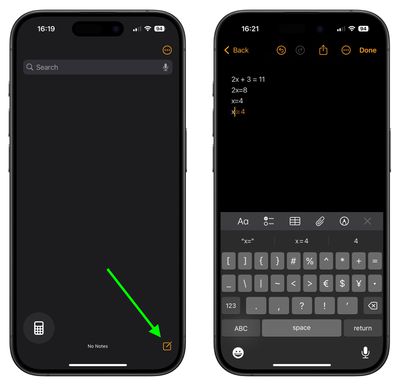
You're not limited to accessing Math Notes through the Calculator app – you can also use the feature directly within the Notes app using any new or existing note.
If you need to switch back to the standard calculator while using Math Notes, simply tap the calculator icon again and choose either Basic or Scientific mode.
You can in fact get Math Notes results almost anywhere in the operating system. If you type an equation into search, for example, you'll get a result, and the same goes for apps like Messages.
Math Notes on iPad
In iPadOS 18, Math Notes works in the same way, but there is an added bonus - you can use an Apple Pencil. Once you start a Math Note from the Calculator app or the Notes app, you can write your equations by hand and have them solved in the exact same way.
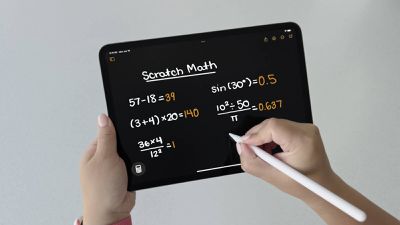
Note that Math Notes not only supports calculations written with Western Arabic numerals and common mathematical symbols, but also calculations using Arabic (Eastern & Western) and Devanagari numerals.