In iOS 17, Apple has made sharing files and media easier than ever, thanks to a cool new AirDrop proximity feature that does most of the work for you.
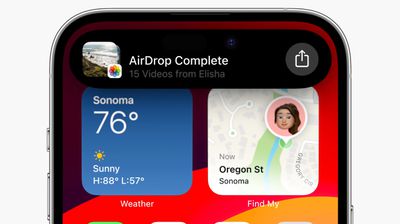
airdrop videos ios 17
In prior versions of iOS, transferring a file or photo between Apple devices involves opening the file in question, tapping the Share button, selecting AirDrop, then choosing the nearby device you want to send the file to.

With iOS 17, this procedure still exists for sharing between Apple devices, but if you're transferring between iPhones then you can cut out some of the typical sharing steps by using AirDrop's new proximity feature.

To initiate a transfer, select the photo or file that you want to share with someone. From there, simply bring your unlocked ‌iPhone‌ next to the other person's unlocked ‌‌iPhone‌, and your device will pop up a share interface without you having to tap on the Share Sheet.

Tap the Share button that pops up to send the photo or file to the person next to you, and it will be received on the other device automatically, with permission granted through their proximity.
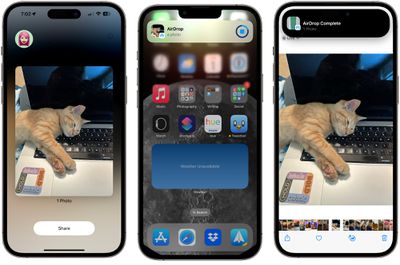
airdrop proximity sharing

Note that sharing files this way works even if AirDrop receiving is turned off or limited to contacts, so it offers a way to share a file with someone without having to change your overall AirDrop settings.

Enable or Disable AirDrop Proximity Sharing

We're used to AirDrop working with someone in the same room and involving a few manual steps, but the proximity sharing feature makes transfers between two devices virtually effortless. Of course, if you don't like the idea of proximity sharing, you can turn it off. Here's how it's done in iOS 17.

  1. Open the Settings app.
  2. Tap through to General -> AirDrop.
  3. Toggle the switch next to Bringing Devices Together on or off.
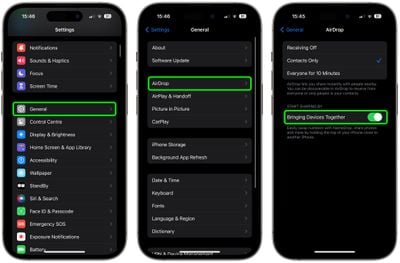
settings

That's all there is to it. Note that disabling this setting will also prevent the sharing of contacts via NameDrop. To learn about how contact sharing has also become easier than ever in iOS 17, check out our dedicated NameDrop how-to.


Tag: AirDrop

Top Rated Comments

vegetassj4 Avatar
31 months ago

Since so little interaction is required, I wonder how long it will be before someone devises a way to exploit this for nefarious purposes.
iOS RSR 17.1.1 (a)

addresses an issue that permits unintentional proximity sharing of all photos to everyone for 10 minutes
Score: 9 Votes (Like | Disagree)
macsplusmacs Avatar
31 months ago
I respect the amount of cats in this story immensely.
Score: 8 Votes (Like | Disagree)
cocky jeremy Avatar
31 months ago
You get a **** pic, you get a **** pic, everybody gets a **** pic!
Score: 5 Votes (Like | Disagree)
Cromulent Avatar
31 months ago
AirDrop is by far my favourite iOS feature. I use it all the time with family.

It would be cool if you could send an encrypted file over the internet to someone on your friends list so you could share anything from anywhere.
Score: 5 Votes (Like | Disagree)
svish Avatar
31 months ago
Good article. Should be easier to transfer files and photos
Score: 3 Votes (Like | Disagree)
Boeingfan Avatar
31 months ago
Hmmm you had me until the point about it overriding airdrop being turned off or set to contacts only. Seems odd; what’s the point of making these controls if someone can just override them?
Score: 3 Votes (Like | Disagree)

Popular Stories

iOS 26

iOS 26.3 and iOS 26.4 Will Add These New Features to Your iPhone

Tuesday February 3, 2026 7:47 am PST by
While the iOS 26.3 Release Candidate is now available ahead of a public release, the first iOS 26.4 beta is likely still at least a week away. Following beta testing, iOS 26.4 will likely be released to the general public in March or April. Below, we have recapped known or rumored iOS 26.3 and iOS 26.4 features so far. iOS 26.3 iPhone to Android Transfer Tool iOS 26.3 makes it easier...
imac video apple feature

Apple Makes Its Second-Biggest Acquisition Ever

Tuesday February 3, 2026 12:45 pm PST by
Apple recently acquired Israeli startup Q.ai for close to $2 billion, according to Financial Times sources. That would make this Apple's second-biggest acquisition ever, after it paid $3 billion for the popular headphone maker Beats in 2014. This is also the largest known Apple acquisition since the company purchased Intel's smartphone modem business and patents for $1 billion in 2019....
iOS 26 Home Feature

Apple Gives Final Warning to Home App Users

Tuesday February 3, 2026 8:55 am PST by
In 2022, Apple introduced a new Apple Home architecture that is "more reliable and efficient," and the deadline to upgrade and avoid issues is fast approaching. In an email this week, Apple gave customers a final reminder to upgrade their Home app by February 10, 2026. Apple says users who do not upgrade may experience issues with accessories and automations, or lose access to their smart...
maxresdefault

M5 Pro and M5 Max MacBook Pro Launch Imminent as Reseller Stock Dwindles

Tuesday February 3, 2026 12:12 pm PST by
New M5 Pro and M5 Max MacBook Pro models are slated to launch in the near future, according to information shared with MacRumors by an Apple Premium Reseller. Subscribe to the MacRumors YouTube channel for more videos. The third-party Apple retailer said that MacBook Pro stock is very low currently because there is an imminent new product introduction. Apple typically coordinates supply with...
Apple Logo Black

Apple's Next Launch is 'Imminent'

Sunday February 1, 2026 12:31 pm PST by
The calendar has turned to February, and a new report indicates that Apple's next product launch is "imminent," in the form of new MacBook Pro models. "All signs point to an imminent launch of next-generation MacBook Pros that retain the current form factor but deliver faster chips," Bloomberg's Mark Gurman said on Sunday. "I'm told the new models — code-named J714 and J716 — are slated...