Every self-respecting app has a dark mode, so why should TikTok [App Store] be any different? Especially given that it's the sort of app you could end up scrolling through endlessly at 2 a.m. in the morning.

tiktok logo
Any respite from that blinding white interface is likely to be welcomed by your poor bleary eyes, which is why it's always a good idea to turn on TikTok's Dark mode.

That said, it's worth noting that TikTok's dark theme won't cause any change in your experience when viewing videos on the For You page. But it will darken all the other sections of the app, such as the Discover section or your profile. Here's how to turn it on.

  1. Launch the TikTok app on your iPhone.
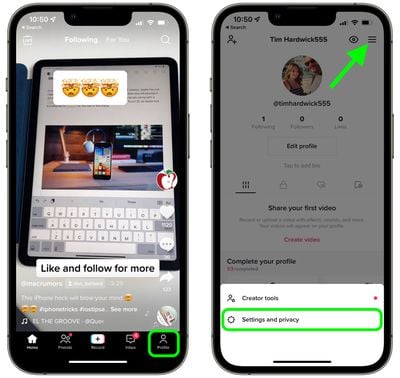
  2. Tap the Profile button in the bottom-right corner of the screen.
  3. Tap the hamburger (three lines) icon in the top-right corner, then tap Settings and privacy in the prompt that appears at the bottom of the screen.
    1tik tok enable dark mode

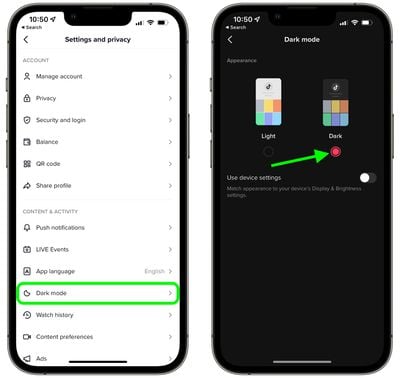
  4. Under "Content & Activity," select Dark mode.
  5. Tap the radio button for Dark to enable Dark mode.
    2tik tok enable dark mode

That's all there is to it. Note that the last screen includes an optional switch that you can toggle on so that TikTok conforms with your system-wide setting for Light/Dark mode.

Tag: TikTok

Popular Stories

Second Generation AirTag Feature

Apple Unveils New AirTag With Longer Range, Louder Speaker, and More

Monday January 26, 2026 6:07 am PST by
Apple today introduced the second-generation AirTag, with key features including longer range for tracking items and a louder speaker. For those who are not familiar, the AirTag is a small accessory that you can attach to your backpack, keys, or other items. Then, you can track the location of those items in the Find My app on the iPhone, iPad, Mac, Apple Watch, and iCloud.com. The new...
M5 MacBook Pro

Apple Reportedly Aiming to Upgrade the MacBook Pro Twice This Year

Sunday January 25, 2026 11:46 am PST by
Apple plans to release new MacBook Pro, MacBook Air, Mac Studio, and Studio Display models in the first half of this year, according to Bloomberg's Mark Gurman. In his Power On newsletter today, Gurman added that redesigned MacBook Pro models with an OLED touch screen "should be hitting toward the end of 2026," meaning that the MacBook Pro line would be upgraded twice this year. First up...
Apple Logo Spotlight

Apple to Launch These 20+ Products This Year

Sunday January 25, 2026 6:02 pm PST by
2026 promises to be yet another busy year for Apple, with the company rumored to be planning more than 20 product announcements over the coming months. Beyond the usual updates to iPhones, iPads, Macs, and Apple Watches, Apple is expected to release its all-new smart home hub, which was reportedly delayed until the more personalized version of Siri is ready. Other unique products rumored for ...
imac video apple feature

Apple Unveils First New Products of 2026

Monday January 26, 2026 1:55 pm PST by
Apple today introduced its first two physical products of 2026: a second-generation AirTag and the Black Unity Connection Braided Solo Loop for the Apple Watch. Read our coverage of each announcement to learn more:Apple Unveils New AirTag With Longer Range, Louder Speaker, and More Apple Introduces New Black Unity Apple Watch BandBoth the new AirTag and the Black Unity Connection Braided...
iOS 26

What to Expect From iOS 26.4

Friday January 23, 2026 12:31 pm PST by
iOS 26.3 is shaping up to be a relatively minor update, with only a couple of notable new features, but iOS 26.4 is expected to be much more significant. We are still waiting for the iOS 26.3 Release Candidate to come out, so the first iOS 26.4 beta is likely still at least a few weeks away. Following beta testing, iOS 26.4 will likely be released to the general public at some point in March ...