iOS 15: How to Filter Search Results in Maps - MacRumors
Skip to Content

iOS 15: How to Filter Search Results in Maps

by

In iOS 15, Apple has worked to improve the search results in its Maps app, and has added the ability to filter results by options like what specific cuisine you're looking for, whether a restaurant is open or offers takeout, and more.

apple maps icon ios 15 beta 2
In the following steps, we've demonstrated how it works by looking for restaurants that serve a particular type of cuisine, but you can filter other categories, like a specific chain of supermarket or drugstore, for example. Here's how it works.

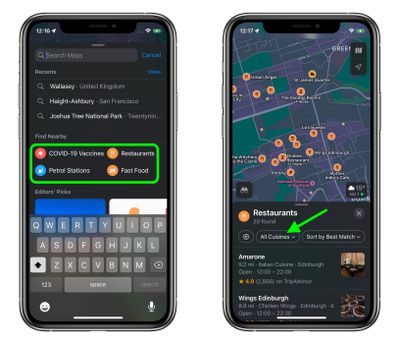
  1. In the Maps app, navigate the map view to a location you want to search, then tap the search bar.
  2. Under "Find Nearby," select a category that you want to search for. In our example, we're selecting Restaurants.
  3. In the Restaurants card that appears, tap the cuisines filter button (currently set to "All Cuisines").
    maps

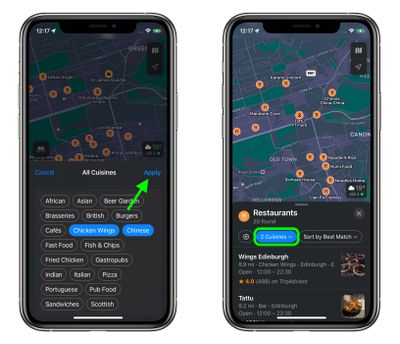
  4. Tap the types of cuisine that you'd like to include in your search. You can tap as many as you like.
  5. Click Apply, then you'll see only results that match your filtered criteria. To change the filter, simply tap the "Cuisines" button again.
    maps

Bear in mind that filters aren't available for all "Find Nearby" search types that Apple includes in Maps. You won't find any if you select gas stations, for example.

Related Forum: iOS 15

Popular Stories

Ads Are Coming to Apple Maps Feature

Ads Aren't in the Apple Maps App Yet, But They're Coming Soon

Wednesday May 13, 2026 4:15 pm PDT by
Apple released iOS 26.5 yesterday with a new Suggested Places feature in the Apple Maps app, which is a precursor to the ads that Apple plans to start showing later this year. There was some confusion over whether ads are live, but as of now, the Apple Maps app still doesn't have ads. Apple did start laying the groundwork for ads in iOS 26.5 and tested a splash screen, but no ads appeared...
macOS 27 on MacBook Pro

Apple Says macOS 27 Won't Be Compatible With These Macs

Wednesday June 3, 2026 8:29 am PDT by
During WWDC 2025, Apple revealed that macOS 26 Tahoe would be the final major macOS version for Intel-based Macs. macOS 27 will be compatible with Apple silicon Macs only, meaning that you will need a Mac with an M-series chip or a MacBook Neo with an A18 Pro chip in order to install the software update. Apple will unveil macOS 27 during its WWDC 2026 keynote this Monday, June 8, and the...
MacBook Neo on Yellow Feature

MacBook Neo is So Popular That Apple Reportedly Doubled Production

Wednesday June 3, 2026 9:24 am PDT by
On an earnings call in late April, Apple's CEO Tim Cook said that customer response to the MacBook Neo was "off the charts," and the popularity of the laptop has reportedly led the company to significantly boost production. Apple supply chain analyst Ming-Chi Kuo this week said he believes that MacBook Neo shipments to Apple were doubled from an initial target of 5 million units to 10...