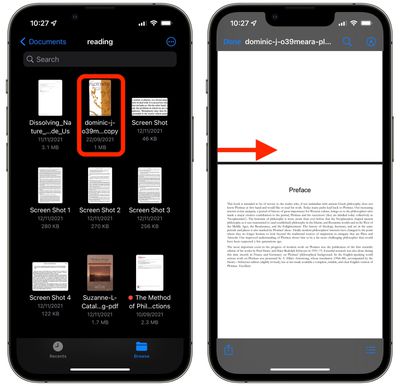
In iOS, Apple's stock Files app is a handy place for keeping PDF documents on your iPhone or iPad. Not only can you view and organize your documents in the Files app, but it also provides you with editing tools that go beyond the usual Markup features like highlighting passages and adding your signature.
files
It's not immediately obvious, but when viewing PDF documents in the Files app, there are hidden tools that enable you to rotate pages, add blank pages, insert images, delete pages, and even scan documents to add to the PDF. Here's how to find them.

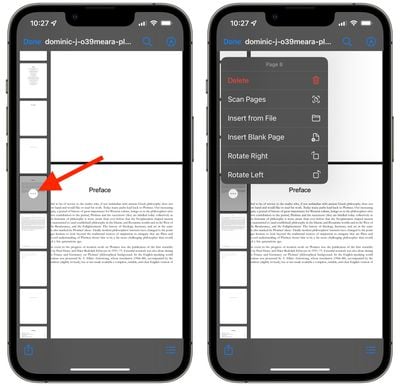
With your PDF document open in Files, swipe rightwards from the left edge of the screen. A quick, short swipe should do it – it doesn't need to be all the way across the screen. The gesture should reveal a sidebar containing easily browsable thumbnail previews of the document's pages. Now, tap the three-dotted circular icon on the thumbnail corresponding to the currently viewed page to bring up the editing tools. (A long press performs the same action on any other page.)
files
You should now see a menu overlay containing the following options: Rotate Left, Rotate Right, Insert Blank Page, Insert From File, Scan Pages, and Delete. Note that the tools apply to the currently selected page/thumbnail, so make sure you don't accidentally delete a page, because there's no way to recover it once it's gone. When you're done editing the document, close it and your changes will be automatically saved.


Tag: Files
Related Forum: iOS 15

Popular Stories

imac video apple feature

Apple Unveils First New Products of 2026

Monday January 26, 2026 1:55 pm PST by
Apple today introduced its first two physical products of 2026: a second-generation AirTag and the Black Unity Connection Braided Solo Loop for the Apple Watch. Read our coverage of each announcement to learn more:Apple Unveils New AirTag With Longer Range, Louder Speaker, and More Apple Introduces New Black Unity Apple Watch BandBoth the new AirTag and the Black Unity Connection Braided...
iPhone 5s

iPhone 5s Gets New Software Update 13 Years After Launch

Monday January 26, 2026 3:56 pm PST by
Alongside iOS 26.2.1, Apple today released an updated version of iOS 12 for devices that are still running that operating system update, eight years after the software was first released. iOS 12.5.8 is available for the iPhone 5s and the iPhone 6, meaning Apple is continuing to support these devices for 13 and 12 years after launch, respectively. The iPhone 5s came out in September 2013,...
Apple Logo Black

Apple Just Made Its Second-Biggest Acquisition Ever After Beats

Thursday January 29, 2026 10:07 am PST by
Apple today confirmed to Reuters that it has acquired Q.ai, an Israeli startup that is working on artificial intelligence technology for audio. Apple paid close to $2 billion for Q.ai, according to sources cited by the Financial Times. That would make this Apple's second-biggest acquisition ever, after it paid $3 billion for the popular headphone and audio brand Beats in 2014. Q.ai has...
Apple Creator Studio

Apple's Next Launch is Today

Tuesday January 27, 2026 2:39 pm PST by
Update: Apple Creator Studio is now available. Apple Creator Studio launches this Wednesday, January 28. The all-in-one subscription provides access to the Final Cut Pro, Logic Pro, Pixelmator Pro, Motion, Compressor, and MainStage apps, with U.S. pricing set at $12.99 per month or $129 per year. A subscription to Apple Creator Studio also unlocks "intelligent features" and "premium...
Apple Event Logo

Apple Teases 'Innovations That Have Never Been Seen Before' This Year

Friday January 30, 2026 5:40 am PST by
Apple CEO Tim Cook believes that his company will have opportunities to deliver "innovations that have never been seen before" this year. "As I said at the beginning of my remarks, this was, in so many ways, a remarkable quarter for Apple, and we're excited for all the opportunities we'll have in the year ahead to deliver innovations that have never been seen before and enrich the lives of...