

Skip to Content

Disable iPhone Private Browsing Authentication in Safari

by

With iOS 17, Apple introduced several new privacy and security features to its mobile operating system, one being the ability to require secondary authentication for Private Browsing tabs in Safari. Here's how it works and how to turn it off.
iOS 17 General Safari Feature
On an iPhone or iPad running iOS 17 or iPadOS 17, if you have any Private Browsing tabs open in Safari and then exit the session or the app, Apple's browser now requires Face ID/Touch ID authentication or your passcode to access them again.

In other words, if someone gets hold of your iPhone or ‌iPad‌ when it is unlocked, they still won't be able to view your Private Browsing tabs without knowing your passcode.
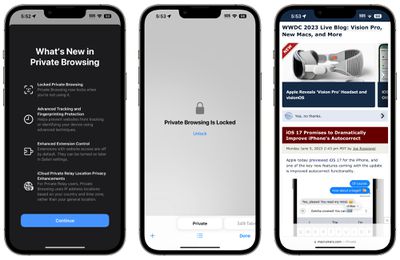
safari private browsing ios 17
If you don't tend to hand your unlocked device over to anyone else or find the authentication requirement annoying, you can turn it off pretty easily by following these steps.

  1. Open the Settings app on your iPhone or ‌iPad‌.
  2. Scroll down and tap Safari.
  3. Under the "Privacy & Security" section, toggle off the switch next to Require Face ID to Unlock Private Browsing so that it's in the gray position.
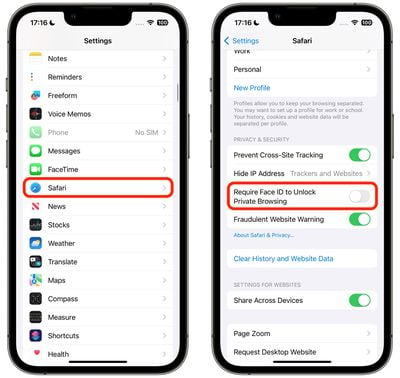
settings

In iOS 17, for the first time you can also select a different default search engine for private browsing tabs.


Tag: Safari

Popular Stories

Apple Event Logo

Apple Released Seven New Products Today

Wednesday March 11, 2026 7:05 am PDT by
Starting today, the seven new Apple products that were announced last week are available at Apple Stores and beginning to arrive to customers. The colorful MacBook Neo and all of the other new products are on display at most Apple Store locations around the world starting today. Apple Stores have inventory of the new products for both walk-in customers and Apple Store pickup, but...
ios 26 4 yellow

Everything New in iOS 26.4 Beta 4

Monday March 9, 2026 3:50 pm PDT by
Apple is continuing to test the iOS 26.4 beta, and the latest update is now available for developers and public beta testers. As testing goes on, there are fewer new features in each beta, but today’s release adds new emoji characters and a few other changes. New Emoji Apple added new emoji characters, including trombone, treasure chest, distorted face, hairy creature, fight cloud, orca,...
Apple MacBook Pro M4 hero

Apple Planning 'MacBook Ultra' With Touchscreen and Higher Price

Sunday March 8, 2026 8:05 am PDT by
Apple is planning to launch an all-new "MacBook Ultra" model this year, featuring an OLED display, touchscreen, and a higher price point, Bloomberg's Mark Gurman reports. Gurman revealed the information in his latest "Power On" newsletter. While Apple has been widely expected to launch new M6-series MacBook Pro models with OLED displays, touchscreen functionality, and a new, thinner design...















