

 Have you ever woken up to your iPhone or iPad alerting you to the fact that "You Have a New Memory" on this day, in the form of photos and videos you shot years ago? If the answer is yes, you've been the willing (or unwilling) recipient of a Photos feature notification called Memories.
In iOS 12, the Photos app automatically curates photos and videos that you've taken into specific memory collections. Essentially, these are homemade movies of past events like family gatherings or vacations which your device generates without any input required on your part (although you can edit them).
Despite Apple's good intentions, the risks inherent in its Memories feature are pretty obvious. So if you're less than enthusiastic about the idea of your iOS device digging up bygones from the annals of your Photo library, here's how to switch off those Memory alerts.
How to Disable Memories Alerts in iOS 12
- Launch the Settings app on your iPhone or iPad.

- Tap Notifications.
- Select Photos from the list of apps.
- Tap Memories.
- Toggle the Allow Notifications switch to the OFF position.
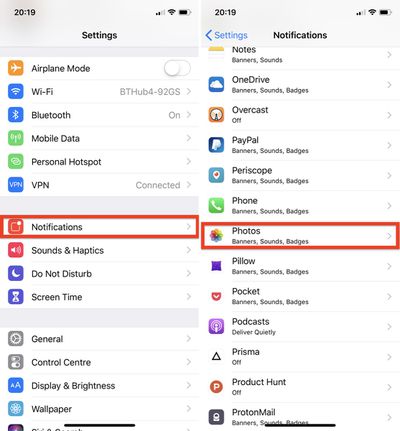
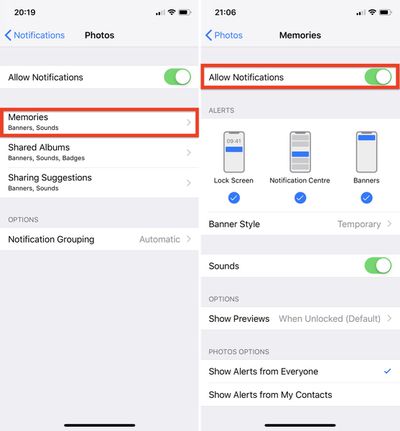
Note that this doesn't disable the automatic Memories feature, which will still appear in the Photos app's For You tab, but at least you won't receive unexpected reminders about events that you intentionally consigned to the history books long ago.





















Top Rated Comments
As a parent you take 1000's of photos of your kids but you rarely take a chance to look back over them. Memories is a fabulous way to enjoy exactly that - memories. It's especially good if you have an Apple TV. Makes great family viewing once a month I find.
Yet there will be those who will gripe, especially here on MR, about interference, annoyance and just general negativity towards anything Apple does. I seriously doubt most of the posters on MR forums are genuine apple users. If they were they'd have moved off onto some other company's platform long ago where I'm sure they'll find it's all fluffy clouds and unicorns of tech goodies and empowerment and root access for their mother.
Let me decide what albums I want to see, if I want collections of people created automatically, if I want to have albums by filters, and all the other stupid add ons they force on my content trying to make Photos "friendly" (or more accurately I suspect, demo-able).
Oh good, I’d forgotten. :rolleyes:
“Despite Apple's good intentions, the risks inherent in its Memories feature are pretty obvious. So if you're less than enthusiastic about the idea of your iOS device digging up bygones from the annals of your Photo library, here's how to switch off those Memory alerts."
I don't need someone to make me happy, but **** happens and this is a good article for someone who FOR SOME REASON needs to disable Photo memories.
Those heartbreaking photos may not be the brightest moment of your life. But would you delete the last photos of deceased friend or family member? You might wanna keep it, but don't want to reflect back by the time it appears on Memories. Like I said, life is not just black and white moments.
Just because you think it's awesome doesn't mean everyone have to like it. Hey no need to be so bitter, you have a perfectly happy life and happy kids, remember? LOL