Skip to Content

How to Delete a Device from HomeKit with the Home App

by

If you want to get rid of a HomeKit device or remove it from your ‌HomeKit‌ setup, Apple has made doing so very easy.

In the Home app on your iPhone or iPad:

  1. Press and hold the icon of the accessory you want to remove.
  2. Tap on Settings.
  3. Scroll to the bottom and tap on Remove Accessory.
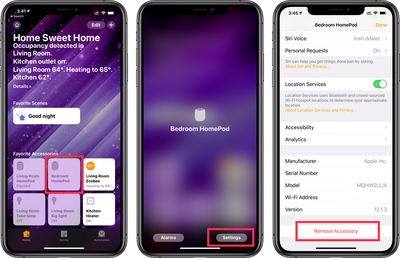
remove homekit device

Removing a HomeKit device on Mac:

  1. Open the Home app and double click (or right-click) on the accessory you want to remove
  2. Click on Settings.
  3. Scroll down to the bottom and click Remove Accessory.

Note that many smart devices can only be associated with one user account at a time. If you sell or give away a device, its new owner may need to take extra steps to set it up unless you deregister it from any associated manufacturer account and delete it from your Home app before it can be used in their own home.

For example, the iHome iSP6 smart plug's instructions direct you to create an iHome account and use the iHome app to set it up. If you do this, your smart plug is associated with your iHome account and it can't be associated with another iHome account unless you remove it from yours. Its new owner can reset it to factory settings to work around this, though, so not all is lost.

Popular Stories

macbook air blue

What's Coming in the M5 MacBook Air

Thursday February 26, 2026 3:57 pm PST by
Along with the low-cost MacBook, Apple could introduce a refreshed version of the MacBook Air next week. Most of the focus will be on the new machine, but the MacBook Air is expected to get some useful internal updates. M5 Chip The next-generation MacBook Air will adopt the M5 chip, which Apple already introduced in the iPad Pro and MacBook Pro models that came out last year. Apple's M5...
Apple Announces Special Event in New York Feature 1

Apple Teases 'A Big Week Ahead' With Announcements Starting Monday

Thursday February 26, 2026 6:06 am PST by
Apple CEO Tim Cook today teased "a big week ahead," with announcements starting Monday. His post included an #AppleLaunch hashtag with a colorful Apple logo, along with a short video that ultimately shows an Apple logo on the lid of a Mac. Apple is reportedly planning a three-day stretch of product announcements from Monday, March 2 through Wednesday, March 4, with up to five new products...
ipad mini 7 1

Could Apple's OLED iPad Mini Finally Be a Kindle Killer?

Friday February 27, 2026 12:08 pm PST by
With a similar screen size and easy, one-handed grip, the iPad mini has always been the Apple device that overlaps most with dedicated e-readers. Now, amid rumors pointing to an OLED display for the next generation, could the iPad mini finally replace devices such as the Kindle and Kobo? The shift from LCD to OLED could make the iPad mini far more appealing as a reading device. OLED panels...