In iOS 16, Apple has brought some notable improvements to the Photos app, one of which is the ability to copy edits you make to an image and then paste them to other pictures. Keep reading to learn how it's done.

iOS 16 Photos and Camera Guide Feature
If you have multiple photos that you want to edit in the same way, or if you've made changes to one photo that you want to replicate in another photo, you can use the new copy and paste edits tools in ‌iOS 16‌.

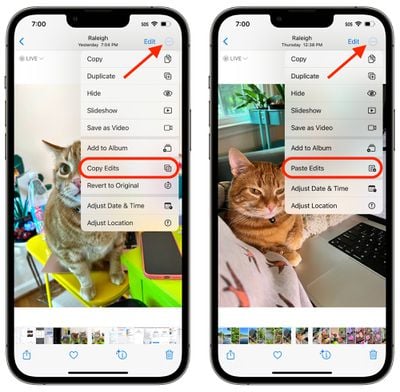
To use the new option in the Photos app, first open an image, then tap Edit and make the adjustments to it that you want. When you're finished, tap Done, and then tap on the ellipsis (three dots) icon in the upper right corner of the interface.
photos
From there, tap Copy Edits in the dropdown menu to copy everything that you did to the image to the clipboard. Then open up another photo, tap on the ellipsis (three dot) icon again, and then tap Paste Edits to get the exact same adjustments.


Popular Stories

Apple Logo Black

Apple Just Made Its Second-Biggest Acquisition Ever After Beats

Thursday January 29, 2026 10:07 am PST by
Apple today confirmed to Reuters that it has acquired Q.ai, an Israeli startup that is working on artificial intelligence technology for audio. Apple paid close to $2 billion for Q.ai, according to sources cited by the Financial Times. That would make this Apple's second-biggest acquisition ever, after it paid $3 billion for the popular headphone and audio brand Beats in 2014. Q.ai has...
Aston Martin CarPlay Ultra Screen

Apple's CarPlay Ultra to Expand to These Vehicle Brands Later This Year

Sunday February 1, 2026 10:08 am PST by
Last year, Apple launched CarPlay Ultra, the long-awaited next-generation version of its CarPlay software system for vehicles. Nearly nine months later, CarPlay Ultra is still limited to Aston Martin's latest luxury vehicles, but that should change fairly soon. In May 2025, Apple said many other vehicle brands planned to offer CarPlay Ultra, including Hyundai, Kia, and Genesis. In his Powe...
14 inch MacBook Pro Keyboard

Apple Changes How You Order a Mac

Saturday January 31, 2026 10:51 am PST by
Apple recently updated its online store with a new ordering process for Macs, including the MacBook Air, MacBook Pro, iMac, Mac mini, Mac Studio, and Mac Pro. There used to be a handful of standard configurations available for each Mac, but now you must configure a Mac entirely from scratch on a feature-by-feature basis. In other words, ordering a new Mac now works much like ordering an...
imac video apple feature

Apple Unveils First New Products of 2026

Monday January 26, 2026 1:55 pm PST by
Apple today introduced its first two physical products of 2026: a second-generation AirTag and the Black Unity Connection Braided Solo Loop for the Apple Watch. Read our coverage of each announcement to learn more:Apple Unveils New AirTag With Longer Range, Louder Speaker, and More Apple Introduces New Black Unity Apple Watch BandBoth the new AirTag and the Black Unity Connection Braided...
apple unsold web store

Retail Accessories Apple Won't Sell You Now Available via New Site

Friday January 30, 2026 8:46 am PST by
A newly surfaced resale operation is seemingly offering Apple Store–exclusive display accessories to the public for the first time, potentially giving consumers access to Apple-designed hardware that the company has historically kept confined to its retail environments. Apple designs a range of premium MagSafe charging stands, display trays, and hardware systems exclusively for displays in ...