

With the advent of AirPods Pro 2, Apple added a new Touch control system to its popular premium earbuds. In addition to being used to play/pause audio and skip tracks, the Touch sensors respond to swipes up and down the stem that increase or decrease the volume of whatever you're listening to.
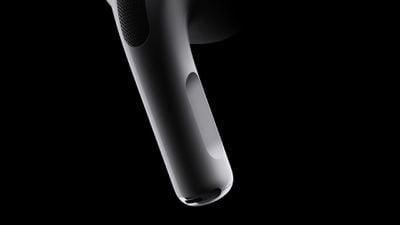
Apple AirPods Pro 2nd gen Touch control 220907
Apple acknowledges that swipe gestures for adjusting volume may not appeal to everyone, and indeed some AirPods Pro owners may struggle to use them as intended. For that reason, Apple has included an accessibility option to enable or disable the gestures in iOS. Here's how it works.

  1. With AirPods Pro connected, launch the Settings app on your iPhone running iOS 16.1 or later.
  2. Tap the AirPods Pro tab just under your Apple ID banner.
  3. Scroll down, then tap Accessibility.
  4. Scroll down again, then under "Volume Control," toggle the switch next to Volume Swipe on or off.
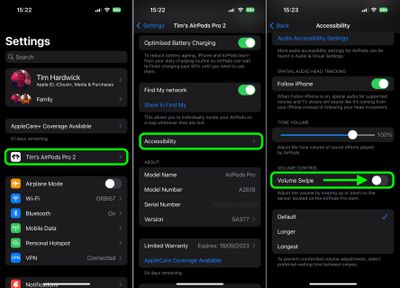
settings

If you turned off the swipe sensitivity of the Touch controls, they will be immediately disabled and will no longer respond to the gesture. To re-enable volume swipes, simply toggle the option back on in Settings.


Related Roundup: AirPods Pro 3
Buyer's Guide: AirPods Pro (Buy Now)
Related Forum: AirPods

Popular Stories

m5 macbook pro deal

Why You Shouldn't Buy the Next MacBook Pro

Tuesday February 10, 2026 4:27 pm PST by
Apple is planning to launch new MacBook Pro models as soon as early March, but if you can, this is one generation you should skip because there's something much better in the works. We're waiting on 14-inch and 16-inch MacBook Pro models with M5 Pro and M5 Max chips, with few changes other than the processor upgrade. There won't be any tweaks to the design or the display, but later this...
iOS 26

Apple Releases iOS 26.3 and iPadOS 26.3

Wednesday February 11, 2026 10:07 am PST by
Apple today released iOS 26.3 and iPadOS 26.3, the latest updates to the iOS 26 and iPadOS 26 operating systems that came out in September. The new software comes almost two months after Apple released iOS 26.2 and iPadOS 26.2. The new software can be downloaded on eligible iPhones and iPads over-the-air by going to Settings > General > Software Update. According to Apple's release notes, ...
M3 iPad Air

Apple's Next Two Products Are Coming Soon

Thursday February 12, 2026 11:17 am PST by
Apple plans to release an iPhone 17e and an iPad Air with an M4 chip "in the coming weeks," according to the latest word from Bloomberg's Mark Gurman. "Apple retail employees say that inventory of the iPhone 16e has basically dried out and the iPad Air is seeing shortages as well," said Gurman. "I've been expecting new versions of both (iPhone 17e and M4 iPad Air) in the coming weeks."...
macbook air prime day 2025

M5 MacBook Air: Release Date, Features, and Performance Predictions

Wednesday February 11, 2026 3:36 am PST by
The MacBook Air is Apple's most popular laptop – a thin, fanless machine that wields quiet power thanks to the efficiency of Apple silicon. While the M4 model isn't exactly old, attention is already turning to its successor. Apple doesn't telegraph new product launches ahead of time, but we can draw a surprisingly clear picture of what to expect by looking at Apple's silicon roadmap,...
iPhone 16e Bottom Crop

Apple Reportedly Unveiling a New iPhone Next Week

Tuesday February 10, 2026 1:51 pm PST by
Apple plans to announce the iPhone 17e on Thursday, February 19, according to Macwelt, the German equivalent of Macworld. The report said the iPhone 17e will be announced in a press release on the Apple Newsroom website, so do not expect an event for this device specifically. The iPhone 17e will be a spec-bumped successor to the iPhone 16e. Rumors claim the device will have four key...









































