Apple in iOS 15 introduced Focus mode, an expansion of Do Not Disturb that allows you to set up different permissions for apps, contacts, and more depending on what you're doing. In iOS 16, Apple has expanded what Focus modes can do with new features, including the ability to activate Dark Mode on your device when a specific Focus in enabled. Here's how it works.
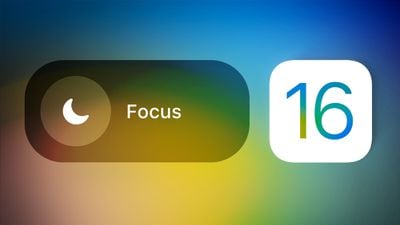
iOS 16 Focus Feature
In iOS 16, the Focus options include a completely new feature called Focus Filters, which allow you to customize how you apps and device behave when a particular Focus is on. With Focus Filters, you can, for example, filter out certain content within apps. If you have a work Focus, for instance, you might filter out events from your family calendar.

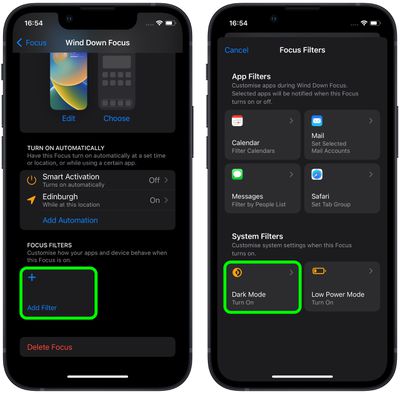
In addition to filtering out content, however, you can also use System Filters. Filters in this category let you customize system settings when a Focus is enabled. So, for example, you can activate ‌Dark Mode‌ when your Focus mode for winding down in the evening is enabled, making the iOS interface more soothing on your eyes. The following steps show you how it's done.

How to Turn On Dark Mode With a Focus

  1. Launch the Settings app on your ‌iPhone‌, then tap Focus.
  2. Select the Focus mode that you want ‌Dark Mode‌ to be enabled by.
    focus

  3. Scroll down, and under "Focus Filters," tap Add Filter.
  4. Under "System Filters," tap the Dark Mode card.
    focus

  5. Make sure Dark is shown in the "Appearance" selection, then tap Add.
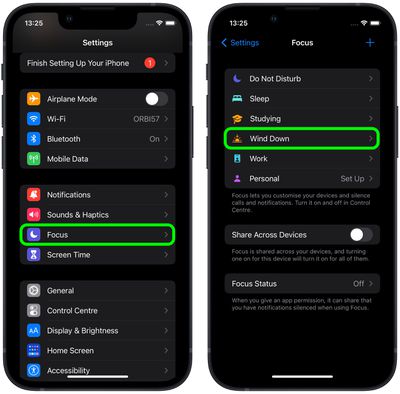
‌Dark Mode‌ will now be automatically activated the next time you enable the Focus mode.

Apple has made a Focus Filter API for developers so that third-party apps can allow the same specific filtering options within a Focus as Apple's own app. If you use a third-party email app, for example, you'll be able to select a mailbox to show within that app provided the developer adds the Focus Filter API. For more on everything new in Focus with iOS 16, check out our comprehensive guide.


Popular Stories

iOS 26

iOS 26.2 Coming Soon With These 8 New Features on Your iPhone

Thursday December 11, 2025 8:49 am PST by
Apple seeded the second iOS 26.2 Release Candidate to developers earlier this week, meaning the update will be released to the general public very soon. Apple confirmed iOS 26.2 would be released in December, but it did not provide a specific date. We expect the update to be released by early next week. iOS 26.2 includes a handful of new features and changes on the iPhone, such as a new...
iOS 26

iOS 26.4 and iOS 27 Features Revealed in New Leak

Friday December 12, 2025 10:56 am PST by
Macworld's Filipe Espósito today revealed a handful of features that Apple is allegedly planning for iOS 26.4, iOS 27, and even iOS 28. The report said the features are referenced within the code for a leaked internal build of iOS 26 that is not meant to be seen by the public. However, it appears that Espósito and/or his sources managed to gain access to it, providing us with a sneak peek...
iOS 26

Apple Releases iOS 26.2 With Alarms for Reminders, Lock Screen Changes, Enhanced Safety Alerts and More

Friday December 12, 2025 10:10 am PST by
Apple today released iOS 26.2, the second major update to the iOS 26 operating system that came out in September, iOS 26.2 comes a little over a month after iOS 26.1 launched. ‌iOS 26‌.2 is compatible with the ‌iPhone‌ 11 series and later, as well as the second-generation ‌iPhone‌ SE. The new software can be downloaded on eligible iPhones over-the-air by going to Settings >...
AirPods Pro Firmware Feature

Apple Releases New Firmware for AirPods Pro 2 and AirPods Pro 3

Thursday December 11, 2025 11:28 am PST by
Apple today released new firmware designed for the AirPods Pro 3 and the prior-generation AirPods Pro 2. The AirPods Pro 3 firmware is 8B30, up from 8B25, while the AirPods Pro 2 firmware is 8B28, up from 8B21. There's no word on what's include in the updated firmware, but the AirPods Pro 2 and AirPods Pro 3 are getting expanded support for Live Translation in the European Union in iOS...
macOS Tahoe 26 Thumb

Apple Releases macOS Tahoe 26.2 With Edge Light

Friday December 12, 2025 10:08 am PST by
Apple today released macOS Tahoe 26.2, the second major update to the macOS Tahoe operating system that came out in September. macOS Tahoe 26.2 comes five weeks after Apple released macOS Tahoe 26.1. Mac users can download the macOS Tahoe update by using the Software Update section of System Settings. macOS Tahoe 26.2 includes Edge Light, a feature that illuminates your face with soft...
AirTag 2 Mock Feature

Apple AirTag 2: Four New Features Found in iOS 26 Code

Thursday December 11, 2025 10:31 am PST by
The AirTag 2 will include a handful of new features that will improve tracking capabilities, according to a new report from Macworld. The site says that it was able to access an internal build of iOS 26, which includes references to multiple unreleased products. Here's what's supposedly coming: An improved pairing process, though no details were provided. AirTag pairing is already...
ipados 26 1 slide over

Apple Releases iPadOS 26.2 With Multitasking Improvements

Friday December 12, 2025 10:09 am PST by
Apple today released iPadOS 26.2, the second major update to the iPadOS 26 operating system released in September. iPadOS 26.2 comes a month after iPadOS 26.1. The new software can be downloaded on eligible iPads over-the-air by going to Settings > General > Software Update. iPadOS 26.2 continues with the multitasking improvements that were added with iPadOS 26.1. You can now drag and...
iphone fold text

'iPhone Fold' Arrival Expected to Cement Book-Style Era for Foldables

Friday December 12, 2025 3:55 am PST by
Foldable smartphone panel shipments are projected to jump 46% year-over-year in 2026, with Apple's entry into the market serving as the main catalyst, according to Counterpoint Research's latest Foldable-Rollable Display Shipment Tracker. "Apple is the key driver as it starts to procure panels for its first foldable iPhone," said Counterpoint's Guillaume Chansin. The research firm expects...