

Apple today released iOS 15.5 and iPadOS 15.5 to the public after a few weeks of testing. The new updates aren't as feature rich as the prior updates and focus primarily on under-the-hood changes, but there are still a few minor tweaks, which we've outlined below.


Podcasts Update
The Apple Podcasts app includes a setting that allows users to limit the number of episodes stored on the iPhone or iPad. It will also automatically delete older episodes, preventing the app from taking up too much storage space on iOS devices.
Apple Cash
In the Apple Cash section of the Wallet app, there are now "Request" and "Send" buttons to make it easier to manage cash directly from Wallet.
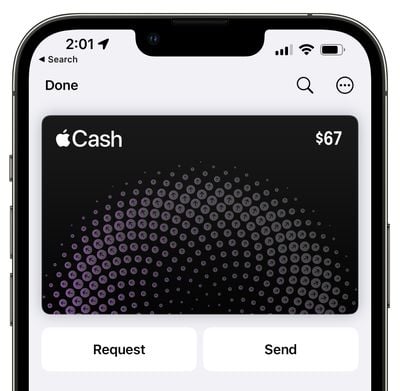
Apple Pay in the Messages app has also been renamed "Apple Cash."
Home App
There now are WiFi signal bars that let you ensure the HomePod has a connection in the Home app.
Universal Control
In iPadOS 15.5, Universal Control is no longer in beta. That means the feature is fully, officially launched, and that the bugs have been worked out.

First introduced in iPadOS 15.4 and macOS Monterey 12.3, Universal Control is designed to allow you to use one mouse/trackpad and keyboard across multiple iPads and Macs.
Apple Card
Apple now refers to the physical Apple Card as the "Titanium Card" in the Wallet app.
External Links in Reader Apps
iOS 15.5 adds support for the "External Link Account Entitlement" that is designed to allow reader apps to add a link to an external website for account creation and management purposes. An external link will allow an app like Netflix to offer a way to sign up for an account outside of the App Store in-app purchase system.
Reader apps include those that provide digital content like magazines, newspapers, books, audio, music, or video as the primary functionality of the app, with Spotify, Netflix, Hulu, and other apps serving as an example.
Photo Memories
Apple in iOS 15.5 added a list of "Sensitive Locations" to the Photos app, which means those locations are blocked from showing up in memories. Included on this list are various concentration camps and holocaust memorials.
Apple Music Playback API
iOS 15.5 reintroduces an Apple Music API that allows third-party Apple Music players to change the playback speeds of songs. The API was removed in iOS 15.4, but it is being put back in iOS 15.5.
Apple Classical References
In the beta, there were references to the upcoming "Apple Classical" app that Apple has in development to complement Apple Music, but the app did not launch as part of the iOS 15.5 update.
There are "Open in Apple Classical" and "Open this in the new app designed for classical music" in the Music app code, however, which suggests that a launch could be coming in the not too distant future.

Apple acquired classical music streaming service Primephonic back in August 2021 and said that it would be building a new classical music experience for Apple Music. Apple is planning to launch a new standalone app dedicated to classical music, and the app will combine Primephonic's user interface and specializations for classical music with Apple Music and features such as Lossless and Spatial Audio. Apple has not provided details on when the app might come out, but preparations are clearly being made.
SportsKit Updates
Apple is continuing to build out its "SportsKit" support as it following the launch of Friday Night Baseball, and there are TV app mentions for reporting scores for different baseball innings.
Automation Fix
iOS 15.5 addresses a bug that could cause home automations triggered by people leaving or arriving to fail.
Communication Safety in Messages
iOS 15.5 expands the Communication Safety in Messages feature to Australia, Canada, New Zealand, and the UK. Communication Safety in Messages, which was previously available in the United States, is designed to scan incoming and outgoing iMessage images on children's devices for nudity and warn them that such photos might be harmful. If nudity is detected in a photo that's received by a child, the photo will be blurred and the child will be provided with resources from child safety groups. Nudity in a photo sent by a child will trigger a warning encouraging the child not to send the image.
Communication Safety is opt-in, privacy-focused, and must be enabled by parents. It is limited to the accounts of children, with detection done on-device, and it is not related to the anti-CSAM functionality that Apple has in development and may release in the future.
Security Fixes
iOS 15.5 and iPadOS 15.5 also include more than 25 security fixes, as outlined on Apple's security support site. None of the fixes were actively exploited, but it is still worth updating right away.
There are fixes for WebKit, the kernel, Wi-Fi, AppleAVD, and more.
Other Features
Find another iOS 15.5 feature that we left out? Let us know in the comments.





/https://forums.macrumors.com/attachments/2005751/)













































