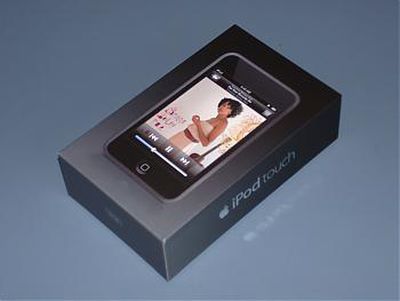
Now that the iPod touch has gotten into reviewers hands, iProng has posted a full list of what's different between the iPod Touch and the iPhone.
There were few surprises based on previously published specs. The biggest differences that were known include the lack of EDGE connectivity, Mail application, and editable Calendar.
A couple that may be less obvious if you haven't played with the Touch yet is the lack of external volume buttons and no built-in speaker.
Reviews are emerging for Apple's newly released 3rd generation iPod nano and iPod classic.
iPod nano Reviewers seem to be generally impressed with Apple's new nano. The update provided popular features such as video and games to the nano but keeps reasonable price points. Playlist and CNet didn't seem to mind the smallish 2" screen for watching video, however iLounge notes that the even the largest capacity offered (8 GB) doesn't do much for video storage. All 3 reviews were once again impressed that Apple is under-estimating battery life.
iPod classic Reviews for the latest revision in the standard iPod line, now "iPod classic", were mixed. Perhaps the most critical review was that of Playlist, which noted a "sluggish interface" and "unresponsive controls" when album artwork was synched. All 3 reviews noted that previous 5th generation iPod games are incompatible with the iPod classic as are some iPod accessories, namely video-out accessories. While Apple has chosen to provide higher-resolution component video out, it has rendered previous video output accessories useless with this iPod.
This is not to say that all is dim with the classic. iLounge notes that the games offered for the classic are of better quality, and the increased storage sizes are industry-leading. Also, Apple is once again conservative on its battery life numbers (Playlist got 11 more hours of audio playback than Apple had promised).
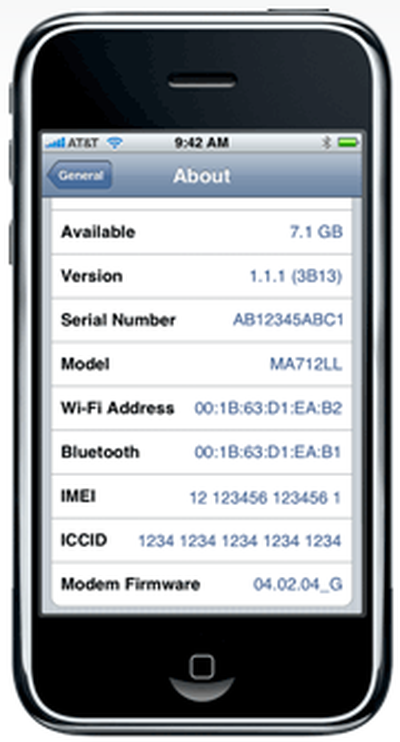
Apple's Store Credit page shows off an interesting screenshot of an iPhone (noted by modrak):
If you notice, this iPhone is up to version 1.1.1 with Modem Firmware 4.02.04_G. Apple has only publicly released iPhone Firmware 1.0.2 at this time. Apple is expected to introduce a firmware update in the near future to distribute the iTunes Wifi Store software.
Forum user confirmed also notes that on the Settings screen are two new settings:
Reuters reports that Deutsche Telekom (T-Mobile) has "clinched" the exclusive deal with Apple to sell the iPhone in Germany.
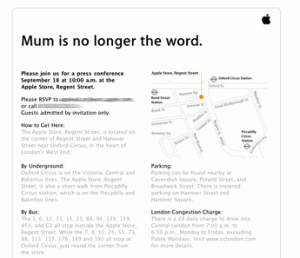
According to Reuters source, the deal will be announced next week. This would coincide with Apple's "Mum is no longer the word" Media event to be held in London on September 18th.
The initial price of the German iPhone is expected to be 399 euros ($554). T-Mobile as reportedly agreed to the both voice and data revenue sharing with Apple.
ThinkSecret states that the iPhone will not be available in Europe until the first half of November and will not support 3G networking to start, however, could introduce 3G iPhones in Europe as early as February 2008.
Apple posted details about the $100 Apple Store Credit for early iPhone adopters.
If you bought your iPhone before August 22, you qualify for an instant $100 electronic credit toward the purchase of products at the Apple Retail Store or the Apple Online Store.
Step 1: Identify your iPhone To confirm eligibility, simply enter your phone number and iPhone serial number in the fields provided.
Step 2: Enter your access code You will receive an SMS text message on your iPhone containing the access code to redeem your $100 credit. Enter your phone number and your access code in the fields provided to generate an electronic store credit.
Step 3: Get your $100 Apple Store credit You will receive a $100 electronic store credit to purchase products at the Apple Retail Store or the Apple Online Store.
Requests must be submitted between September 13, 2007 and November 30, 2007.
MacRumors has been given the opportunity to provide an exclusive preview of an unreleased and unannounced application from Ambrosia Software called WireTap Studio, due for first release later this month.
While WireTap Studio shares a name with WireTap Pro, it is an entirely new application with a broader range and appeal. The major feature of the original WireTap Pro application was the ability to selectively record audio from any Mac application and save it to a variety of formats. Uses ranged from recording Internet radio to ripping audio from DVDs. WireTap Studio promises to provide a more complete solution with tools to record, edit and manage your audio. A few standout features should make it particularly compelling for both amateurs and professionals who distribute audio over the Internet.
As a preview, we are simply touching on the major features of the application, and this shouldn't be seen as a review. I do think that the most compelling feature is the patent pending LivePreview technology, so if you read nothing else you should at least watch the video below. Beyond that, lossless editing and lossless format selection are also very attractive features.The Controller
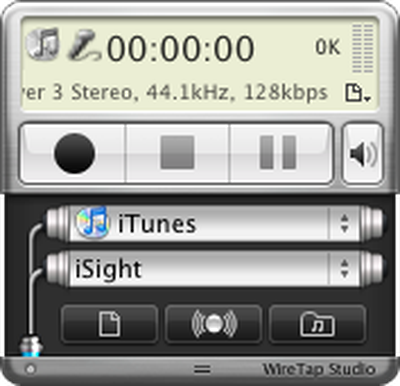
The WireTap Studio Controller provides you with an "always on top" window that gives you access to many of the features of the application in a compact interface:
Controller
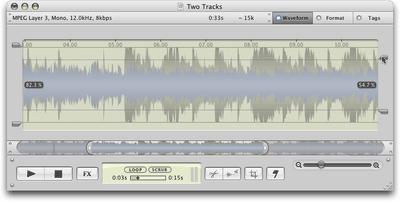
As you can see, two different sources can be selected. Either source can be an active application or an audio input device: microphone, iSight, Line In, etc. For example, podcasters can record from their microphone as well as a second application such as iTunes or Skype. This means you can perform over-the-Internet audio interviews or lay down a background track to your voice. Most useful, perhaps, is that each track can later be normalized independently, allowing you to calibrate the volumes to match:
Normalize volume on two different tracks
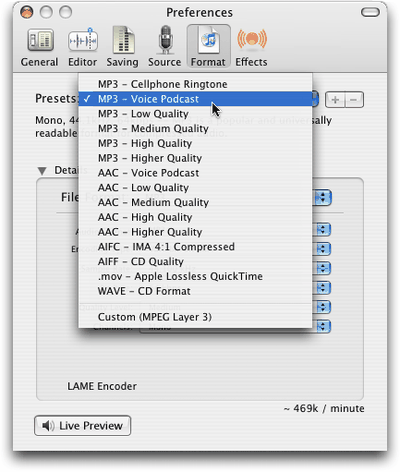
Audio can of course be recorded and exported in a variety of formats and qualities, including MP3, AAC, AIFC, AIFF, Apple Lossless and WAVE formats. You can choose from presets or specify exact parameters:
Preset formats
The Library
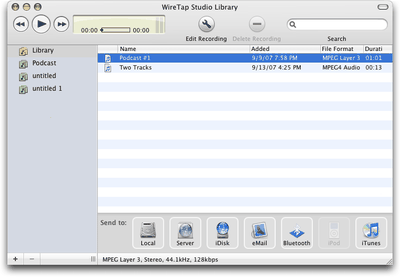
Recordings are organized in an iTunes-like library view, which can be organized into folders and searched by keywords/tags. Audio recordings can be distributed conveniently, simply by dragging the title to the appropriate icon on the bottom "Send to" toolbar. Ambrosia tells us that they will be including "iPhone" as an export option before the application is released.
Library view
LivePreview
Now, on to the good stuff. One challenge for audio distribution on the Internet is finding the sweet spot between file size and audio quality. To address this, WireTap Studio provides a new feature called LivePreview. LivePreview gives you realtime conversion of the source audio into any supported format. This allows you to preview encoding quality on the fly.
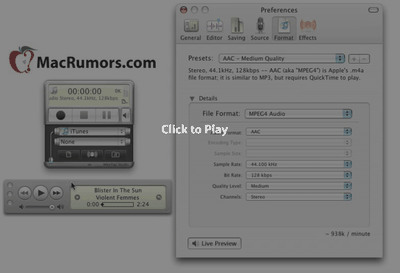
Describing LivePreview doesn't quite capture the ease and utility of the feature, so I encourage you to watch this QuickTime movie of LivePreview in action:
Audio starts about 25 seconds into the video. The audio source is a CD.
Lossless Recording and Editing
While changing audio encoding on the fly is nice, getting to change your mind is even better. Once audio has been recorded, the audio encoding decision that you make is not set in stone.
Under the hood, WireTap Studio records everything in a full-quality lossless format. For instance, if you use WireTap Studio to record off of a CD into a 64kbps MP3 file, you can later (days, weeks, etc...) change the format to 128kbps (or 320kbps) MP3 and see the expected gain in quality. The full uncompressed audio remains available to the software "behind the scenes" to allow format conversions to work as expected.
Another related feature is lossless editing. No matter how many changes you've made to the recording, you can always go back to the original recording (at the highest quality). This feature is similar to how Apple's iPhoto and Aperture applications work on digital photos, keeping the originals intact while you apply edits over time.
Other Features
- Timed recordings with Pre-recording actions and Post-recording actions - Scheduled recordings with auto wake from sleep and auto power on for the computer - Support for Audio Unit plug-ins - Automatically Crop Leading and Trailing Silence - Mark and Crop at Silence
WireTap Studio will be offered as shareware and is expected to be released later this month with upgrade options for existing WireTap Pro customers.
iPhoneAtlas notes that the iPod Touch keyboard offers a number of additional keyboard options than the current iPhone keyboard.
The iPod Touch provides keyboards in 14 different languages as well as the following formats:
QWERTY QWERTZ AZERTY QZERTY Japanese IME
Users can also switch between two or more keyboards with a special icon on the keyboard.
Apple is expected to provide an iPhone software update later this month to introduce the iTunes Wifi Store to iPhone users. With the plan to introduce international iPhone support soon, it would not be surprising if this additional keyboard support made its way into the coming update.
PCMag posts a review of the Apple iPod Touch, which is expected to be released later this month. The review is quite favorable and starts with:
The relatively hefty $300 and $400 price tags for 8 and 16 GB, respectively, don't bug me either. Why? This is probably the best portable media player ever made.
The author describes the iPod Touch as "much skinnier" than the iPhone, a bit shorter and a hair wider. They cover many of the features and focus on some of the new features introduced with the iPod Touch. The Wifi iTunes store appears to work quite well with a full iTunes experience in your hand. The Starbucks integration has not yet been activated (due October 2nd).
One new feature in the iPod Touch that was previously demonstrated in the Guided Tour video is the "double click" on the home button.
Pressing the only tactile button on the player twice makes music controls appear over whatever screen mode you happen to be inSafari, YouTube, etc. Even if the player is locked, double-clicking will bring up a set of music controls that features track information, play/pause, forward and backward within a playlist or album, a Music button to take you directly to the Now Playing screen, and a Close button to escape.
The review also provides a final answer on the editing abilities on the Touch. There is no email, and no way to edit or enter Calendar events. Contacts, however, can be edited on the iPod Touch. The review concludes favorably however:
At $300 and $400 for 8 and 16 GB, respectively, these are not cheap devices, especially considering the storage limitations. Still, factor in the slick interface, elegant Web browser, the beautiful glass display, the seamless integration of the WiFi music store, and the iPod touch is worth the price. No portable media player has ever done this much so easily, or looked so good doing it.
Update: Apple has posted a detailed Manual (PDF) for the iPod Touch.
Ringtonator provides a easy to use application which "converts" an AAC file into a Ringtone from iTunes' perspective.
The application modifies metatags based on a followup discovery by Cleverboy about what exactly distinguishes a Ringtone from a Song files in iTunes.
In essence, Apple introduced an additional tag-type that identifies a Ringtone. These tags can be modified by Atomic Parsley manually and should provide a relatively future-proof method to convert songs into Ringtones that iTunes recognizes and treats correctly.
I then took a file I'd recorded myself, and saved as an AAC, and applied the same "stik" metadata to the file using a program called Atomic Parsley. .... The program outputted the new file, and I double-clicked on the file. The file immediately appeared in my ringtone list, and after syncing, it appeared on my phone without one iota of complaint. --NONE.
Ringtonator is a Mac application, but Atomic Parsley is available for both Mac and Windows.
Update: MakeiPhoneRingtone from RogueAmoeba has been updated to use the same described technique to make Ringtones.
Apple 2.0 puts faith in a recent note by Gene Munster claiming that the pace of iPhone sales has tripled since the price break.
By Munster's reckoning, Apple and AT&T (T) were selling an average of 9,000 iPhones a day before the price reduction, which would have put their quarterly sales at 594,000 as of Sept. 5. The two companies had already sold 270,000 phones in the previous quarter. To reach 1 million by Sept. 9, they would have had to sell 136,000 more phones, or 27,000 a day -- a 200% increase.
It should be noted that Munster and other analysts were initially extremely bullish on early iPhone sales numbers, claiming that Apple had sold upwards of 500,000 on opening weekend. Such high expectations were unfounded, as Apple announced that 270,000 had been sold.
Munster's latest claims appear to be a little more thorough, with accompanying surveys of retail stores. Munster notes that such a large surge is not sustainable, and believes sales will stabilize at a 50% increase, or 1.28 million by the end of the quarter.
Apple released Logic Studio today. Logic Studio features Logic Pro 8, and introduces a new live performace application called MainStage. Logic Studio also includes Soundtrack Pro 2, Apple's professional audio post production software; Studio Instruments, made up of 40 pristine quality instruments; Studio Effects, with 80 professional effect plug-ins; a vast Studio Sound Library; and a powerful set of production utilities.
From the fun and intuitive GarageBand to the all new Logic Studio, there's never been a better time to be a musician on the Mac," said Rob Schoeben, Apple's vice president of Applications Product Marketing. "For less than $500, Logic Studio transforms the Mac into the most powerful musical instrument in the world."
Logic Express 8 was also introduced:
Logic Express 8 delivers the power, precision, and professional toolset of Logic Pro 8including a redesigned interface that allows musicians to write, record, edit, and mix with unparalleled speed and ease.
Update: Apple also announced a recent purchaser program. Those who purchased Logic 7 on or after August 1, 2007 are eligible for a free upgrade to Logic Studio ($9.95 shipping and handling).
The folks over at iPhone Dev Wiki posted a free SIM unlock tool for the iPhone. Similar to the other solutions, this software-only solution should allow you to SIM unlock your iPhone, allowing you to use any GSM cell phone carrier. In the U.S. this limits your alternative choice to T-Mobile (over AT&T), but in other countries, GSM carriers are far more common.
The software is being mirrored (Gizmodo mirror) by a number of locations along with downloadable source code. Tutorials are still being developed but some early instructions have become available. At this time the instructions are not very user-friendly, so casual users may want to wait until a more automated solution is published.
Apple has released Keyboard Software Update 1.2. Apple states that the update is intended to provide support for Apple's aluminum keyboard special features. The 35.3 MB update requires Mac OS 10.4.10.
In addition, Apple also released Compatibility Update for QuickTime 7.2, which promises increased compatibility with iLife. The 18.1 MB update requires Mac OS 10.3.9 or 10.4.9 or later and QuickTime 7.2.
GearLog relays some comments by Apples vice president of Hardware Product Marketing, Greg Joswiak.
As has been known, Joswiak confirms that the iPod Touch and iPhone use the same software platform -- "they're both running OS X on basically the same hardware".
The iPod Touch does not have Bluetooth (despite images floating around the internet) and there are no games coming for the iPod Touch for now.
Of interest, Joswiak comments on 3rd party application development:
Apple takes a neutral stance - they're not going to stop anyone from writing apps, and they're not going to maliciously design software updates to break the native apps, but they're not going to care if their software updates accidentally break the native apps either.
RogueAmoeba has posted a small Mac application that allows you to copy unprotected AAC files into your iTunes 7.4.1 Ringtones folder. This allows iTunes to sync these ringtones with your iPhone.
The free application appears to simply automate the step-by-step free iTunes Ringtone workaround that has been previously posted.
The application works as advertised and seems to work better than Applegazette's iRing which was an Applescript accomplishing the same task.
This solution, of course, may very well break in the next version of iTunes and only supports unprotected AAC files.
Apple's first foldable iPhone, with a book-style design featuring a ~5.5-inch outer display and a ~7.8-inch inner display with a minimal crease down the middle.