iOS 27 Adds Four New Features to Notes App, Including Markdown Copy-and-Paste - MacRumors
Skip to Content

iOS 27 Adds Four New Features to Notes App, Including Markdown Copy-and-Paste

The upcoming iOS 27 update that Apple unveiled last week includes some new features and enhancements for Apple's Notes app on the iPhone.

iOS 27 and Notes Feature
iOS 27 is currently available as a developer beta, with a public beta to follow in July. The update is expected to be released to all users in September.

Below, we have outlined four additions to Apple's Notes app on iOS 27.

Siri AI

iOS 27 Adds Four New Features to Apples Notes App Article 4
On the iPhone 15 Pro and newer, the more intelligent and personal version of Siri known as "Siri AI" can create notes with generated content. For example, you can ask Siri AI to create a note with a list of all iPhone models that are compatible with iOS 27, and it will do so after retrieving this information from the internet.

On iOS 26 and earlier, Siri can only create notes based on the words you actually say.

In addition, Siri AI will intelligently show an "Add to Notes" shortcut below certain messages in the Messages app based on the context of the conversation.

iOS 27 Messages Notes Suggestion

Copy and Paste in Markdown

iOS 27 Adds Four New Features to Apples Notes App Article 3
iOS 27 introduces the ability to copy and paste text that is formatted in the Markdown language, created by well-known Apple commentator John Gruber.

Markdown lets you add formatting to text without using HTML:

  • Bold text: **bold**
  • Italic text: *italic*
  • Linked text: [Apple](https://apple.com)
  • List item: - Example

For example, if you paste "Apple's next CEO is **John Ternus**" into the Notes app on iOS 27, "John Ternus" will appear in bold text.

In reverse, if you select formatted text in the Notes app and tap on the right arrow in the Cut/Copy/Paste menu that pops open, there is a new "Copy as Markdown" option on iOS 27. If you tap on this option, any rich text formatting in your selection will automatically be converted to Markdown that can be pasted elsewhere.

Apple Notes already gained support for importing and exporting Markdown files on iOS 26.

Divider Lines
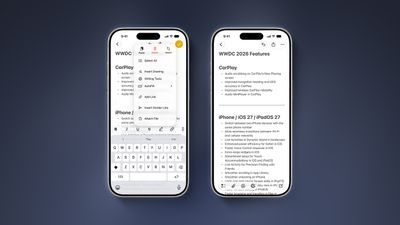
iOS 27 Adds Four New Features to Apples Notes App Article 2
iOS 27 lets you organize notes with divider lines. Simply place the text cursor where you want the line to be inserted, tap on the right arrow in the Cut/Copy/Paste menu that pops open, and tap on the new "Insert Divider Line" option.

Section Links

iOS 27 Adds Four New Features to Apples Notes App Article 1
You can now add a link to a specific section of a note. When you tap on the link, the Notes app automatically jumps to that section of text.

For example, you could create a new note that links back to a section of a previous note.

Related Roundups: iOS 27, iPadOS 27

Popular Stories

Everything New Your iPhone Can Do on iOS 27 Feature 1

12 New Things Your iPhone Can Do in iOS 27

Friday July 3, 2026 7:25 am PDT by
Apple will release iOS 27 in September, and despite the company's focus this year on refining its flagship operating system and nixing bugs, there are still many additional features on the way, not least of which is Apple's new context-aware Siri, re-tooled for the generative AI era. This year's major iPhone software update isn't all about AI, though, as the following feature list...
iCloud iPhone 17 Pro

iPhone Users Who Pay for iCloud Storage Get Two New Perks on iOS 27

Thursday July 2, 2026 6:10 am PDT by
If you pay for certain iCloud+ storage plans beyond the 5GB that Apple offers for free, you will receive two more perks on iOS 27 at no additional cost. A summary of the two new iCloud+ perks on iOS 27:Increased daily usage limits for some new Apple Intelligence features, including image generation in the revamped Image Playground app. HomeKit Secure Video cameras receive generated video...
AirPods Pro Beta Firmware 2

Apple Releases New AirPods Beta Firmware With iOS 27 Features

Tuesday June 9, 2026 11:31 am PDT by
Apple today released new beta firmware for the AirPods 4, AirPods Pro 2, and AirPods Pro 3. The firmware is limited to developers at the current time, and it has a build number of 9A5292e. In iOS 27, iPadOS 27, and macOS Golden Gate, Apple is adding a new AirPods interface and support for custom EQ. AirPods are also compatible with the new Siri AI. With iOS 26, iPadOS 26, and macOS Tahoe, ...


Top Rated Comments

Apple Knowledge Navigator Avatar
3 weeks ago
Never in my life have I thanked the Lord for divider lines!
Score: 18 Votes (Like | Disagree)
3 weeks ago
Those divider lines! - solid update, Notes is such a great app
Score: 12 Votes (Like | Disagree)
repoman016 Avatar
3 weeks ago
As someone who shares grocery lists via notes the divider lines will be welcomed when having to go to more than 1 store/location
Score: 9 Votes (Like | Disagree)
rchaser Avatar
3 weeks ago

As someone who shares grocery lists via notes the divider lines will be welcomed when having to go to more than 1 store/location
"As someone who uses the notes app for grocery lists instead of using the reminders app..."

😘

I mean, come on my guy. You pull your grocery list up on your watch and check off each item you get as you shop...why would you make it more difficult?

Do you keep your calendar in Numbers...??
Score: 8 Votes (Like | Disagree)
freedomlinux Avatar
3 weeks ago

Do you keep your calendar in Numbers...??
Wha? Of course not, that would be ridiculous.

My page-a-day calendar is a HyperCard Keynote deck!
Score: 3 Votes (Like | Disagree)
3 weeks ago
It's the little things that make all the difference in life, like… divider lines.
Score: 3 Votes (Like | Disagree)