Apple's Shazam Music Recognition Now Available in ChatGPT
ChatGPT is now able to identify songs that are playing using Apple-owned music service Shazam. With a new Shazam integration, ChatGPT users can type in a question like "Shazam, what is this song?" to bring up a "Tap to Shazam" interface to get the title of a song.
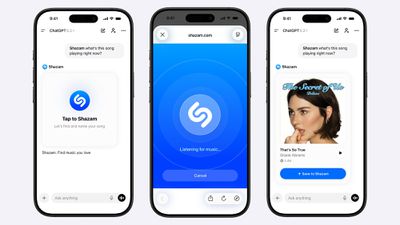
Shazam's full music recognition technology is available in ChatGPT, so users won't need to exit out of the app to identify a song and listen to an inline preview. Using Shazam in ChatGPT works the same way as Shazam on an Apple device.
Shazam can be added to ChatGPT by opening up the ChatGPT settings, navigating to apps, and searching for Shazam. After installation, Shazam can be invoked by starting a request with "Shazam."
Using Shazam in ChatGPT does not require the Shazam app to be installed, and the song recognition functionality can be used on any platform. With the Shazam app installed, songs identified using ChatGPT are added to the Shazam app library for later access.
Shazam is rolling out in ChatGPT as of today.
Popular Stories
OpenAI today introduced Intelligent UI, a new feature that will let ChatGPT answer questions with "fully interactive user interfaces." OpenAI says everyday answers will be more visual, and the feature will make it easier for users to understand complicated topics.
ChatGPT responses will include graphics, tappable buttons, forms, charts, diagrams, and other interactive experiences. Sample...
Wednesday September 23, 2026 5:15 pm PDT by
Juli CloverOpenAI saw disappointing results working with Apple to integrate ChatGPT in Siri, according to court documents filed [PDF] in its ongoing legal fight with Elon Musk's company SpaceXAI (xAI at the time the lawsuit was filed).
Apple added ChatGPT to Siri in December 2024, but users had to go through a multistep opt-in process, which added a layer of friction. By January 2025, OpenAI said the...
Apple today updated the Shazam app for iOS with an ever so slightly frostier app icon and a new set of iMessage stickers.
To send stickers in the Messages app on the iPhone, tap the plus sign in a conversation, select Stickers, tap on the Shazam app icon, and tap on a sticker. You can also send stickers during FaceTime video calls and in other apps where the emoji keyboard is...







/https://forums.macrumors.com/attachments/2611570/)








































![Apple Watch Ultra 3 Hits New Low Price With Amazon's $299 Discount [Updated]](https://images.macrumors.com/t/BXKI27vT0hWfumJQpYzf41rH3Mw=/112x112/article-new/2026/10/apple-watch-ultra-3-milanese.jpeg)