

WhatsApp Launches Strict Account Settings for High-Risk Users - MacRumors
Skip to Content

WhatsApp Launches Strict Account Settings for High-Risk Users

WhatsApp is rolling out a new optional security feature called Strict account settings, which is designed to protect users who may be targeted by sophisticated cyberattacks.
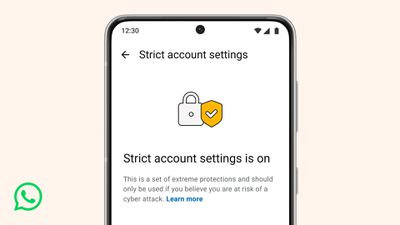
whatsapp strict account settings
Similar in spirit to Apple's Lockdown Mode for iPhone, the feature is aimed primarily at journalists, activists, and public-facing figures. Once enabled, the setting locks various account options to their most restrictive settings.

For example, WhatsApp will automatically block attachments and media from senders who aren't in your contacts, reducing potential vectors for spyware or malicious files. Here's WhatsApp's support explanation about other settings that are impacted:

  • Account security: Two-step verification is turned on. Security notifications are turned on and locked. End-to-end encrypted backups are encouraged for users with backups enabled.
  • Messaging and media: Link previews are turned off. Blocking high volumes of unknown account messages is turned on.
  • Profile and presence: Your Last seen and online, Profile photo, About details, and links on your profile are locked to contacts only or to your pre-established, more-selective list of people.
  • Groups: Only known contacts or a pre-established, more-selective list of people can add you to groups.

Strict account settings can be found in Settings ➝ Privacy ➝ Advanced. When it shows up for you could depend on your location, as WhatsApp says the rollout is happening gradually over the coming weeks. Bear in mind that you can't control Strict account settings from WhatsApp Web – it can only be accessed from your primary device.

WhatsApp also noted that it has transitioned parts of its codebase to Rust, a programming language known for its memory safety features. The company says this change helps protect photos, videos, and messages from spyware. More technical details are available on Meta's engineering blog.


Popular Stories

iOS 26

iOS 26.4 Adds Two New Features to CarPlay

Tuesday March 24, 2026 1:55 pm PDT by
iOS 26.4 was released today, and it includes a couple of new features for CarPlay: an Ambient Music widget and support for voice-based chatbot apps. To update your iPhone 11 or newer to iOS 26.4, open the Settings app and tap on General → Software Update. CarPlay will automatically offer the new features so long as the iPhone connected to your vehicle is running iOS 26.4 or later....
Apple Business hero

Apple Unveils 'Apple Business' All-in-One Platform

Tuesday March 24, 2026 8:53 am PDT by
Apple today announced Apple Business, a new all-in-one platform that unifies device management, productivity tools, and customer outreach features. The service is designed to be a consolidated replacement for several of Apple's existing business-focused offerings, including Apple Business Essentials, Apple Business Manager, and Apple Business Connect. It provides organizations with a single...
AirPods Pro Firmware Feature

Apple Releases New Firmware for AirPods Pro 3, AirPods Pro 2 and AirPods 4

Tuesday March 24, 2026 12:31 pm PDT by
Apple today released new firmware for the AirPods Pro 2, AirPods Pro 3, and the AirPods 4. The firmware has a version number of 8B39, up from 8B34 on the AirPods Pro 3, 8B28 on the AirPods Pro 2, and 8B21 on the AirPods 4. There is no word on what's included in the firmware, but Apple has a support document with limited notes. Most updates are limited to bug fixes and performance...

Top Rated Comments

Veinticinco Avatar
8 weeks ago

Sorry - can any of the more advanced Whatsapp users help me find the setting that stops Meta from digesting the contents of my messages?
Sure, you just press and hold the app icon, click the red “Remove App” option and click confirm the warning this will delete all data.

In the words of Ripley in Aliens, (with anything Meta/FB) it’s the only way to be sure.
Score: 9 Votes (Like | Disagree)
contacos Avatar
8 weeks ago

Sorry - can any of the more advanced Whatsapp users help me find the setting that stops Meta from digesting the contents of my messages?
Any source on that claim? Messages are end to end encrypted. They "only" know, who's writing who but not it's content. In fact, WhatsApp had encrypted messaging cloud backups before iMessage
Score: 6 Votes (Like | Disagree)
Veinticinco Avatar
8 weeks ago

Do you live in Latin America?
Obviously not. What’s your point? That nobody in LatAm region can effectively opt out of managing their healthcare via WhatsApp? I seriously doubt that. It’s a choice that’s made for convenience only, but I guess some people don’t take their private and confidential data seriously.
Score: 3 Votes (Like | Disagree)
Veinticinco Avatar
8 weeks ago

Awesome. WhatsApp is the default messaging app in Latin America because of interoperability. Medical appointments, etc are done through WhatsApp.
That’s weird because the very last thing I’d open up to Meta servers is my medical appointments. In fact, I use it for nothing other than friends and acquaintances (like school parent groups, which I mute and archive for my own sanity).
Score: 3 Votes (Like | Disagree)
AlanMarron Avatar
8 weeks ago
Awesome. WhatsApp is the default messaging app in Latin America because of interoperability. Medical appointments, etc are done through WhatsApp.
Score: 3 Votes (Like | Disagree)
8 weeks ago
Sorry - can any of the more advanced Whatsapp users help me find the setting that stops Meta from digesting the contents of my messages?
Score: 2 Votes (Like | Disagree)















