Precision Finding on Apple Watch Doesn't Work With the Original AirTag

A new Apple support document and our own testing has confirmed that Precision Finding on the Apple Watch Series 9 and later and Apple Watch Ultra 2 and later works with the AirTag 2, but the original AirTag is not supported.
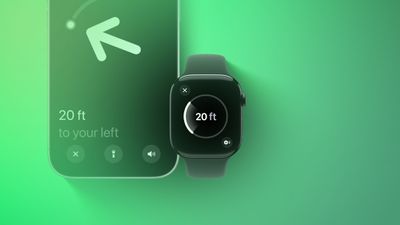
Precision Finding Apple Watch Feature
Apple has not indicated why this feature does not work with the original AirTag. However, the new AirTag is equipped with Apple's second-generation Ultra Wideband chip, while the original has Apple's first-generation Ultra Wideband chip.

Precision Finding can lead you to the exact location of an item with an AirTag attached to it, by showing you a directional arrow and your distance away from the item on a compatible iPhone, and now on a compatible Apple Watch too.

Precision Finding already existed on the above Apple Watch models for finding an iPhone 15 or newer, but there was no Precision Finding on the Apple Watch for finding an AirTag until now. As we confirmed, however, Precision Finding on the Apple Watch still does not work with the first-generation AirTag released in 2021.

To use Precision Finding to find a second-generation AirTag with a compatible Apple Watch, the watch must be running watchOS 26.2.1 or later.

How to set up the feature, according to Apple:

  1. On your Apple Watch, go to Control Center.
  2. Scroll to the bottom and tap Edit.
  3. Tap the Add button.
  4. Scroll down to Find Items.
  5. Tap Find Items, then tap Find AirTag.
  6. Tap Choose, then choose an item.
  7. Tap the Done button, then tap Done.

How to use the feature, according to Apple:

  1. On your Apple Watch, go to Control Center.
  2. Scroll down and tap the Find AirTag button.
  3. Follow the on-screen instructions and move around your space until your Apple Watch connects to your AirTag.
  4. Follow the distance and direction information on your Apple Watch. When you are close to your AirTag, the watch screen turns green.

If you have an original AirTag, you can still find it with Precision Finding on an iPhone 11 or newer.

With the AirTag 2, Precision Finding works at distances up to 1.5× farther away from an item compared to the original AirTag, but this longer range requires an iPhone 15 or newer, Apple Watch Series 9 or newer, or Apple Watch Ultra 2 or newer.

To learn more about the new AirTag, read our coverage of Apple's announcement.

Related Roundup: AirTag

Popular Stories

Apple Logo Black

Apple Just Made Its Second-Biggest Acquisition Ever After Beats

Thursday January 29, 2026 10:07 am PST by
Apple today confirmed to Reuters that it has acquired Q.ai, an Israeli startup that is working on artificial intelligence technology for audio. Apple paid close to $2 billion for Q.ai, according to sources cited by the Financial Times. That would make this Apple's second-biggest acquisition ever, after it paid $3 billion for the popular headphone and audio brand Beats in 2014. Q.ai has...
14 inch MacBook Pro Keyboard

Apple Changes How You Order a Mac

Saturday January 31, 2026 10:51 am PST by
Apple recently updated its online store with a new ordering process for Macs, including the MacBook Air, MacBook Pro, iMac, Mac mini, Mac Studio, and Mac Pro. There used to be a handful of standard configurations available for each Mac, but now you must configure a Mac entirely from scratch on a feature-by-feature basis. In other words, ordering a new Mac now works much like ordering an...
apple unsold web store

Retail Accessories Apple Won't Sell You Now Available via New Site

Friday January 30, 2026 8:46 am PST by
A newly surfaced resale operation is seemingly offering Apple Store–exclusive display accessories to the public for the first time, potentially giving consumers access to Apple-designed hardware that the company has historically kept confined to its retail environments. Apple designs a range of premium MagSafe charging stands, display trays, and hardware systems exclusively for displays in ...
Apple Creator Studio

Apple's Next Launch is Today

Tuesday January 27, 2026 2:39 pm PST by
Update: Apple Creator Studio is now available. Apple Creator Studio launches this Wednesday, January 28. The all-in-one subscription provides access to the Final Cut Pro, Logic Pro, Pixelmator Pro, Motion, Compressor, and MainStage apps, with U.S. pricing set at $12.99 per month or $129 per year. A subscription to Apple Creator Studio also unlocks "intelligent features" and "premium...
imac video apple feature

Apple Unveils First New Products of 2026

Monday January 26, 2026 1:55 pm PST by
Apple today introduced its first two physical products of 2026: a second-generation AirTag and the Black Unity Connection Braided Solo Loop for the Apple Watch. Read our coverage of each announcement to learn more:Apple Unveils New AirTag With Longer Range, Louder Speaker, and More Apple Introduces New Black Unity Apple Watch BandBoth the new AirTag and the Black Unity Connection Braided...

Top Rated Comments

bozzykid Avatar
6 days ago at 07:02 am

can someone explain why you'd use your watch and not your phone?
Your watch is on your actual wrist and with you at all times. That's like saying, "Why use an Apple Watch? Your phone tells the time."
Score: 14 Votes (Like | Disagree)
nuff_said Avatar
6 days ago at 06:53 am
I wish I could say, if not a bug, I’m shocked. /s
But I’m not and you shouldn’t be either
Score: 7 Votes (Like | Disagree)
christian.terra Avatar
6 days ago at 07:10 am

Your watch is on your actual wrist and with you at all times. That's like saying, "Why use an Apple Watch? Your phone tells the time."

Not everyone has an iPhone with an Ultra Wideband chip in it but many have an Apple Watch with it.

I’ve run into this scenario many times. Kids take the phone and I’m scrambling to find my AirTagged keys. HomePod is hit or miss so having the ability to use my Watch would be a plus with all our existing tagged items.
All good points - i guess since we never had the functionality, it seems strange to me.
Score: 4 Votes (Like | Disagree)
KrisLord Avatar
5 days ago at 02:49 pm
Got my new tag today.

Apple Watch and iPhone updated.

Precision finding works fine from iphone.

From an Apple Watch, if you find via the ‘find items” app then it doesn’t do precision find. If you use control center (add the option to find a tag) then it does.

I can’t help but think the watch update is a bit half baked.
Score: 3 Votes (Like | Disagree)
Slix Avatar
6 days ago at 07:04 am

can someone explain why you'd use your watch and not your phone? I can't think of a scenario where you'd only have your watch unless you lose BOTH your airtagged item and phone.
Not everyone has an iPhone with an Ultra Wideband chip in it but many have an Apple Watch with it.
Score: 3 Votes (Like | Disagree)
hagjohn Avatar
6 days ago at 07:12 am
Probably because of the second-generation Ultra Wideband chip, is more precise.
Score: 3 Votes (Like | Disagree)