iPhone Feature for Tracking Lost Bags With AirTag Expands to JetBlue

JetBlue today announced that it now supports the iPhone feature that makes it easier to share the location of AirTag-equipped baggage at airports.
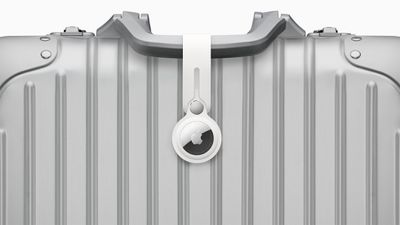
AirTag on Baggage
iOS 18.2 added a new feature to the Find My app that allows you to temporarily share the location of an AirTag-equipped item with others, including employees at participating airlines. This way, if you have put AirTags inside your bags, the airline can better help you find them in the event they are lost or delayed at the airport.

Here is how JetBlue explains the process:

Customers who place an Apple AirTag or Find My network accessory in their bag can now choose to securely share its location with JetBlue's Baggage Service team, helping the airline reunite customers with their belongings more quickly.

To share an item's location, customers can generate a Share Item Location link in the Find My app on their iPhone, iPad, or Mac. This link can be provided to JetBlue by scanning a QR code in the baggage claim area or by working with a crewmember at the airport's Baggage Service Office. JetBlue crewmembers will use the temporary link to help locate and retrieve bags found within JetBlue stations or other contracted facilities.

Other airlines that already offer the feature include American Airlines, Delta, United, Air Canada, Virgin Atlantic, Lufthansa, and more.
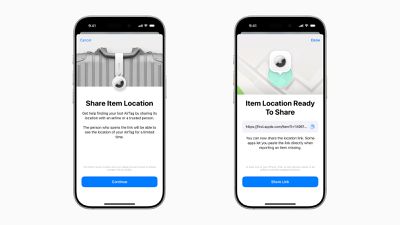
iOS 18 2 Share Item Location
iPhone, iPad, and Mac users running iOS 18.2, iPadOS 18.2, and macOS Sequoia 15.2 or later can generate a "Share Item Location" link in the Find My app. Anyone they share the link with can then view a web page with a location of the item on a map. The page will automatically update with the item's latest known location.

Apple said it worked directly with airlines to put systems in place to "privately and securely" accept the "Share Item Location" links. Access to each link is "limited to a small number of people," and airport employees are required to "authenticate" to view the link by signing into their Apple Account or partner email address.
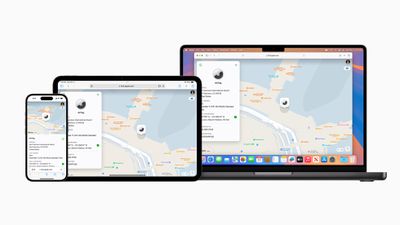
Apple Share Item Location iPhone iPad Mac
The item's location stops being shared "as soon as a user is reunited with their item," or automatically expires after seven days.

Popular Stories

iOS 26

iOS 26.1 Available Now With These 8 New Features

Monday November 3, 2025 5:54 am PST by
Following more than a month of beta testing, Apple released iOS 26.1 on Monday, November 3. The update includes a handful of new features and changes, including the ability to adjust the look of Liquid Glass and more. Below, we outline iOS 26.1's key new features. Liquid Glass Toggle iOS 26.1 lets you choose your preferred look for Liquid Glass. In the Settings app, under Display...
Finder Siri Feature

Apple's New Siri Will Be Powered By Google Gemini

Wednesday November 5, 2025 11:57 am PST by
The smarter, more capable version of Siri that Apple is developing will be powered by Google Gemini, reports Bloomberg. Apple will pay Google approximately $1 billion per year for a 1.2 trillion parameter artificial intelligence model that was developed by Google. For context, parameters are a measure of how a model understands and responds to queries. More parameters generally means more...
Apple Logo Spotlight

Report: Apple to Launch These New Products in 2026

Sunday November 2, 2025 5:34 am PST by
Apple is planning to launch at least 15 new products in 2026, according to Bloomberg's Mark Gurman. Gurman outlined what to expect from Apple in 2026 in the latest edition of his "Power On" newsletter. He said the company is heading "into one of its most pivotal years in recent memory," with the rollout of major new Apple Intelligence features, intense regulatory pressure on the App Store,...
iOS 26

Apple Releases iOS 26.1 With Liquid Glass Toggle, Slide to Stop Alarm, New Apple Intelligence Languages and More

Monday November 3, 2025 1:11 pm PST by
Apple today released iOS 26.1, the first major update to the iOS 26 operating system that came out in September, iOS 26.1 comes over a month after iOS 26 launched. ‌iOS 26‌.1 is compatible with the ‌iPhone‌ 11 series and later, as well as the second-generation ‌iPhone‌ SE. The new software can be downloaded on eligible iPhones over-the-air by going to Settings > General >...
2024 iPhone Boxes Feature

Apple Adjusts Trade-In Values for iPhones, iPads, Macs, and More

Thursday November 6, 2025 11:12 am PST by
Apple today updated its trade-in values for select iPhone, iPad, Mac, and Apple Watch models. Trade-ins can be completed on Apple's website, or at an Apple Store. The charts below provide an overview of Apple's current and previous trade-in values in the U.S., according to its website. Maximum values for most devices either decreased or saw no change, but the iPad Air received a slight bump. ...
Early Black Friday Deals 2

The Best Early Black Friday Apple Deals

Sunday November 2, 2025 10:04 am PST by
We're officially in the month of Black Friday, which will take place on Friday, November 28 in 2025. As always, this will be the best time of the year to shop for great deals, including popular Apple products like AirPods, iPad, Apple Watch, and more. In this article, the majority of the discounts will be found on Amazon. Note: MacRumors is an affiliate partner with some of these vendors. When ...
tvOS 26 Feature

Apple Releases tvOS 26.1

Monday November 3, 2025 1:07 pm PST by
Apple today released tvOS 26.1, an update to the tvOS 26 operating system that came out in September. tvOS 26.1 is available on the Apple TV 4K and the Apple TV HD models, but Liquid Glass is only available on the second-generation Apple TV 4K or later. tvOS 26 can be downloaded using the Settings app on the ‌‌Apple TV‌‌. Open up Settings and go to System > Software Update to get the ...
apple one  cpqesecbv342 upscaled feature

Apple One Gets New Colorful Logo Following Apple TV Rebrand [Updated]

Monday November 3, 2025 3:22 pm PST by
Apple updated the logo and name for its Apple TV streaming service today, and it looks like Apple One might be next. On the revamped Apple TV website, there's a new, more colorful Apple One logo available. The logo features an Apple icon that's split into six slices, and each slice includes the color that Apple uses for one of the services included in Apple One Premium. Apple One is...

Top Rated Comments

svish Avatar
20 weeks ago
Good to see more airlines supporting this. Will be very useful if the checked in baggage ever gets lost. But it might be better to keep the AirTag inside the bag instead of just being strapped outside.
Score: 1 Votes (Like | Disagree)

snak-atak Avatar
20 weeks ago
Wondering how many people place their AirTag on the outside of their bag as a luggage tag? Wouldn’t it be safer tucked inside their bag? Or does that make it harder to track?
Score: 1 Votes (Like | Disagree)
vegetassj4 Avatar
20 weeks ago
Thanks JetBlue, now how long will I have to wait to actually get my bag back?


Attachment Image
Score: 1 Votes (Like | Disagree)