Festivitas Lets You Add Holiday Lights to Your Mac Desktop

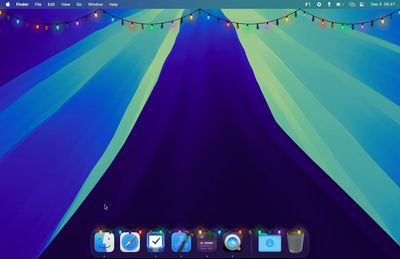
If you're looking to get into the holiday spirit, developer Simon Støvring this week released Festivitas, a simple macOS app that lets you customize your Mac desktop with colorful string lights.
festivitas app
Festivitas adds lights to the Mac's dock and menu bar. Light size, distance, and cable thickness can be customized, as can the colors and the light changing sequence.

When Festivitas is first launched, it requires accessibility features to locate the dock and add the lights. Permissions can be revoked by going to System Settings > Privacy and Security > Accessibility.

Festivitas is compatible with Macs running macOS 14.6 and later, and it can be downloaded for four euros, which is equivalent to approximately $4.23.

Popular Stories

iOS 26

iOS 26.2 Coming Soon With These 8 New Features on Your iPhone

Thursday December 11, 2025 8:49 am PST by
Apple seeded the second iOS 26.2 Release Candidate to developers earlier this week, meaning the update will be released to the general public very soon. Apple confirmed iOS 26.2 would be released in December, but it did not provide a specific date. We expect the update to be released by early next week. iOS 26.2 includes a handful of new features and changes on the iPhone, such as a new...
iOS 26

iOS 26.4 and iOS 27 Features Revealed in New Leak

Friday December 12, 2025 10:56 am PST by
Macworld's Filipe Espósito today revealed a handful of features that Apple is allegedly planning for iOS 26.4, iOS 27, and even iOS 28. The report said the features are referenced within the code for a leaked internal build of iOS 26 that is not meant to be seen by the public. However, it appears that Espósito and/or his sources managed to gain access to it, providing us with a sneak peek...
iOS 26

Apple Releases iOS 26.2 With Alarms for Reminders, Lock Screen Changes, Enhanced Safety Alerts and More

Friday December 12, 2025 10:10 am PST by
Apple today released iOS 26.2, the second major update to the iOS 26 operating system that came out in September, iOS 26.2 comes a little over a month after iOS 26.1 launched. ‌iOS 26‌.2 is compatible with the ‌iPhone‌ 11 series and later, as well as the second-generation ‌iPhone‌ SE. The new software can be downloaded on eligible iPhones over-the-air by going to Settings >...
AirPods Pro Firmware Feature

Apple Releases New Firmware for AirPods Pro 2 and AirPods Pro 3

Thursday December 11, 2025 11:28 am PST by
Apple today released new firmware designed for the AirPods Pro 3 and the prior-generation AirPods Pro 2. The AirPods Pro 3 firmware is 8B30, up from 8B25, while the AirPods Pro 2 firmware is 8B28, up from 8B21. There's no word on what's include in the updated firmware, but the AirPods Pro 2 and AirPods Pro 3 are getting expanded support for Live Translation in the European Union in iOS...
macOS Tahoe 26 Thumb

Apple Releases macOS Tahoe 26.2 With Edge Light

Friday December 12, 2025 10:08 am PST by
Apple today released macOS Tahoe 26.2, the second major update to the macOS Tahoe operating system that came out in September. macOS Tahoe 26.2 comes five weeks after Apple released macOS Tahoe 26.1. Mac users can download the macOS Tahoe update by using the Software Update section of System Settings. macOS Tahoe 26.2 includes Edge Light, a feature that illuminates your face with soft...
AirTag 2 Mock Feature

Apple AirTag 2: Four New Features Found in iOS 26 Code

Thursday December 11, 2025 10:31 am PST by
The AirTag 2 will include a handful of new features that will improve tracking capabilities, according to a new report from Macworld. The site says that it was able to access an internal build of iOS 26, which includes references to multiple unreleased products. Here's what's supposedly coming: An improved pairing process, though no details were provided. AirTag pairing is already...
ipados 26 1 slide over

Apple Releases iPadOS 26.2 With Multitasking Improvements

Friday December 12, 2025 10:09 am PST by
Apple today released iPadOS 26.2, the second major update to the iPadOS 26 operating system released in September. iPadOS 26.2 comes a month after iPadOS 26.1. The new software can be downloaded on eligible iPads over-the-air by going to Settings > General > Software Update. iPadOS 26.2 continues with the multitasking improvements that were added with iPadOS 26.1. You can now drag and...
iphone fold text

'iPhone Fold' Arrival Expected to Cement Book-Style Era for Foldables

Friday December 12, 2025 3:55 am PST by
Foldable smartphone panel shipments are projected to jump 46% year-over-year in 2026, with Apple's entry into the market serving as the main catalyst, according to Counterpoint Research's latest Foldable-Rollable Display Shipment Tracker. "Apple is the key driver as it starts to procure panels for its first foldable iPhone," said Counterpoint's Guillaume Chansin. The research firm expects...

Top Rated Comments

hieranonymous Avatar
13 months ago
This feels like such a throwback to the nineties heyday of the classic MacOS, when novelty apps like this were common. macOS is all grown up now—vastly improved but with nary a trace of that old-timey whimsy.
Score: 26 Votes (Like | Disagree)
cateye Avatar
13 months ago
Worth mentioning that MacRumors forum member @Mithi made an adorbs desktop Christmas Tree app for MacOS ('https://forums.macrumors.com/threads/i-made-a-christmas-tree-for-your-mac.2373022/') a couple years ago and keeps improving and updating it each holiday since. And it's free!
Score: 24 Votes (Like | Disagree)
parkds Avatar
13 months ago
There was something back in the OS 9 era that did this. It might have simply been called Holiday Lights. I remember as a college kid really enjoying having them enabled this time of year.
Score: 21 Votes (Like | Disagree)
ErikGrim Avatar
13 months ago
Now we just need to resurrect that snow extension (Flurry?) that put snow on your desktop and would cover the top of your windows.
Score: 18 Votes (Like | Disagree)
DCYorke Avatar
13 months ago

There was something back in the OS 9 era that did this. It might have simply been called Holiday Lights. I remember as a college kid really enjoying having them enabled this time of year.
These were fun times. My favourite was Oscar the Grouch in the trash can!
Score: 17 Votes (Like | Disagree)
Sowelu Avatar
13 months ago

There was something back in the OS 9 era that did this. It might have simply been called Holiday Lights. I remember as a college kid really enjoying having them enabled this time of year.
Holiday Lights ('https://www.macupdate.com/app/mac/16740/maclampsx') is still alive and well. Not as many features as the original, but it has been updated to work on modern macOS. It's now 'MacLampsX'. I am rocking it as we speak (see screen shot).

I like the lights to just be on top with a calming twinkle and a steady flow of light snow, of course. And these are incandescent-looking classic lights, not the cold and ugly LEDs that we are mostly subjected to today in both real life and apps. I reached out to the developer years ago wondering whatever happened to this app and he said he was thinking about resurrecting it, and he did!

I miss the good old days when a bit of whimsy was built into most apps and operating systems with theme and icon packs and novelty software such as this. Anyone remember Stick Software ('http://www.sticksoftware.com/')? Eyeballs still work on modern macOS! There were so many fun and goofy apps. Catz? Dogz?

The 90's and early 2000's will always be my favorite internet (wild wild west) and Mac era (even vintage PCs). What I would give for someone to update the entire After Dark Screensavers collection and re-release it. Berkley Systems was acquired and folded into a Sierra division after After Dark 4 was released, and their parent company killed most of their titles (including most of Sierra eventually). It was never even updated for WindowsXP and it never worked in OS X. There are a few modules out there that will run on modern versions of macOS, but it's just not the same, of course.

Nowadays GUIs are so cold, boring and stoic. Apple, the pioneers of beautiful icons completely destroyed them and now we are living with ugly tile icons, many are just glyphs slapped onto tiles, and to add insult to injury, we cannot change most of them. Remember Candy Bar? Why can't we have nice things anymore?

Anyway, I like that you can add lights onto the dock, so I will of course give Festivitas a go.

Attachment Image
Score: 10 Votes (Like | Disagree)