Snapchat Updated With iOS 18 Lock Screen Shortcut and iPhone 16 Camera Control Support
iOS 18 allows iPhone users to change the flashlight and camera shortcuts on the Lock Screen to something else, and Snapchat is now an option.
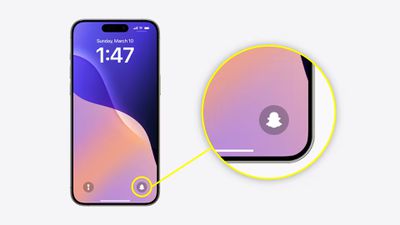
Snapchat today announced that iPhone users can now quickly launch the app's camera view from the Lock Screen on iOS 18, even when the device is locked. To set this up, update to the latest version of the Snapchat app, released today. Then, tap and hold on the Lock Screen, tap on the Customize button, tap on the Lock Screen, tap on the minus sign next to the flashlight or camera shortcuts, tap on the plus sign that appears in its place, and tap on the Snapchat option that appears in the Control Center gallery.
Snapchat's update also includes Camera Control support on all iPhone 16 models to quickly access the app's camera view using that button.
Popular Stories
Some iPhone Duos are already experiencing hinge issues that cause display cracks, based on photos shared on Reddit and the MacRumors forums. Almost all of the display faults are right along the hinge, and most result in a line of bright pixels across one side of the screen.
An iPhone Duo owner in Australia said his device cracked after being opened fewer than 20 times, and there was no...
Shortly after the iPhone Duo launched, a few users reported hinge issues that were causing cracks in the inner display. Apple has now responded to the reports in a statement to MacRumors, saying a small number of units are affected.
The response to iPhone Duo from early users has been incredibly positive, and we are seeing exciting things from developers who are rapidly updating their apps...
Apple's iPhone Duo has failed JerryRigEverything's latest durability test. Despite its IP68 dust-resistance rating, dust entered the hinge through several ingress points, overwhelming the magnets that hold the phone shut. The bend test then left a permanent green line across the inner display, before the screen became unresponsive.
The outer screen with Ceramic Shield 2 scratched at level 7...







/https://forums.macrumors.com/attachments/2441201/)