Apple Releases First iOS 18 and iPadOS 18 Public Betas

Apple today provided the first betas of iOS 18 and iPadOS 18 to public beta testers, bringing the new software to the general public for the first time since the Worldwide Developers Conference in June. Apple has seeded three developer betas so far, and the first public beta includes the same content that's in the third developer beta.


Public beta testers who have signed up for Apple's beta testing program can download the iOS 18 and iPadOS 18 updates by opening up the Settings app, going to General, tapping into the Software Update section and selecting the iOS 18 Public Beta option.

Note that betas can have bugs, battery issues, and other complications, so it is wise to install the software on a secondary device or make a backup in case you need to downgrade back to iOS 17.

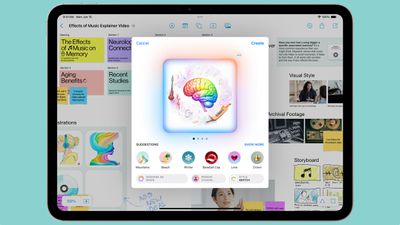
iOS 18 introduces Apple Intelligence, which are AI features deeply integrated into the operating system. Not all functionality is available at this time, but it brings Writing Tools for rewriting, polishing, proofreading, and summarizing text across apps, and you can generate custom images with Image Playground. There are custom emoji available through the Genmoji feature, and Siri is getting entirely overhauled. Note that ‌Apple Intelligence‌ isn't yet live in the betas.

ipaos 18 image playground
Along with the AI features (which will be limited to the iPhone 15 Pro models and M-series iPads), iOS 18 brings a redesigned Home Screen with the option to rearrange app icons and widgets with open spaces, plus there's a tint option and new darker colors for Dark Mode.
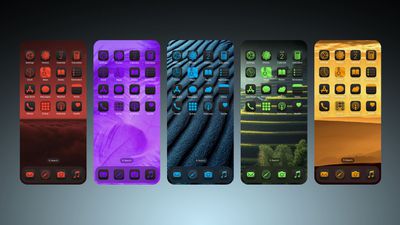
iOS 18 Home Screen Feature 1
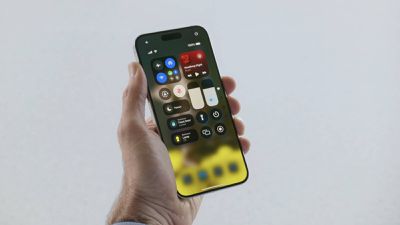
Control Center has been revamped and you can pick and choose what you want to have front and center from the new Controls Gallery. There are multiple pages so you can group related controls, and you can customize sizes. As part of this update, the Flashlight and Camera icons on the Lock Screen can be swapped out, and you can also choose Control Center options for the ‌iPhone‌ 15 Pro Action Button.

control center ios 18
The Messages app supports scheduling texts, you can use any emoji for the Tapback feature, and you can send messages via satellite. There are text effects you can use for any word, phrase, or emoji, plus formatting like bold and italic is an option. For texts with Android users, Apple now supports RCS, which basically means you won't run into issues with sending images and files, plus you can see typing indicators and read receipts and send texts over Wi-Fi.
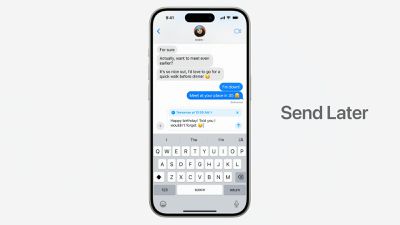
iMessage Send Later iOS 18
Safari is able to summarize webpages and show you important info at a glance, the Photos app has been overhauled to focus more on surfacing your best photos. A dedicated Passwords app makes it easier to get to your saved passwords and logins, and you can now lock any app with Face ID or Touch ID.
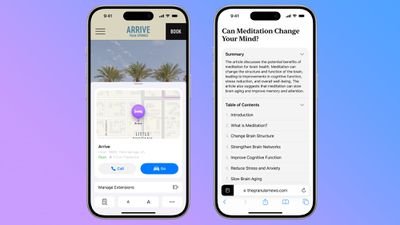
ios 18 safari app
There are a ton of new features in iOS 18 and iPadOS 18 that aren't mentioned here, so for a more in-depth look make sure to check out our iOS 18 roundup and our iPadOS 18 roundup.


Related Forums: iOS 18, iPadOS 18

Popular Stories

maxresdefault

Apple Shows Off a Key Reason to Upgrade to the iPhone 17

Saturday February 7, 2026 9:26 am PST by
Apple today shared an ad that shows how the upgraded Center Stage front camera on the latest iPhones improves the process of taking a group selfie. "Watch how the new front facing camera on iPhone 17 Pro takes group selfies that automatically expand and rotate as more people come into frame," says Apple. While the ad is focused on the iPhone 17 Pro and iPhone 17 Pro Max, the regular iPhone...
Finder Siri Feature

Why Apple's iOS 26.4 Siri Upgrade Will Be Bigger Than Originally Promised

Friday February 6, 2026 3:06 pm PST by
In the iOS 26.4 update that's coming this spring, Apple will introduce a new version of Siri that's going to overhaul how we interact with the personal assistant and what it's able to do. The iOS 26.4 version of Siri won't work like ChatGPT or Claude, but it will rely on large language models (LLMs) and has been updated from the ground up. Upgraded Architecture The next-generation...
wwdc sans text feature

Apple Rumored to Announce New Product on February 19

Thursday February 5, 2026 12:22 pm PST by
Apple plans to announce the iPhone 17e on Thursday, February 19, according to Macwelt, the German equivalent of Macworld. The report, citing industry sources, is available in English on Macworld. Apple announced the iPhone 16e on Wednesday, February 19 last year, so the iPhone 17e would be unveiled exactly one year later if this rumor is accurate. It is quite uncommon for Apple to unveil...
apple wallet drivers license feature iPhone 15 pro

Apple Says These 7 U.S. States Plan to Offer iPhone Driver's Licenses

Monday February 9, 2026 6:24 am PST by
In select U.S. states, residents can add their driver's license or state ID to the Apple Wallet app on the iPhone and Apple Watch, and then use it to display proof of identity or age at select airports and businesses, and in select apps. The feature is currently available in 13 U.S. states and Puerto Rico, and it is expected to launch in at least seven more in the future. To set up the...
14 inch MacBook Pro Keyboard

New MacBook Pros Could Now Arrive in March

Sunday February 8, 2026 6:02 am PST by
New MacBook Pro models with the M5 Pro and M5 Max chips could arrive as soon as Monday, March 2, according to Bloomberg's Mark Gurman. In today's "Power On" newsletter, Gurman said that the release of new MacBook Pro models is tied to the release of macOS Tahoe 26.3. The launch is said to be slated for as early as the week of March 2. He added that the M4 Pro and M4 Max models on sale today...

Top Rated Comments

jmgregory1 Avatar
21 months ago
Whenever I see examples of the tinted app icons, I’m reminded that companies shouldn’t always give people what people think they want.
Score: 44 Votes (Like | Disagree)
TestedLion Avatar
21 months ago

Whenever I see examples of the tinted app icons, I’m reminded that companies shouldn’t always give people what people think they want.
Yes, they 100% should do exactly that.. as long as it doesn't allow a naive end-user to break functionality. Example: black text on a black background... thus rendering it unreadable. Or, turning off/on system level functionality. Otherwise, if people buy it, let them mod it to their heart's content as long as it doesn't cause damage / loss for the user or Apple.
Score: 13 Votes (Like | Disagree)
Premium1 Avatar
21 months ago

iOS 18 will be in beta mode until at least iOS 18.6 is released in the summer of next year. That's because Tim Cook is an incompetent MBA degree holding CEO who doesn't care much about bugs, and is instead focused on maximizing profits.
Sir... This is a Wendy's....
Score: 13 Votes (Like | Disagree)
pdaholic Avatar
21 months ago

Very tempted to instal ?
I am too. But then before I click the install button I realize that there’s no “gotta have it feature” on ios18 that supersedes the risk of breaking apps, worsening battery life, destabilizing the os, etc…So I wait ?
Score: 7 Votes (Like | Disagree)
slynger Avatar
21 months ago

Is it worth switching From the dev beta to the public one? Is it more stable or no?
Pretty sure they are the same.
Score: 6 Votes (Like | Disagree)
slynger Avatar
21 months ago
Alright I caved. Download in progress. ?
Score: 6 Votes (Like | Disagree)