Microsoft 'Windows App' Offers Access to Windows PCs From Any Device

Microsoft is launching a "Windows App" that can remotely connect to a Windows PC and provide access to it from any platform. Available for macOS, iOS, iPadOS, PCs, and web browsers, the app also provides a gateway to Windows 365, Azure Virtual Desktop, Microsoft Dev Box, and the company's Remote Desktop Services.
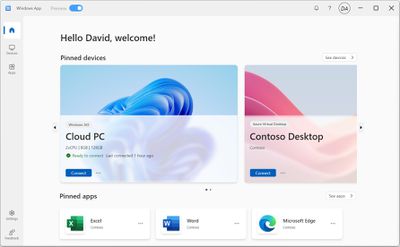
windows app overview
The Windows app includes a customizable Home Screen from which users can access multiple different cloud services and remote PCs. The app features multiple monitor support, custom display resolutions, dynamic display resolutions and scaling, peripheral redirection, and more.

Microsoft has offered the Remote Desktop Connection app in Windows for years now, but the Windows app signals a broader shift to cloud computing for Windows more generally.

For now the app is only available as a preview for enterprise accounts, but it is likely to support regular customers in time, although the option to sign in using a personal Microsoft account doesn't currently work, according to The Verge. The Mac version requires macOS 12 or later, while the iOS/iPadOS app needs a device running iOS or iPadOS 16 or later. The web version of the app can be accessed by going to windows.cloud.microsoft.

Popular Stories

top stories 2025 12 20

Top Stories: iOS 26.3 Beta, Major Apple Leaks, and More

Saturday December 20, 2025 6:00 am PST by
You'd think things would be slowing down heading into the holidays, but this week saw a whirlwind of Apple leaks and rumors while Apple started its next cycle of betas following last week's release of iOS 26.2 and related updates. This week also saw the release of a new Apple Music integration with ChatGPT, so read on below for all the details on this week's biggest stories! Top Stories i...
iPhone Top Left Hole Punch Face ID Feature Purple

iPhone 18 Pro Features Leaked in New Report, Including Under-Screen Face ID

Tuesday December 16, 2025 8:44 am PST by
Next year's iPhone 18 Pro and iPhone 18 Pro Max will be equipped with under-screen Face ID, and the front camera will be moved to the top-left corner of the screen, according to a new report from The Information's Wayne Ma and Qianer Liu. As a result of these changes, the report said the iPhone 18 Pro models will not have a pill-shaped Dynamic Island cutout at the top of the screen....
ios 18 security update

Don't Want to Upgrade to iOS 26? Here's How to Stay on iOS 18 [Update: Now Unavailable]

Friday December 19, 2025 10:37 am PST by
Since the beginning of December, Apple has been pushing iPhone users who opted to stay on iOS 18 to install iOS 26 instead. Apple started by making the iOS 18 upgrades less visible, and has now transitioned to making new iOS 18 updates unavailable on any device capable of running iOS 26. If you have an iPhone 11 or later, Apple is no longer offering new versions of iOS 18, even though there...
maxresdefault

Where's the New Apple TV?

Monday December 22, 2025 11:30 am PST by
Apple hasn't updated the Apple TV 4K since 2022, and 2025 was supposed to be the year that we got a refresh. There were rumors suggesting Apple would release the new Apple TV before the end of 2025, but it looks like that's not going to happen now. Subscribe to the MacRumors YouTube channel for more videos. Bloomberg's Mark Gurman said several times across 2024 and 2025 that Apple would...
apple beta 26 lineup

Apple's 2026 and 2027 Product Roadmap: Foldable iPhone, iPhone 18 Pro, M5 Macs, and More

Tuesday December 16, 2025 4:42 pm PST by
There has been a whirlwind of rumors over the last few days, sourced from leaked internal software designed for the iPhone and the Mac, and news sites like The Information. Below, we have a quick recap of everything we've heard this week, which serves as a guide to Apple's product plans in 2026 and beyond. We've organized the info by likely release date, though there are some products that...
apple beta 26 lineup

Apple Leak Confirms Work on Foldable iPhone, AirTag 2, and Dozens More Devices

Monday December 15, 2025 2:05 pm PST by
Last week, details about unreleased Apple devices and future iOS features were shared by Macworld. This week, we learned where the information came from, plus we have more findings from the leak. As it turns out, an Apple prototype device running an early build of iOS 26 was sold, and the person who bought it shared the software. The OS has a version number of 23A5234w, and the first...

Top Rated Comments

jcshas Avatar
28 months ago
Isn’t this essentially the same as Microsoft Remote Desktop, or what am I missing here?
Score: 22 Votes (Like | Disagree)
bradman83 Avatar
28 months ago

Isn’t this essentially the same as Microsoft Remote Desktop, or what am I missing here?
It builds on remote desktop by adding support for Windows 365 and Azure desktops, so you can access cloud-based Windows VMs in addition to remote access to physical PCs.
Score: 9 Votes (Like | Disagree)
Lord Hamsa Avatar
28 months ago

So no more Parallels?
No, this doesn't replace all of the use cases for a virtual machine. This would require some physical machine running Windows to be accessible to you, either locally or via the cloud. It's more like Remote Desktop than Parallels, with the difference being the cloud components built into it.

Parallels would still be useful for when you need to run Windows directly on the same machine.
Score: 8 Votes (Like | Disagree)
infinitedreams Avatar
28 months ago
Now I can run Windows on my iPhone!


Attachment Image
Score: 7 Votes (Like | Disagree)
chucker23n1 Avatar
28 months ago

Isn’t this essentially the same as Microsoft Remote Desktop, or what am I missing here?
Yes. This is basically a rebrand of their previous RDP client. Some of the previous UI is also still there:


They do seem to have improved a few things. Resizing the window to set the resolution now sort of works, although I find text to be blurry on on-Retina Displays.

Copying files finally seems to be implemented.

I still prefer Royal, but my use cases are more advanced…

Attachment Image
Score: 6 Votes (Like | Disagree)
till Avatar
28 months ago
The last time I needed to use Azure Virtual Desktop for a few days of development work, it was a nightmare of navigating control panels and billing systems which were clearly designed for businesses with an accounting department.

Hopefully this simplifies things.
Score: 5 Votes (Like | Disagree)