Will the iPhone 16 Feature Taptic Buttons?

While it was rumored that the iPhone 15 Pro models would be equipped with solid-state buttons, the devices ended up launching with traditional mechanical buttons. Attention has now shifted to whether the solid-state buttons will still happen with the iPhone 16 lineup next year, but there are conflicting rumors so far, as outlined below.
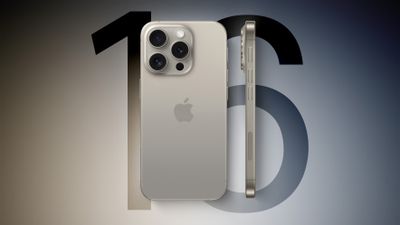
iPhone 16 Side 2 Feature
For context, solid-state buttons would provide haptic feedback when pressed to simulate the feeling of movement, similar to the Home button on the iPhone SE and the Force Touch trackpad on modern MacBooks. On the other hand, mechanical buttons actually move when pressed. All of the buttons on the iPhone 15 Pro models are mechanical, including the new Action button that provides quick access to an assigned function.

Benefits of solid-state buttons could include fewer mechanical parts that can break and improved water resistance. Solid-state buttons could also potentially sit flush with the iPhone's frame, allowing for a more seamless design.

Multiple analysts and a leaker claimed that Apple had tested solid-state buttons on prototype iPhone 15 Pro models, but the company apparently decided not to move forward with the change before mass production started due to "technical issues."

Apple supplier Cirrus Logic seemingly confirmed that the solid-state buttons had been canceled earlier this year, and it has seemingly touched on the topic again. In a shareholder letter this week, the supplier shared the following information:

Finally, during the quarter we completed the disposition of wafers associated with a new high-performance mixed-signal (HPMS) product that was previously expected to ship this year. As anticipated, the disposition did not have a material financial impact.

In an email, an equity research analyst at British bank Barclays informed us that Cirrus Logic disposed of these wafers due to Apple canceling the solid-state buttons on the iPhone 15 Pro models. The devices were expected to have additional Taptic Engines that provided haptic feedback when the buttons were pressed, and Cirrus Logic was expected to supply Apple with haptic drivers that would have enabled this functionality.

The analyst also told us that they do not expect iPhone 16 models to be equipped with solid-state buttons, given that Cirrus Logic has disposed of its related inventory for the project, but MacRumors contributor Marko Zivkovic believes otherwise. Last month, Zivkovic reported that the entire iPhone 16 lineup will be equipped with solid-state Action and "Capture" buttons. The purpose of the "Capture" button remains unknown, and he cautioned that Apple's plans could once again change as development progresses.

Zivkovic said the "Capture" button would be located below the power button on the right side of the iPhone 16 models, should it materialize. As a result, he said the mmWave 5G antenna window on iPhone 16 models sold in the U.S. would be moved to the left side of the devices, below the volume buttons. This rumor was seemingly corroborated this week by a leaker on Chinese social media platform Weibo, but it is unclear if the account independently confirmed the information, or if it was simply repeating the details shared by Zivkovic.

All in all, rumors about solid-state buttons for the iPhone 16 lineup do not align right now, with some sources expecting them and others not. As the launch of the devices next September draws closer, Apple's plans should become clearer.


Related Roundup: iPhone 16
Related Forum: iPhone

Popular Stories

iOS 26

iOS 26.2 Coming Soon With These 8 New Features on Your iPhone

Thursday December 11, 2025 8:49 am PST by
Apple seeded the second iOS 26.2 Release Candidate to developers earlier this week, meaning the update will be released to the general public very soon. Apple confirmed iOS 26.2 would be released in December, but it did not provide a specific date. We expect the update to be released by early next week. iOS 26.2 includes a handful of new features and changes on the iPhone, such as a new...
iOS 26

iOS 26.4 and iOS 27 Features Revealed in New Leak

Friday December 12, 2025 10:56 am PST by
Macworld's Filipe Espósito today revealed a handful of features that Apple is allegedly planning for iOS 26.4, iOS 27, and even iOS 28. The report said the features are referenced within the code for a leaked internal build of iOS 26 that is not meant to be seen by the public. However, it appears that Espósito and/or his sources managed to gain access to it, providing us with a sneak peek...
AirPods Pro Firmware Feature

Apple Releases New Firmware for AirPods Pro 2 and AirPods Pro 3

Thursday December 11, 2025 11:28 am PST by
Apple today released new firmware designed for the AirPods Pro 3 and the prior-generation AirPods Pro 2. The AirPods Pro 3 firmware is 8B30, up from 8B25, while the AirPods Pro 2 firmware is 8B28, up from 8B21. There's no word on what's include in the updated firmware, but the AirPods Pro 2 and AirPods Pro 3 are getting expanded support for Live Translation in the European Union in iOS...
iOS 26

Apple Releases iOS 26.2 With Alarms for Reminders, Lock Screen Changes, Enhanced Safety Alerts and More

Friday December 12, 2025 10:10 am PST by
Apple today released iOS 26.2, the second major update to the iOS 26 operating system that came out in September, iOS 26.2 comes a little over a month after iOS 26.1 launched. ‌iOS 26‌.2 is compatible with the ‌iPhone‌ 11 series and later, as well as the second-generation ‌iPhone‌ SE. The new software can be downloaded on eligible iPhones over-the-air by going to Settings >...
Google maps feaure

Google Maps Quietly Added This Long-Overdue Feature for Drivers

Wednesday December 10, 2025 2:52 am PST by
Google Maps on iOS quietly gained a new feature recently that automatically recognizes where you've parked your vehicle and saves the location for you. Announced on LinkedIn by Rio Akasaka, Google Maps' senior product manager, the new feature auto-detects your parked location even if you don't use the parking pin function, saves it for up to 48 hours, and then automatically removes it once...
AirTag 2 Mock Feature

Apple AirTag 2: Four New Features Found in iOS 26 Code

Thursday December 11, 2025 10:31 am PST by
The AirTag 2 will include a handful of new features that will improve tracking capabilities, according to a new report from Macworld. The site says that it was able to access an internal build of iOS 26, which includes references to multiple unreleased products. Here's what's supposedly coming: An improved pairing process, though no details were provided. AirTag pairing is already...
macOS Tahoe 26 Thumb

Apple Releases macOS Tahoe 26.2 With Edge Light

Friday December 12, 2025 10:08 am PST by
Apple today released macOS Tahoe 26.2, the second major update to the macOS Tahoe operating system that came out in September. macOS Tahoe 26.2 comes five weeks after Apple released macOS Tahoe 26.1. Mac users can download the macOS Tahoe update by using the Software Update section of System Settings. macOS Tahoe 26.2 includes Edge Light, a feature that illuminates your face with soft...
iOS 26

15 New Things Your iPhone Can Do in iOS 26.2

Friday December 5, 2025 9:40 am PST by
Apple is about to release iOS 26.2, the second major point update for iPhones since iOS 26 was rolled out in September, and there are at least 15 notable changes and improvements worth checking out. We've rounded them up below. Apple is expected to roll out iOS 26.2 to compatible devices sometime between December 8 and December 16. When the update drops, you can check Apple's servers for the ...

Top Rated Comments

JCCL Avatar
28 months ago
"Improved water resistance" An Apple Watch Ultra has mechanical buttons and you can go diving with it. How much can it really improve?
Score: 10 Votes (Like | Disagree)
syklee26 Avatar
28 months ago
How do you reset if they are haptic?
Score: 6 Votes (Like | Disagree)
Devnul0 Avatar
28 months ago
What's with the idea of possibly adding another button on the right or left side? It's already nearly impossible to do a lot of things with one hand because of having the buttons directly across from each other they get pressed when one tries to hold the phone, and I have far too many screenshots of my lock screen. Put the damned power button back on top where it belongs!
Score: 6 Votes (Like | Disagree)
yabeweb Avatar
28 months ago

The same way you do now long press volume up and the power button to use the slider to shut off or tap volume up volume down and long press the power button to force restart
Being haptic means it is software based...so if the sowftare is stuck.....

I am against haptic as they offer no real value it's just to tout it as a difference, but there is no advantage in having a button turned into a non button.
Score: 4 Votes (Like | Disagree)
danbalsh Avatar
28 months ago
I could see this being interesting if it included force touch. So press for mute, deep press for camera, press and hold for shortcut etc...
Score: 4 Votes (Like | Disagree)
jamezr Avatar
28 months ago
Sorry but no buttons is a no buy for me personally.....
Score: 3 Votes (Like | Disagree)