watchOS 10 Extends Optimized Charge Limit to More Apple Watch Models - MacRumors
Skip to Content

watchOS 10 Extends Optimized Charge Limit to More Apple Watch Models

With watchOS 9 on the Apple Watch Ultra, Apple introduced a new battery feature called Optimized Charge Limit, which uses on-device machine learning to analyze your daily usage and dynamically set a maximum charge limit for your watch.
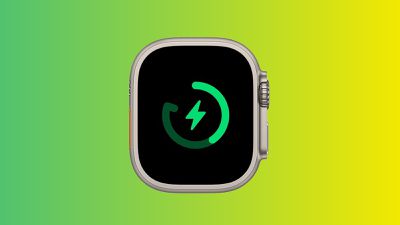
apple watch optimized charge limit
Available now as a developer beta and coming to all users later this year, watchOS 10 will extend this Optimized Charge Limit to additional Apple Watch models, including Apple Watch SE, Series 6, Series 7, and Series 8. Any new models released later this year alongside the public release of watchOS 10 will undoubtedly also support the feature.

Optimized Charge Limit is an extension of the Optimized Battery Charging feature that waits to fully charge your battery until just before your device expects you to need your Apple Watch, in order to limit battery degradation due to overcharging. Optimized Charge Limit augments this by predicting how much battery life you are likely to need on any given day and only charging up to a level sufficient for your expected needs.

As a result, on some days your Apple Watch may charge all the way to 100%, while on other days it might charge to only 80% or 90%. The feature is optional but on by default, and it only engages in locations where you spend a lot of time such as at home or at work, recognizing that less frequently visited locations are more likely to have unpredictable impacts on your watch usage and charging patterns.

You can also manually override a planned Optimized Charge Limit by tapping the open charging icon after connecting to a charger and selecting the "Charge to Full Now" option.

For more details on how to manage Optimized Charge Limit, check out our how-to on the feature.

(Thanks, @aaronp613!)

Related Roundups: watchOS 26, watchOS 27
Related Forum: Apple Watch

Popular Stories

watchos 27

Apple Seeds watchOS 27 Beta 5 to Developers

Monday August 10, 2026 10:10 am PDT by
Apple today seeded the fifth beta of watchOS 27 to developers, with the update coming two weeks after the launch of the fourth beta. The beta can be downloaded through the Watch app on the iPhone with a free developer account. The Apple Watch will need to be on the charger, connected to Wi-Fi, and have a battery level of 50 percent or above for new software to be installed. The beta is...
watchos 27

tvOS 27 and watchOS 27 Third Public Betas Now Available

Tuesday August 11, 2026 10:20 am PDT by
Apple today released the third public betas of tvOS 27 and watchOS 27, giving Apple TV and Apple Watch users a chance to try the new software ahead of its fall launch. There's also a new HomePod Software 27 beta for the HomePod and HomePod mini. You can sign up for Apple's public beta testing program on the beta website, and then download the updates through the Settings app on each device. ...
watchos 26 gradient light

Apple Releases watchOS 26.6 With Security Updates

Monday July 27, 2026 10:25 am PDT by
Apple today released watchOS 26.6, the sixth update to the watchOS 26 operating system that came out in September. watchOS 26.6 comes over two months after Apple released watchOS 26.5. watchOS 26.6 can be downloaded for free on an iPhone running iOS 26.6 by opening up the Apple Watch app and going to General > Software Update, or initiating an update in the Settings app on the watch. To...

Top Rated Comments

42 months ago
I would much prefer me to be able to manually set a "Max Charge". Like we can in many EVs and on other phones.
Score: 10 Votes (Like | Disagree)
Radeon85 Avatar
42 months ago
I hate this feature, if I put something on charge I want it to be at 100% guaranteed.
Score: 7 Votes (Like | Disagree)
MrRom92 Avatar
42 months ago

Am I the only one that thinks this sounds terrible? Thanks for the heads up. Definitely turning it off by default! 😂 I want 100% each day thanks..
Yeah, same boat. My watch is already not at 100% sometimes when I need to go, and that’s after leaving it on the charger overnight. If you wanna slow it down at 3-4AM, fine, I’m probably sleeping, by 6AM clock that thing better be at 100
Score: 7 Votes (Like | Disagree)
42 months ago
Am I the only one that thinks this sounds terrible? Thanks for the heads up. Definitely turning it off by default! 😂 I want 100% each day thanks..
Score: 7 Votes (Like | Disagree)
TheYayAreaLiving 🎗️ Avatar
42 months ago
I love this feature. It works flawlessly! Please bring this Optimized Charging feature to iOS 17.

Score: 7 Votes (Like | Disagree)
42 months ago

I love this feature. It works flawlessly! Please bring this Optimized Charging feature to iOS 17.


And macOS! I never need 100% battery on my MacBook.
Score: 4 Votes (Like | Disagree)