Apple Releases Rapid Security Response Update for iOS 16.2 Beta Users [Updated]
One of the new features in iOS 16 is Rapid Security Response, which lets Apple push out important security fixes to users without requiring a full iOS update. For users running the iOS 16.2 beta, Apple today released one of those updates to deliver unspecified bug fixes affecting the software.
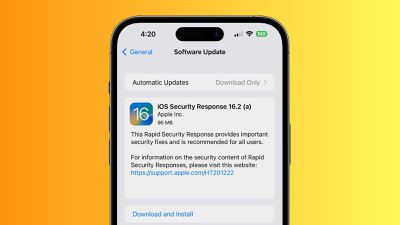
iOS Security Response 16.2 (a) arrives via the standard Software Update mechanism in the Settings app, but is a relatively quick update, requiring just a couple of minutes to download and prepare the update and then a quick restart and install process.
After the update has been installed, the system will report an updated version of iOS 16.2 (a), and tapping on the version in the About section of Settings will display information about your installed iOS version and the Rapid Security Response update, with the ability to remove the security update if desired.
Update: According to Apple documentation shared by Appleosophy, the Rapid Security Response update issued today is "for testing purposes only and does not contain security content."
Popular Stories
The Apple TV 4K hasn't been updated since 2022, and it's due for a refresh. An update is planned for 2026, but Apple is likely going to wait to launch it after Siri AI launches in iOS 27.
Design
Apple TV design updates don't happen often, and that's not changing. The next Apple TV is going to have the same squircle shape as the current model, and it'll continue to be made from a black...
In May, Apple agreed to pay $250 million to settle a U.S. class action lawsuit over Siri AI's delayed launch, and eligible iPhone users could receive up to a $95 payout.
This week, the California court overseeing the case held a hearing regarding preliminary approval of the settlement, but the judge has not yet issued a ruling. It will likely be at least a few more months before eligible...
iOS 27 includes new Apple Intelligence features for compatible cameras in Apple's Home app, but only if you have an iCloud+ plan with at least 2TB of storage. This limitation effectively means that the new features are only available with a minimum $9.99/month subscription, even though the centerpiece of the subscription is the 2TB of storage.
The features include AI descriptions for...