iOS 16: Three Major Features Apps Are Getting Updated to Support

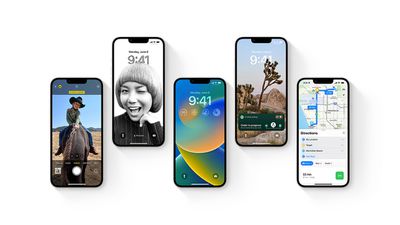
Apple is releasing iOS 16 to the general public today, offering users new ways to customize their Lock Screen, the ability to edit and unsend messages, and more. While there are several features that users can begin to use right after they update to iOS 16, there are several new features that apps will need to add support for first before users can begin to enjoy them.
iOS 16 Preview
Below, we've highlighted three features that users can expect apps to add in the coming days and weeks following the release of iOS 16. Be sure to stay tuned to MacRumors for full coverage of iOS 16's release and apps as they get updated.

Lock Screen Widgets
Lock Screen
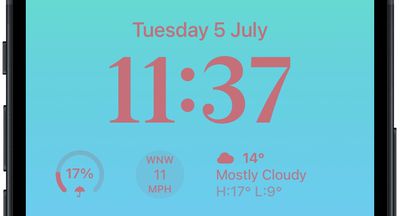
By itself, the redesigned iOS 16 Lock Screen and the suite of customization features it now provides, such as the ability to choose different fonts and colors for the time, are major changes. On top of that, however, the iPhone Lock Screen now benefits from the ability to add widgets.

Out of the box, iOS 16 offers several widget options for the iOS 16 Lock Screen, including Apple Watch Activity rings, world clock, temperature, calendar, Home, batteries, and more. In the coming days, third-party apps will release their own widgets for the iOS 16 Lock Screen, giving users even more flexibility and freedom over how they wish to customize the face of their ‌iPhone‌.

Focus Filters

ios 16 focus filters
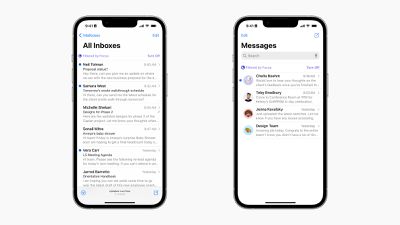
The Focus filters are a new part of iOS 16 that builds on Focus modes introduced with iOS 15 last year. Focus filters allow the parameters you set for your own Focus mode, such as Personal or Work, to carry through into the actual content of individual apps and beyond simply notifications.

For example, users can enable a Focus filter for the Messages app so that only messages from contacts allowed to break through specific Focus modes are shown within the app. Third-party apps will be able to take advantage of Focus filters, allowing users to limit distracting content within apps to only those they wish to focus on.

Coming Later This Year: Live Activities
ios 16 live activities
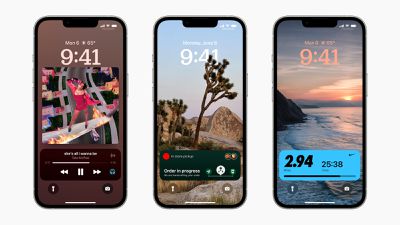
Coming later this year to an update to iOS 16 is an all-new type of notification and interaction for apps called Live Activities. Live Activities reside on the bottom portion of the Lock Screen and can display real-time and dynamic information from apps, such as Uber for tracking your ride or sports apps for keeping tabs on the scores of a game.

On the ‌iPhone‌ 14 Pro and ‌iPhone‌ 14 Pro Max, Live Activities play an even larger role in the iOS experience. While on other devices Live Activities are only visible on the Lock Screen and Notification Center, the new high-end iPhones display certain types of Live Activities in the Dynamic Island. Learn more about Dynamic Island here.


Related Forum: iOS 16

Popular Stories

iOS 26

iOS 26.2 Coming Soon With These 8 New Features on Your iPhone

Thursday December 11, 2025 8:49 am PST by
Apple seeded the second iOS 26.2 Release Candidate to developers earlier this week, meaning the update will be released to the general public very soon. Apple confirmed iOS 26.2 would be released in December, but it did not provide a specific date. We expect the update to be released by early next week. iOS 26.2 includes a handful of new features and changes on the iPhone, such as a new...
iOS 26

iOS 26.4 and iOS 27 Features Revealed in New Leak

Friday December 12, 2025 10:56 am PST by
Macworld's Filipe Espósito today revealed a handful of features that Apple is allegedly planning for iOS 26.4, iOS 27, and even iOS 28. The report said the features are referenced within the code for a leaked internal build of iOS 26 that is not meant to be seen by the public. However, it appears that Espósito and/or his sources managed to gain access to it, providing us with a sneak peek...
iOS 26

Apple Releases iOS 26.2 With Alarms for Reminders, Lock Screen Changes, Enhanced Safety Alerts and More

Friday December 12, 2025 10:10 am PST by
Apple today released iOS 26.2, the second major update to the iOS 26 operating system that came out in September, iOS 26.2 comes a little over a month after iOS 26.1 launched. ‌iOS 26‌.2 is compatible with the ‌iPhone‌ 11 series and later, as well as the second-generation ‌iPhone‌ SE. The new software can be downloaded on eligible iPhones over-the-air by going to Settings >...
AirPods Pro Firmware Feature

Apple Releases New Firmware for AirPods Pro 2 and AirPods Pro 3

Thursday December 11, 2025 11:28 am PST by
Apple today released new firmware designed for the AirPods Pro 3 and the prior-generation AirPods Pro 2. The AirPods Pro 3 firmware is 8B30, up from 8B25, while the AirPods Pro 2 firmware is 8B28, up from 8B21. There's no word on what's include in the updated firmware, but the AirPods Pro 2 and AirPods Pro 3 are getting expanded support for Live Translation in the European Union in iOS...
macOS Tahoe 26 Thumb

Apple Releases macOS Tahoe 26.2 With Edge Light

Friday December 12, 2025 10:08 am PST by
Apple today released macOS Tahoe 26.2, the second major update to the macOS Tahoe operating system that came out in September. macOS Tahoe 26.2 comes five weeks after Apple released macOS Tahoe 26.1. Mac users can download the macOS Tahoe update by using the Software Update section of System Settings. macOS Tahoe 26.2 includes Edge Light, a feature that illuminates your face with soft...
AirTag 2 Mock Feature

Apple AirTag 2: Four New Features Found in iOS 26 Code

Thursday December 11, 2025 10:31 am PST by
The AirTag 2 will include a handful of new features that will improve tracking capabilities, according to a new report from Macworld. The site says that it was able to access an internal build of iOS 26, which includes references to multiple unreleased products. Here's what's supposedly coming: An improved pairing process, though no details were provided. AirTag pairing is already...
ipados 26 1 slide over

Apple Releases iPadOS 26.2 With Multitasking Improvements

Friday December 12, 2025 10:09 am PST by
Apple today released iPadOS 26.2, the second major update to the iPadOS 26 operating system released in September. iPadOS 26.2 comes a month after iPadOS 26.1. The new software can be downloaded on eligible iPads over-the-air by going to Settings > General > Software Update. iPadOS 26.2 continues with the multitasking improvements that were added with iPadOS 26.1. You can now drag and...
iphone fold text

'iPhone Fold' Arrival Expected to Cement Book-Style Era for Foldables

Friday December 12, 2025 3:55 am PST by
Foldable smartphone panel shipments are projected to jump 46% year-over-year in 2026, with Apple's entry into the market serving as the main catalyst, according to Counterpoint Research's latest Foldable-Rollable Display Shipment Tracker. "Apple is the key driver as it starts to procure panels for its first foldable iPhone," said Counterpoint's Guillaume Chansin. The research firm expects...

Top Rated Comments

Octavius8 Avatar
43 months ago
“…as the ability to choose different fonts and colors for the time, are major changes…” reaaaally???. Creativity and innovation is allowing the users to change fonts?. We are in deep problems Apple. Assume the trolling from Samsung, you have earned it. Truly.
Score: 4 Votes (Like | Disagree)
QuarterSwede Avatar
43 months ago

“…as the ability to choose different fonts and colors for the time, are major changes…” reaaaally???. Creativity and innovation is allowing the users to change fonts?. We are in deep problems Apple. Assume the trolling from Samsung, you have earned it. Truly.
For Apple that is major. Traditionally customization isn’t something they allow or even like. Honestly, after seeing some of the god awful Android customized UIs, etc., I don’t blame them. Yes there are really nice ones out there but the majority look TERRIBLE.
Score: 3 Votes (Like | Disagree)
svish Avatar
43 months ago
Looking forward to using iOS 16 and Live activities.
Score: 1 Votes (Like | Disagree)
gaximus Avatar
43 months ago

They need to adjust the update circles if everything important is delayed. Why not every two years or completely on the fly?
Having yearly updates is a huge selling point for iPhone. And they also bring features on the fly. Best of both worlds.
Score: 1 Votes (Like | Disagree)
Paradoxally Avatar
43 months ago

They need to adjust the update circles if everything important is delayed. Why not every two years or completely on the fly?
Because then WWDC would be boring.
Score: 1 Votes (Like | Disagree)
_Spinn_ Avatar
43 months ago
I'm very excited for the new lockscreen and the live activities.
Score: 1 Votes (Like | Disagree)