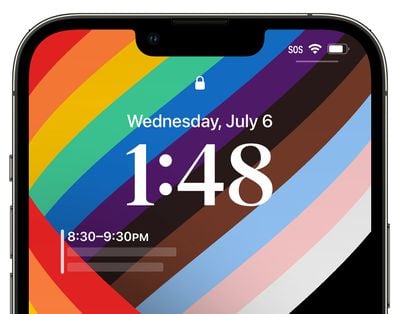
Everything New in iOS 16 Beta 3: AFib History, Clownfish Wallpaper, Lockdown Mode, Lock Screen Updates and More

Apple today seeded the third betas of iOS 16 and iPadOS 16 to developers for testing purposes, and as expected, the betas refine some of the features that Apple has added in iOS 16, and there are also some new additions. Everything new in the third beta of iOS 16 is outlined below.
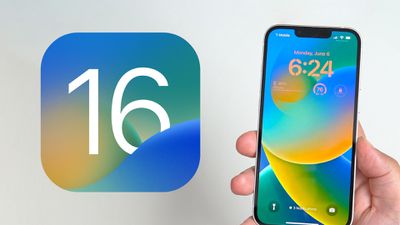
ios 16 lock screen feature

AFib History

Apple in iOS 16 and watchOS 9 is adding an AFib History feature for those who have atrial fibrillation, with the aim of tracking how long a person is in atrial fibrillation and how often. In iOS 16 beta 3, the AFib History section has been added to the Health app, and the AFib feature is activated in watchOS 9 beta 3. For now, AFib History is limited to those in the United States.
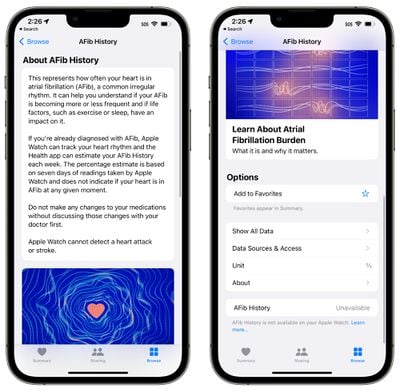
afib history ios 16

iCloud Shared Photo Library

The third beta of iOS 16 introduces support for iCloud Shared Photo Library, which is designed to make it easier for you to share photos with friends and family members. You can invite up to five people to share a photo library with you, and all participants can add, delete, and edit images.
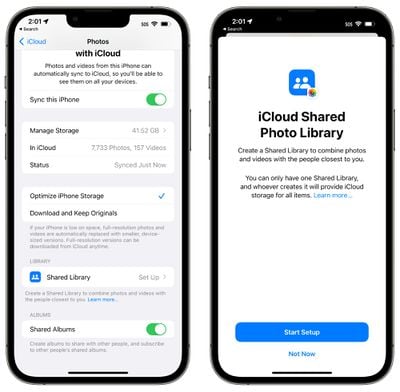
shared photo library splash screen

Lockdown Mode

Added as an extreme security measure, Lockdown Mode is available in iOS 16, iPadOS 16, and macOS Ventura. It is an optional security feature that is aimed at protecting a small number of high-profile users who are at risk of targeted cyberattacks from state-sponsored spyware.
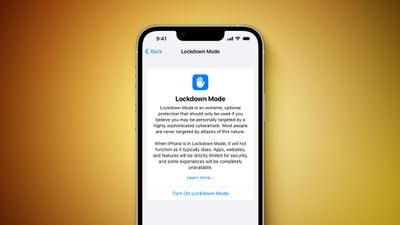
Lockdown Mode Feature
Lockdown Mode is aimed at journalists, activists, government employees, and others who might be targeted by sophisticated cyberattacks. It is not for the everyday user, and it restricts many iPhone features. In Messages, for example, attachments other than images are blocked, and in FaceTime, calls from people you have not previously contacted are blocked.

Complex web technologies and browsing features are blocked in web browsers, shared albums are removed from the Photos app, wired connections are blocked, and configuration profiles cannot be installed. More on Lockdown Mode can be found in our article outlining the feature.

Lock Screen Time Font

There are now 12 fonts to choose from for the time on the customizable iOS 16 Lock Screen, including one option that is thinner than prior fonts, and another that is a thicker version of the previously available serif font.
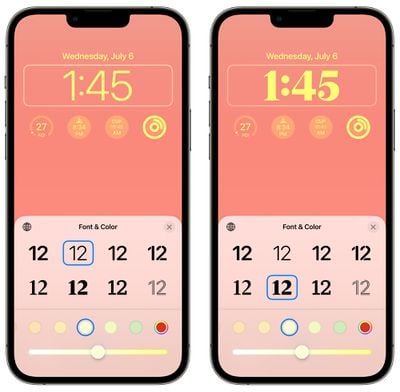
ios 16 beta 3 new fonts

Calendar Lock Screen Widget

For privacy purposes, the Calendar Lock Screen widget no longer provides details on the next upcoming event while the ‌iPhone‌ is locked. It blurs out the information until the ‌iPhone‌ is unlocked by its owner.

ios 16 calendar app hidden lock screen

Reminders

Theres a new "Include Due Today" option in the Settings section of the Reminders app. It is designed to include both overdue and due today items in the badge count, rather than just due today items.
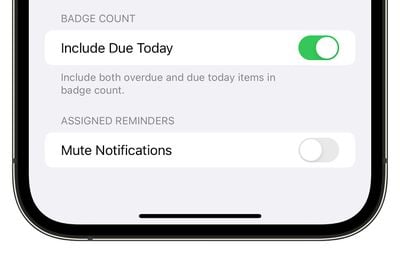
ios 16 reminders include due today

Earth Lock Screen Wallpaper

With the Earth Lock Screen wallpaper, widgets will no longer block the view of the earth. The earth image moves down when widgets are used, and up if there are no widgets placed. In prior versions of the beta, widgets overlapped.
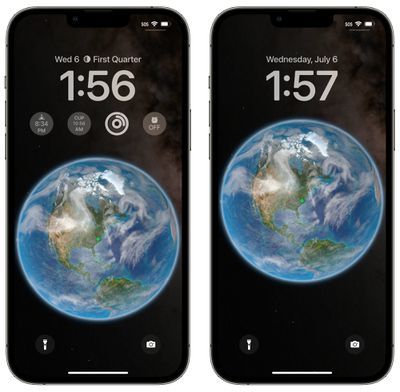
globe wallpaper widget change ios 16

iOS Version Interface Update

In the Settings app under About > iOS Version, if you tap on the version number, the interface has been updated. It's simpler and is no longer a pop-up card, plus it no longer links to Apple's security website.
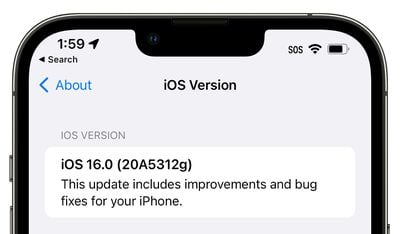
ios 16 version update interface

Clownfish Wallpaper

Some iOS 16 users who installed the third beta are seeing a Clownfish wallpaper option. This wallpaper was on the original ‌iPhone‌ when it was introduced by Steve Jobs in 2007, but it has never officially launched. It is not showing up for everyone, but it could be added as a wallpaper option in a future beta.


Stage Manager

On the iPad, there is a new splash screen for the Stage Manager feature. There are also new tutorials for walking you through how to use it, along with an updated multitasking menu with improved labeling.
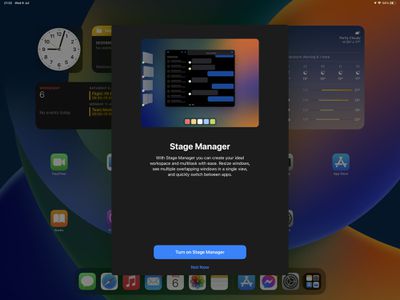
stage manager splash screen

iCloud Splash Screen

When choosing an iCloud+ subscription option, there's a new splash screen that explains the features.

Virtual Card Support

iOS 16 adds support for virtual cards for shopping using Safari. Some banks and card providers allow customers to generate virtual card numbers (similar to how Apple Card works) to use online to avoid having their credit card details stolen. Safari in iOS 16 will support this feature based on code in the beta.

Other New Features

Know of a new feature in iOS 16 beta 3 that we left out? Let us know in the comments below.

Related Forum: iOS 16

Popular Stories

top stories 2025 12 20

Top Stories: iOS 26.3 Beta, Major Apple Leaks, and More

Saturday December 20, 2025 6:00 am PST by
You'd think things would be slowing down heading into the holidays, but this week saw a whirlwind of Apple leaks and rumors while Apple started its next cycle of betas following last week's release of iOS 26.2 and related updates. This week also saw the release of a new Apple Music integration with ChatGPT, so read on below for all the details on this week's biggest stories! Top Stories i...
iPhone Top Left Hole Punch Face ID Feature Purple

iPhone 18 Pro Features Leaked in New Report, Including Under-Screen Face ID

Tuesday December 16, 2025 8:44 am PST by
Next year's iPhone 18 Pro and iPhone 18 Pro Max will be equipped with under-screen Face ID, and the front camera will be moved to the top-left corner of the screen, according to a new report from The Information's Wayne Ma and Qianer Liu. As a result of these changes, the report said the iPhone 18 Pro models will not have a pill-shaped Dynamic Island cutout at the top of the screen....
ios 18 security update

Don't Want to Upgrade to iOS 26? Here's How to Stay on iOS 18 [Update: Now Unavailable]

Friday December 19, 2025 10:37 am PST by
Since the beginning of December, Apple has been pushing iPhone users who opted to stay on iOS 18 to install iOS 26 instead. Apple started by making the iOS 18 upgrades less visible, and has now transitioned to making new iOS 18 updates unavailable on any device capable of running iOS 26. If you have an iPhone 11 or later, Apple is no longer offering new versions of iOS 18, even though there...
airpods pro 3 new blue

AirPods Pro 3's Static and Noise Issues Haven't Been Resolved

Thursday December 18, 2025 3:44 pm PST by
Since the AirPods Pro 3 launched, there have been complaints from users who have noticed a static-like sound or a crackling issue when using the earbuds, particularly when Active Noise Cancellation is on but no media is playing. Users have also run into strange high-pitched whistling sounds that happen intermittently. We shared the issues back in late October, and despite two subsequent...
apple music chatgpt

ChatGPT's Apple Music Integration Is Now Live

Wednesday December 17, 2025 3:50 pm PST by
There's now a dedicated Apple Music app for ChatGPT, which allows ChatGPT to make music recommendations and build playlists. Apple Music can be added to ChatGPT through the Settings section in the Mac app, website, or iOS app. Apple Music is listed under the apps option, and connecting to it requires signing in with your Apple Account for authorization purposes. ChatGPT can be used to...
apple beta 26 lineup

Apple's 2026 and 2027 Product Roadmap: Foldable iPhone, iPhone 18 Pro, M5 Macs, and More

Tuesday December 16, 2025 4:42 pm PST by
There has been a whirlwind of rumors over the last few days, sourced from leaked internal software designed for the iPhone and the Mac, and news sites like The Information. Below, we have a quick recap of everything we've heard this week, which serves as a guide to Apple's product plans in 2026 and beyond. We've organized the info by likely release date, though there are some products that...
samsung exynos 2600 2nm%402x

Samsung Announces World's First 2nm Mobile Chip Ahead of Apple

Friday December 19, 2025 3:59 am PST by
Samsung has officially unveiled the Exynos 2600, the world's first 2 nanometer mobile system-on-a-chip (SoC), built on the company's Gate-All-Around (GAA) process. The 10-core ARM-based design aims to deliver improved performance and efficiency for flagship devices like the upcoming Galaxy S26 series. The chip uses Arm's latest cores and supports new instructions for improved CPU speed and...
iOS 26 Maps Glass

Apple Quietly Discontinued Flyover City Tours in Apple Maps

Thursday December 18, 2025 1:31 pm PST by
Apple Maps no longer offers a Flyover feature that provides users with automated tours of notable landmarks in major cities. The Flyover option appears to have been nixed around when iOS 26 launched, but its removal went largely unnoticed. Flyover city tours were introduced in 2014 with iOS 8 and OS X Yosemite, using Flyover imagery to generate an aerial tour. Most cities with Flyover...

Top Rated Comments

FreakyT Avatar
45 months ago
Hoping the hide calendar details can be disabled -- the calendar widget seems like it would be pretty useless if you need to unlock the phone to see it.
Score: 9 Votes (Like | Disagree)
Fraserh02 Avatar
45 months ago
Imagine if there’s a bug where the stagemanager splash screen shows up on all iPads ?
Score: 8 Votes (Like | Disagree)
SW3029 Avatar
45 months ago

Hoping the hide calendar details can be disabled -- the calendar widget seems like it would be pretty useless if you need to unlock the phone to see it.
The widget will show the details when the owner of the phone looks at the screen due to Face ID recognizing them. This is how sensitive notifications already work in iOS 15 (their details are hidden until owner looks at iPhone).
Score: 8 Votes (Like | Disagree)
now i see it Avatar
45 months ago

Same and I'm also not seeing the clown fish wallpaper...


Attachment Image
Score: 8 Votes (Like | Disagree)
hxlover904 Avatar
45 months ago
This is shaping up to be a really nice iOS update. The first two betas have been relatively stable with no show stoppers so far. Some of the little features are nice quality of life improvements.
Score: 7 Votes (Like | Disagree)
GregJohn Avatar
45 months ago
Nice to see them expand the lock screen (still wish it was on iPad) but I do hope they remove the green dot on the earth (it’s the one I’ve been using)

not a feature but I’ve been using Apple Music for the last half an hour or so and hasn’t crashed for once fingers are crossed it’s actually fixed.
Score: 6 Votes (Like | Disagree)