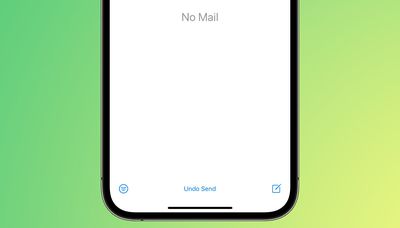
Apple in iOS 16, iPadOS 16, and macOS Ventura is overhauling the Mail app and introducing a slew of new features that bring it more in line with competing mail services such as Gmail. One of those new features is a long-awaited Undo Send option, designed to let you quickly recall an email if you make a mistake.
Undo Send works for up to 10 seconds after you send an email, so you don't have a lot of time to change your mind if you do want to unsend an email that you've sent out. Google's Gmail service also has an undo send feature for emails, but you can customize the cancelation period to 5, 10, 20, or 30 seconds.
For now, Apple is limiting undo send to 10 seconds, but it's possible the company could add other time options in the future.
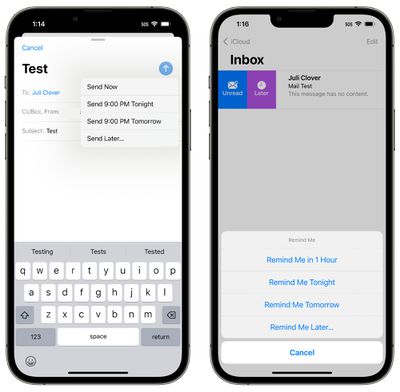
There are several other new features coming to the Mail app. You can schedule your emails for the future, or have Mail give you a reminder about an email you opened but forgot to respond to. It will also let you move sent messages to the top of your inbox so you can get a reminder to send a follow-up, and it can notify you if you forget an important part of an email like an attachment or recipient.
Rich links are now supported in email messages so you can see more at a glance, and search is improved. Apple says that you'll see better search suggestions from the moment you begin a search, and it will also correct typos and use synonyms for your search terms to bring up what you're looking for.
These features are available across Apple's platforms for those running the latest software. Apple's updates are limited to developers at this time, but the company plans to release public betas in July.
Tuesday February 3, 2026 7:47 am PST by Joe Rossignol
While the iOS 26.3 Release Candidate is now available ahead of a public release, the first iOS 26.4 beta is likely still at least a week away. Following beta testing, iOS 26.4 will likely be released to the general public in March or April.
Below, we have recapped known or rumored iOS 26.3 and iOS 26.4 features so far.
iOS 26.3
iPhone to Android Transfer Tool
iOS 26.3 makes it easier...
Tuesday February 3, 2026 12:45 pm PST by Joe Rossignol
Apple recently acquired Israeli startup Q.ai for close to $2 billion, according to Financial Times sources. That would make this Apple's second-biggest acquisition ever, after it paid $3 billion for the popular headphone maker Beats in 2014.
This is also the largest known Apple acquisition since the company purchased Intel's smartphone modem business and patents for $1 billion in 2019....
Tuesday February 3, 2026 8:55 am PST by Joe Rossignol
In 2022, Apple introduced a new Apple Home architecture that is "more reliable and efficient," and the deadline to upgrade and avoid issues is fast approaching.
In an email this week, Apple gave customers a final reminder to upgrade their Home app by February 10, 2026. Apple says users who do not upgrade may experience issues with accessories and automations, or lose access to their smart...
Tuesday February 3, 2026 12:12 pm PST by Juli Clover
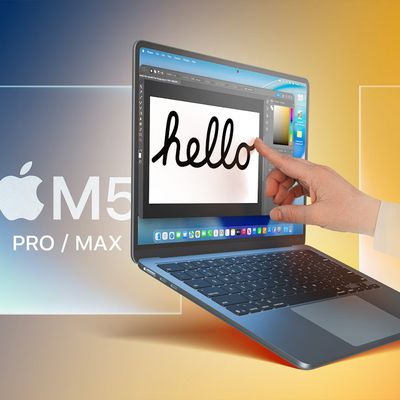
New M5 Pro and M5 Max MacBook Pro models are slated to launch in the near future, according to information shared with MacRumors by an Apple Premium Reseller.
Subscribe to the MacRumors YouTube channel for more videos.
The third-party Apple retailer said that MacBook Pro stock is very low currently because there is an imminent new product introduction. Apple typically coordinates supply with...
Thursday February 5, 2026 12:54 pm PST by Joe Rossignol
Apple turns 50 this year, and its CEO Tim Cook has promised to celebrate the milestone. The big day falls on April 1, 2026.
"I've been unusually reflective lately about Apple because we have been working on what do we do to mark this moment," Cook told employees today, according to Bloomberg's Mark Gurman. "When you really stop and pause and think about the last 50 years, it makes your heart ...
Give the send button options. Express: Sends it after 10 seconds. Courier: Sends the message after 10 minutes. FedEx: Let you schedule when it's sent. UPS: Let's you schedule when it's sent but it sits in iCloud for a few days before it's delivered. USPS: Waits until late afternoon to be sent out, but it sits in iCloud for a week before it's delivered. Surepost: Let's you schedule when it's sent but it sits in iCloud for a week before it's delivered.
I just want machine learning that can tell I referenced adding an attachment in my message text and then pop up when I go to send with a confirmation “It sounds like you meant to attach a file, do you want to send this message without a file or cancel and attach a file?” Because 9 times out of 10 that’s why I would want to undo send.
I use this feature all the time in Gmail. Reminds me of Gmail "Undo Send". Happy to see, Apple has finally decided to bring it to it's own operating system.
By the way folks, there's a reason this is only ten seconds.
There is no "undo send" with E-mail. Once your E-mail hits the SMTP server, it's sent. There's no taking it back. Doing so would require the cooperation of the recipient's mail server, which cannot be guaranteed and opens a can of worms to allow this ability.
A 10 second "undo send" is just delaying sending the message for ten seconds. Yes, that'll be enough to sometimes catch yourself and not send it, but you can easily just mull over sending it for ten seconds and it would accomplish the same thing.