Apple Releases macOS Big Sur Safari 15.1 Beta With Relocated Favorites Bar
Apple today seeded a new beta of Safari 15.1 for macOS Big Sur and macOS Catalina, allowing developers to test the new Safari update ahead of its launch. Safari 15.1 is also the version of Safari that's available in the macOS Monterey beta.
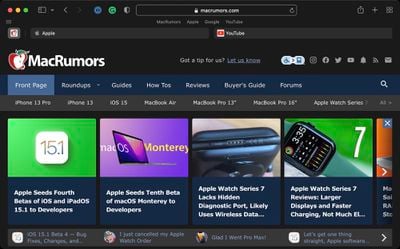
In yesterday's macOS Monterey release, Apple tweaked the design of the Favorites bar, moving it back up above the Tab bar where it was before Safari changes were implemented with the macOS Monterey update and the Safari 15 release. Safari 15.1 includes the same tweak to the Favorites bar.
Apple in macOS Monterey overhauled the look of Safari, debuting a new tab design that has proven to be unpopular with users. Apple has been refining the Safari design since then, and the changes coming in Monterey were made available to macOS Big Sur and macOS Catalina users with the launch of Safari 15.
Registered developers can download the Safari 15.1 beta by logging in and then navigating to the More Downloads section. The latest versions of macOS Big Sur or macOS Catalina are required to install the beta.
Popular Stories
Bloomberg's Mark Gurman has high expectations for Apple's first foldable iPhone.
In his Power On newsletter today, he said the foldable iPhone will be "the most significant overhaul in the iPhone's history."
"iPhone 4, iPhone 6 and iPhone X were clearly a big deal, but this is a whole new design," he said.
Like Samsung's Galaxy Z Fold 7, the foldable iPhone will reportedly open up like ...
March has been an incredibly busy month for Apple, with the company unveiling more than 10 new products and accessories. We said hello to the MacBook Neo at the start of the month, and we bid farewell to the Mac Pro at the end of it.
Nevertheless, there is still a lot more to come this year.
Beyond the usual annual updates to iPhones and Apple Watches, Apple's all-new smart home hub is...
Apple is expected to release two new iPhone apps this year, including an Apple Business app and a Siri app with chatbot-like functionality.
With the Apple Business app, employees at businesses using the new Apple Business platform will be able to install apps for work, view contact information for colleagues, and request support. Apple Business is launching on April 14, and it replaces Apple ...























