Skip to Content

Parallels 17 Brings Windows 11 and macOS Monterey Virtualization Support, Improved Graphics, M1 Optimizations, and More

Parallels Desktop 17 was released today, bringing native support for Windows 11 and macOS Monterey to both Intel and Apple silicon Macs, as well as a range of performance and compatibility improvements.
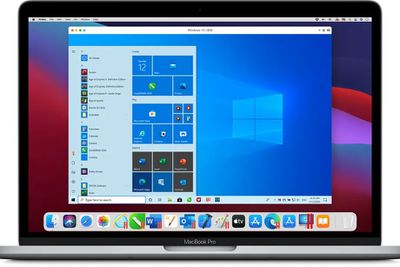
parallels 17
It's worth noting from the off that the versions of Windows that Parallels 17 can run on an M1 Mac are currently limited to the Insider Previews for Windows 10 and Windows 11, due to their compatibility with ARM-based hardware. However, Parallels has promised that when Windows 11 is officially released to the public, the virtualization software will be able to run it.

With that caveat, for both ‌M1‌ and Intel systems, Parallels 17 resumes Windows and Linux up to 38% faster compared to the previous version, and benefits from a sixfold increase in OpenGL graphics processing and up to a 25% improvement in 2D graphics performance, according to the company.

If you're running it on an Apple silicon machine, expect 33% faster Windows startup times, up to 20% better disk performance on Windows 10 Insider Preview, and up to 28% faster DirectX 11 performance.

Elsewhere, Parallels has improved its Coherence mode, which lets you run a windows app without launching the full virtual machine. Coherence will now window shutdowns, updates, and sign-in screens, while drag-and-drop between Windows and Mac apps has been enhanced, with support for dragging text and images between windows, including support for Quick Notes in Monterey.

‌M1‌ users can also now use BitLocker and Secure Boot thanks to a virtualized TPM (Trusted Platform Module) chip. Windows 10 will also recognize macOS battery status and turn on battery saving mode when your Mac runs low on battery.

Parallels Desktop 17 has moved entirely to a subscription model, which means the standard edition costs $79.99 per year, while Pro and Business Editions are available for $99.99 per year. Users who purchased a perpetual license for an earlier version of Parallels Desktop can upgrade to Parallels Desktop 17 for $49.99. A free trial is available to download from the Parallels website.


Popular Stories

MacBook Neo Feature Pastel 1

First MacBook Neo Benchmarks Are In: Here's How It Compares to the M1 MacBook Air

Thursday March 5, 2026 4:07 pm PST by
Benchmarks for the new MacBook Neo surfaced today, and unsurprisingly, CPU performance is almost identical to the iPhone 16 Pro. The MacBook Neo uses the same 6-core A18 Pro chip that was first introduced in the iPhone 16 Pro, but it has one fewer GPU core. The MacBook Neo earned a single-core score of 3461 and a multi-core score of 8668, along with a Metal score of 31286. Here's how the...
imac video apple feature

Apple Unveils Seven New Products

Friday March 6, 2026 11:48 am PST by
Apple this week unveiled seven products, including an iPhone 17e, an iPad Air with the M4 chip, updated MacBook Air and MacBook Pro models, a new Studio Display, a higher-end Studio Display XDR, and an all-new MacBook Neo that starts at just $599. iPhone 17e features the same overall design as the iPhone 16e, but it gains Apple's A19 chip, MagSafe for magnetic wireless charging and magnetic...
Apple MacBook Pro M4 hero

Apple Planning 'MacBook Ultra' With Touchscreen and Higher Price

Sunday March 8, 2026 8:05 am PDT by
Apple is planning to launch an all-new "MacBook Ultra" model this year, featuring an OLED display, touchscreen, and a higher price point, Bloomberg's Mark Gurman reports. Gurman revealed the information in his latest "Power On" newsletter. While Apple has been widely expected to launch new M6-series MacBook Pro models with OLED displays, touchscreen functionality, and a new, thinner design...

Top Rated Comments

60 months ago
This having to buy a new version or upgrade every year is getting ridiculous.
Score: 33 Votes (Like | Disagree)
TheYayAreaLiving 🎗️ Avatar
60 months ago
Ahhh not a big fan of Subscription licenses which start at $79.99.
Score: 18 Votes (Like | Disagree)
orbital~debris Avatar
60 months ago
It seems pretty fitting that some software which lets you run Windows on your Mac has such an unrefined icon/icon badge.
Score: 14 Votes (Like | Disagree)
60 months ago
I feel virtualization of Windows on a Mac is becoming more and more an old fashioned niche.

If you really need to run Windows and are willing to pay for a hefty subscription, maybe Windows 365 ('https://www.microsoft.com/en-us/windows-365') is an easier option?
Score: 14 Votes (Like | Disagree)
daabido Avatar
60 months ago
You can still buy a perpetual license, at least in Australia. Your mileage or kilometreage might vary.
Score: 10 Votes (Like | Disagree)
60 months ago

I feel virtualization of Windows on a Mac is becoming more and more an old fashioned niche.
That's true but for some software it's needed. I'm using for example CalMan and Colorspace to calibrate displays and TV's and they only run in Windows sadly.
Score: 9 Votes (Like | Disagree)