Apple Lists 'M1X MacBook Pro' in YouTube Tags for WWDC Keynote Video
Before WWDC, rumors largely driven by leaker Jon Prosser suggested that Apple would announce redesigned 14-inch and 16-inch MacBook Pros during the conference. Those rumors, however, did not come to fruition. Interestingly, though, Apple lists "m1x MacBook Pro" as a tag for the WWDC keynote uploaded on YouTube.
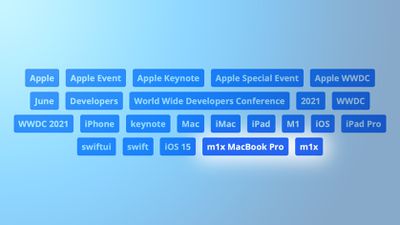
The tag, first spotted by Apple YouTuber Max Balzer on Twitter, is among other tags Apple has added to the video, including iOS 15, M1X, iOS, developers conference, and more. Apple released the M1 Apple silicon chip in November, and speculation has suggested that the next chip, expected in the redesigned MacBook Pros, would be called "m1x."
The inclusion of the tag, while not totally indicative, may suggest that Apple does plan to call the upcoming chip "m1x," or, more likely, is simply using the rumor mill as a way to bump up the WWDC keynote in YouTube search results. Bloomberg's Mark Gurman has stated that the new MacBook Pros could debut as soon as early this summer.
Popular Stories
It is now mid-July, and that means the iPhone 18 Pro and iPhone 18 Pro Max are now just two months away. The devices are expected to look similar to the iPhone 17 Pro and iPhone 17 Pro Max, but there will still be many year-over-year changes, with rumored features including a smaller Dynamic Island, 5G via satellite, and more.
Apple is expected to unveil the iPhone 18 Pro, iPhone 18 Pro Max, ...
Apple has increased the price of iCloud+ in Nigeria, Türkiye, Vietnam, Japan, Egypt, New Zealand, the Philippines, and Indonesia, according to an updated version of its iCloud support document.
Price increases range from 11 percent to 55 percent depending on the plan and the country. Nigeria saw the biggest hike, and a 50GB plan is now ₦1,300, up from ₦900. Türkiye saw the next largest...
Carrier-financed iPhones purchased from Apple will soon be locked to the carrier, ending a workaround customers used to purchase an unlocked iPhone on a payment plan.
Until the rule change, buying an iPhone from Apple and opting for financing through Verizon or T-Mobile meant you would get an iPhone not locked to either carrier's network. That's no longer the case, and now iPhones financed...