Apple Music Now Rolling Out Support for Spatial Audio and Lossless Audio - MacRumors
Skip to Content

Apple Music Now Rolling Out Support for Spatial Audio and Lossless Audio

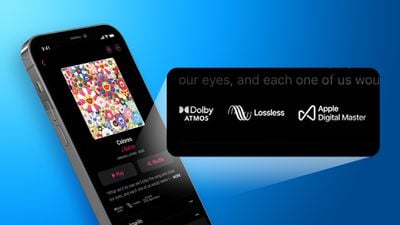
Following Apple's announcement during the WWDC keynote that Spatial Audio and Lossless Audio for Apple Music would be rolling out today, the feature now appears to be going live for some users.
iPhone Hi Fi Apple Music Thumb copy
For many users, restarting their device appears to trigger activation of the feature, but others have reported that a restart hasn't helped, so users may just need to be patient until it becomes available to them.

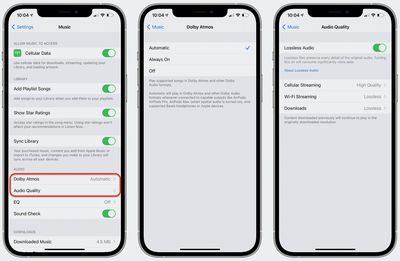
Once it's available, you'll see a new option in the Music section of the Settings app where you can choose whether Spatial Audio with Dolby Atmos is Off, Always On, or Automatic, with the Automatic option using Dolby Atmos content when your device is connected to output accessories like AirPods and compatible Beats that your device recognizes as supporting the feature. For other types of headphones, you may need to manually select the Always On option.
apple music spatial settings
A separate section offers options for Lossless Audio, where you can turn the higher-quality audio files on and then choose from more granular options to specify what quality of music files your device should use when streaming over cellular, streaming over Wi-Fi, or downloading music.
apple music spatial labels
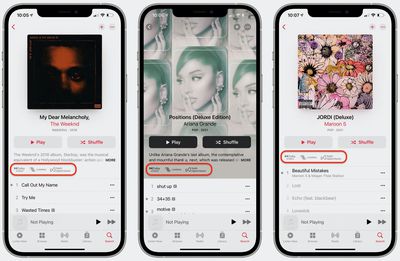
In the Music app, you'll also be able to see which albums support Spatial Audio and Lossless Audio, thanks to new labels in the album details sections.
(Thanks, @JGobel!)

Popular Stories

apple music

Apple Music Is Down for Some Users

Monday April 20, 2026 12:18 pm PDT by
If Apple Music isn't working for you, you're not alone. According to Apple's System Status page, there's currently an Apple Music outage. Apple says that users may be experiencing intermittent issues with the service. The outage started at 2:38 p.m. Eastern Time, and it is ongoing. We'll update this article when the outage has been...
macOS 27 on MacBook Pro

macOS 27 Will Mark the End of an Era

Saturday April 18, 2026 6:45 am PDT by
During its Platforms State of the Union segment at WWDC 2025, Apple revealed that macOS 26 Tahoe is the final major macOS version for Intel-based Macs. The upcoming macOS 27 release will be compatible with Apple silicon Macs only, meaning that you will need a Mac with an M-series chip or a MacBook Neo with an A18 Pro chip in order to install the software update. macOS 27 should be available...
Aston Martin CarPlay Ultra Screen

Apple Says CarPlay Ultra is Coming to These Vehicle Brands

Saturday April 18, 2026 5:59 am PDT by
Last year, Apple launched CarPlay Ultra, the long-awaited next-generation version of its CarPlay software system for vehicles. Nearly a year later, CarPlay Ultra is still limited to Aston Martin's latest luxury vehicles, but that should change fairly soon. In May 2025, Apple said many other vehicle brands planned to offer CarPlay Ultra, including Hyundai, Kia, and Genesis. CarPlay Ultra...

Top Rated Comments

64 months ago
Man I ain’t tryna be patient apple. Aye girl holla at me I’m tryna get this atmos whats up!?
Score: 13 Votes (Like | Disagree)
japanime Avatar
64 months ago
I got it to show up on my iPhone 12 mini / iOS 14.6 just now by going into the Music settings and randomly toggling on and off things like "Automatic Downloads" and "Cellular Data." After doing that a few times, the settings for Atmos suddenly showed up.
Score: 12 Votes (Like | Disagree)
turbineseaplane Avatar
64 months ago
I just heard it....

The music sounds SO much better

Game. Changed.
Score: 12 Votes (Like | Disagree)
dannyyankou Avatar
64 months ago

I got it to show up on my iPhone 12 mini / iOS 14.6 just now by going into the Music settings and randomly toggling on and off things like "Automatic Downloads" and "Cellular Data." After doing that a few times, the settings for Atmos suddenly showed up.
This did the trick! Spread the word!
Score: 7 Votes (Like | Disagree)
64 months ago
They should’ve just said coming June 8th, and slowly rolled it out today/tomorrow. Then I wouldn’t be sitting here waiting all day.
Score: 7 Votes (Like | Disagree)
Donza Avatar
64 months ago
Those trying to figure out how to get lossless audio on Mac...

1) Check that macOS is sending max sample and bit rate that your DAC supports from Audio MIDI Setup:


2) You can validate the result from System Information:

3) Enable lossless in Apple Music preferences:


4) Verify that it is actually playing back lossless version:


Or by selecting track "Get Info":


Did I miss something 😅

Attachment Image

Attachment Image

Attachment Image

Attachment Image

Attachment Image
Score: 6 Votes (Like | Disagree)