

M1 iPad Pro Selfie Camera Can Automatically Pan and Zoom to Keep You in Frame During Video Calls - MacRumors
Skip to Content

M1 iPad Pro Selfie Camera Can Automatically Pan and Zoom to Keep You in Frame During Video Calls

Apple's brand new M1 iPad Pro features drastically improved performance thanks to the new chipset and an improved TrueDepth camera system with a new "Center Stage" mode.
f1618940831
The new 11-inch and 12.9-inch ‌iPad Pro‌ features a 12MP Ultra Wide front-facing camera with a 120° field of view, compared to the standard 7MP wide-angle front-facing camera on the previous generation.

The new TrueDepth camera system enables new capabilities on the ‌iPad Pro‌, including Portrait mode selfies with the ability to adjust bokeh and Depth Control, and Portrait Lighting effects including Natural, Studio, Contour, Stage, Stage Mono, and High-Key Mono.

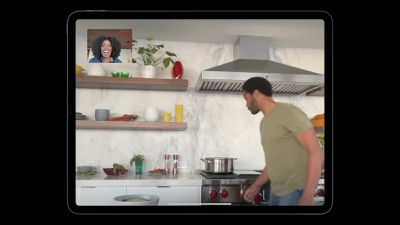
While notably spec and feature upgrades on paper, the Ultra Wide camera enables a new feature that Apple calls "Center Stage." Thanks to the TrueDepth camera's wide viewing angle, the ‌iPad Pro‌ can now use machine learning to automatically detect people in the frame, and pan and zoom to ensure they’re always visible. As Apple explains:

The all-new Center Stage uses the Ultra Wide camera and machine learning to change the way you participate in video calls. As you move around, it automatically pans to keep you center in the frame. When others join in or leave the call, the view expands or zooms in. Center Stages works with FaceTime and other video conferencing app for an even more engaging experience.

The new iPad Pros were one of a handful of new announcements Apple made during its "Spring Loaded" event.


Related Roundup: iPad Pro
Buyer's Guide: iPad Pro (Buy Now)

Popular Stories

iOS 26

iOS 26.4 Adds Two New Features to CarPlay

Tuesday March 24, 2026 1:55 pm PDT by
iOS 26.4 was released today, and it includes a couple of new features for CarPlay: an Ambient Music widget and support for voice-based chatbot apps. To update your iPhone 11 or newer to iOS 26.4, open the Settings app and tap on General → Software Update. CarPlay will automatically offer the new features so long as the iPhone connected to your vehicle is running iOS 26.4 or later....
Apple Business hero

Apple Unveils 'Apple Business' All-in-One Platform

Tuesday March 24, 2026 8:53 am PDT by
Apple today announced Apple Business, a new all-in-one platform that unifies device management, productivity tools, and customer outreach features. The service is designed to be a consolidated replacement for several of Apple's existing business-focused offerings, including Apple Business Essentials, Apple Business Manager, and Apple Business Connect. It provides organizations with a single...
AirPods Pro Firmware Feature

Apple Releases New Firmware for AirPods Pro 3, AirPods Pro 2 and AirPods 4

Tuesday March 24, 2026 12:31 pm PDT by
Apple today released new firmware for the AirPods Pro 2, AirPods Pro 3, and the AirPods 4. The firmware has a version number of 8B39, up from 8B34 on the AirPods Pro 3, 8B28 on the AirPods Pro 2, and 8B21 on the AirPods 4. There is no word on what's included in the firmware, but Apple has a support document with limited notes. Most updates are limited to bug fixes and performance...

Top Rated Comments

jclardy Avatar
64 months ago
It is incredible to me that the $799 iPad gets this feature, yet the $1299 iMac does not.

iMac has essentially the same internals, a larger display and a few extra ports. Yet it gets a 1080P webcam...

Of course they have to save Face ID for next year's model.
Score: 19 Votes (Like | Disagree)
alexandr Avatar
64 months ago
and if you put it on those mac pro wheels — it will follow you around the house.
Score: 10 Votes (Like | Disagree)
64 months ago

I don’t think I would want to use a $1,000 plus iPad in the kitchen.
That oven the guy is using is $30,000 CDN. I guess Apple's target audience here is people who see $1,000 as a cheap disposable item. Like $1,000 for a set of casters.
Score: 9 Votes (Like | Disagree)
jmgregory1 Avatar
64 months ago
This face tracking is cool, but the issue I have with the Zoom / Teams / FaceTime calls on the iPad Pro is I almost exclusively use it in landscape mode, so I’m never looking directly at the camera, since it’s on the side. The question I do have is, will this tracking work while the iPad is in landscape mode - such as what it would be if attached to the Magic Keyboard? Seems to me that it would be tracking in the vertical direction only when in landscape.
Score: 9 Votes (Like | Disagree)
Brookzy Avatar
64 months ago
I think this is what Gurman was on about when he was talking of weird HomePod-iPad combos.
Score: 9 Votes (Like | Disagree)
gsmornot Avatar
64 months ago
You will have to walk behind the screen to clear a boogie. No more leaning over. Ha. Really through, great feature. I can see this in my kitchen just like in the ad.

Side note: The range in the back with the red knobs, Wolf maybe, looks sweet. As someone that cooks often I would love one of those.
Score: 6 Votes (Like | Disagree)















