Paris Metro Navigo Cards Now Supported on iPhone - MacRumors
Skip to Content

Paris Metro Navigo Cards Now Supported on iPhone

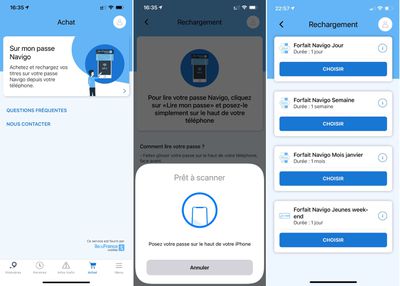
Navigo cards for travelling on the Paris metro and bus network are now supported on iPhone, with the ability to "recharge" passes using Apple Pay (via iGeneration).
smart navigo card paris scan

Last week, it was rumored that Apple had reached an agreement for Navigo cards to work with NFC on iPhone, and now the feature has arrived with the latest update to the Navigo app from Paris's transport authority, Ile-de-France Mobilités.

Users can now buy a ticket within the app using ‌Apple Pay‌ and then add it to their physical Navigo card by scanning it on the back of the iPhone. Contrary to previous reports, Navigo is still unable to be added to Wallet or used digitally.

The implementation is considerably more onerous than Apple Pay-based solutions in other cities. For example, in London, commuters are able to pass through gates with ‌Apple Pay‌ directly, without the need to purchase a ticket ahead of time or recharge a physical card. Nevertheless, the update to Navigo allows users to buy digital tickets to roam Parisian public transport with ‌Apple Pay‌, avoiding the need to recharge at a dedicated machine.

Navigo, the city's digital mobile transit card, was launched in September 2019, but its success was mired by the need for direct secure authentication with reader gates. This is also why ‌Apple Pay‌ cannot currently be implemented to pay for travel directly on gate readers, since it would skirt the Navigo system.

There have been reports that the need for secure authentication with Navigo will be eliminated at some point in 2021, allowing ‌‌Apple Pay‌‌ to be used directly to traverse the public transport network as it does other cities such as New York, which recently completed its rollout of ‌‌Apple Pay‌‌ support.

Navigo on iPhone is supported on iPhone 7 and newer, but it does not yet work with iPhone XR, iPhone XS and iPhone XS Max.


Tag: France

Popular Stories

Apple TV Sans Remote Feature

New Apple TV 4K Leaked

Friday September 25, 2026 8:16 am PDT by
MacRumors contributor Aaron Perris has uncovered an image file from Apple for an unreleased Apple TV 4K, suggesting that a new model will finally be released soon. The image is specifically for an "Apple TV 4K (4th generation)" model. Apple TV 4K (4th generation) image (on a gradient) The image reveals that the Apple TV will have the same external design as the current model, with all of its...

HomePod minis Apple TV and iPad mini Leak Feature

iPad Mini With A20 Pro, New HomePod Mini Colors, and New Apple TV 4K All Just Leaked

Friday September 25, 2026 8:18 am PDT by
The next iPad mini, HomePod mini, and Apple TV 4K models have all leaked, just a few weeks before the devices are expected to be announced. Specifically, MacRumors contributor Aaron Perris discovered a few of Apple's official images of the devices, confirming their existence and some new features that are planned. The most notable iPad mini details revealed in today's leak include an A20 Pro ...
HomePod minis on gradient feature 1 1

Exclusive: First Look at HomePod Mini 2 in Three New Colors

Friday September 25, 2026 8:17 am PDT by
Apple's new HomePod mini will share the same design as the original model and come in five colors, MacRumors has found. The information originates from Apple's own code (spotted by MacRumors contributor Aaron Perris) and shows clear product images of the new models in all of their colors. The above image contains Apple's own icons, which specifically refer to a "HomePod mini 2." The new...

Top Rated Comments

Futurix Avatar
74 months ago
This article seems to be completely wrong - the new feature added to the app is the ability to 'recharge' the Navigo passes (physical cards) with your iPhone. You have to put the card on the back of your phone, pay with Apple Pay for a new season ticket, and it will update the card (via NFC).
Score: 7 Votes (Like | Disagree)
dontwalkhand Avatar
74 months ago

Apple still won’t allow Oyster style cards in the Wallet? Apple Pay is okay for random trips but if you need a travel card because of a discount then you still need to use a physical card.
They do, its up to the transit agency and their equipment manufacturer. So far all cities with Cubic Transportation equipment are getting it, with the exception being London, who seems to be in favor of phasing out Oyster instead, maybe?. The manufacturer themselves have to work with Apple before offering the ability for Apple integration to the transit agencies. Conduent has been working with Apple for quite some time to try to get the SEPTA Key and NJ Transit passes to Apple Wallet....Paris' NAVIGO is also a Conduent system. So once Conduent does their thing with Apple, I am sure Paris will enable it as soon as possible.

See: Hong Kong (Octopus - Vix Technology), Japan (Suica - Proprietary Sony FeLiCa readers, Vix Technology Back of House), Chicago (Ventra - Cubic Transportation), Portland (HOP FastPass - INIT), LA (TAP -Cubic Transportation), and Washington DC (SmarTrip - Cubic Transportation).

Coming Soon:

Phoenix (PlatinumPass - Scheidt & Bachmann, migrating to Vix Technology)
Seattle (ORCA - Vix Technology)
San Francisco (Clipper - Cubic Transportation)
New York (OMNY - Cubic Transportation, enabled with regular credit card Apple Pay now, physical OMNY card and virtual OMNY card coming soon)
Melbourne (MyKi - Vix Technology)
Sydney (Opal - Cubic Transportation)
London (Oyster - Cubic Transportation)
San Diego (CompassCard - Cubic Transportation, migrating to INIT)
Toronto (PRESTO - Scheidt & Bachmann)
Boston (CharlieCard - Scheidt & Bachmann)
Berlin (Schedit & Bachmann)
Amsterdam (OV ChipKaart - Scheidt and Bachmann, Migrating to Vix Technology)
NJTransit (Conduent)
Philadelphia (SEPTA Key- Conduent)
Paris (NAVIGO - Conduent)

NAVIGO is Conduent, so its a matter of time....

As you can tell, there are about five major players in this game, it won't be that hard. Cubic, the biggest one in the room, Scheidt & Bachmann, Conduent, Init, & Vix Technology.

Source: Many friends in the fare collection system industry.
Score: 3 Votes (Like | Disagree)
74 months ago

Apple still won’t allow Oyster style cards in the Wallet? Apple Pay is okay for random trips but if you need a travel card because of a discount then you still need to use a physical card.
It is allowed, you can use suica cards in Japan, Octopus in Hong Kong and other examples. Here is a list: Where you can ride transit with Apple Pay - Apple Support ('https://support.apple.com/en-us/HT207958')
Score: 3 Votes (Like | Disagree)
74 months ago

From Wikipedia: "Cards are available either attached to an account for those who live or work in the Île-de-France region (known simply as Carte Navigo), or can be issued on the spot to anyone at a station (Carte Navigo Découverte). The Navigo card bear the name and a photograph of the holder."

So you can't anonymously take public transportation in Paris?
The cards with pictures on them are the annual subscriptions that give you unlimited rides on the network. It’s a way to control it since they don’t want people abusing it (Sharing with others). And yes, they do random checks on the metro.
Score: 2 Votes (Like | Disagree)
74 months ago

Do you think nobody lives in Paris?
the only country that exists in the world is the United States, clearly
Score: 2 Votes (Like | Disagree)
74 months ago

Users can now buy a Navigo pass within the app using ‌Apple Pay‌ and then scan their digital ticket at gates via NFC. Contrary to previous reports ('https://www.macrumors.com/2021/01/06/apple-to-support-paris-metro-navigo-cards/'), Navigo is still unable to be added to Wallet. This means that users must keep the app open in order to scan their ticket.
Unless I'm missing something this seems to be entirely wrong, the app now allows you to 'charge' your physical card with a ticket or subscription via reverse NFC payable with Apple Pay (with no Apple tax, which is weird). So you still need a physical Navigo card. The only thing is that you don't need to go to a machine to load something on your Navigo card but can use your phone which is some added convenience.
Score: 2 Votes (Like | Disagree)
Latest Stories
watchOS 27: 12 New Things To Check Out on Your Apple Watch
2 hours ago
Banks and Credit Unions to Team Up Against Apple Pay Fees
14 hours ago
Apple Finally Shares tvOS 27 Release Notes With List of New Features
14 hours ago
Amazon's $199 Discount on Apple Watch Ultra 3 Returns to Help Clear Stock
15 hours ago
MacRumors Giveaway: Win an Apple Watch Ultra 4 From Lululook
15 hours ago
Apple Code Confirms iPad 12 Specs: A19, 8GB RAM, N1, C1X Modem
16 hours ago
Some iPhone 18 Pro Max Users Experiencing AT&T Cellular Issues
16 hours ago
Launch Week Deals Hit Latest Macs, Apple Watch Ultra 4, and Apple Accessories
16 hours ago
The MacRumors Show: Tyler Stalman Talks iPhone 18 Pro's Camera
17 hours ago
iPad Mini With A20 Pro, New HomePod Mini Colors, and New Apple TV 4K All Just Leaked
18 hours ago
iPad Mini 8 Leaked: A20 Pro Chip, Landscape Camera, and More
18 hours ago
Exclusive: First Look at HomePod Mini 2 in Three New Colors
18 hours ago
New Apple TV 4K Leaked
18 hours ago
Create a Custom Pass in the Wallet App on iPhone
23 hours ago
How to Check Your Mac's Manufacture Date in macOS 27
1 day ago
What's Gone in macOS Golden Gate and What's Next in macOS 28
1 day ago
TestFlight App Gets New iOS 27 Features
1 day ago
Google Photos Wardrobe Feature Comes to iOS
2 days ago
Apple Music to Host Free Head Trip Festival Livestream
2 days ago
watchOS 27.2 Code Hints at iPhone-Style Screenshot Previews
2 days ago
Beats 360 Headphones Now Available in Apple Stores
2 days ago
Apple Shares New Video Promoting iOS 27 Parental Controls
2 days ago
Apple Has Announced 12 New Products in the Past Month
2 days ago
Apple Watch Ultra 2 vs. Ultra 4 Buyer's Guide: Should You Upgrade?
2 days ago
Here's When Apple TV is Airing Free 'Peanuts' Holiday Specials This Year
2 days ago
Square Announces Apple Business Integration
2 days ago
AirPods Pro 3 on Sale for $199 This Week on Amazon
2 days ago
Qualcomm Announces Renewed Agreement With Apple
2 days ago
Apple Confirms iPhone 18 Pro Bug Fix Update is Coming Next Week
2 days ago
Full iPhone 4 'Antennagate' Q&A Video Surfaces After 16 Years
2 days ago