Safari Translation Feature Reportedly Working in Additional Countries
Apple appears to be rolling out its Safari webpage translation to more countries. According to iPhoneSoft, iOS users in France have reported gaining access to the feature, and tips sent to MacRumors suggest Mac users in Sweden are also seeing it show up for the first time.
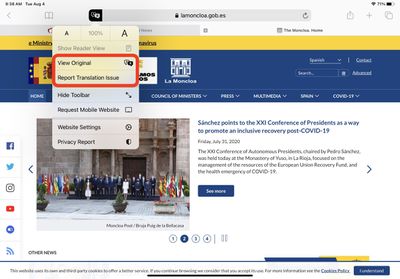
Apple introduced Safari's machine translation earlier this year when it debuted iOS 14 and macOS Big Sur at WWDC in June.
The feature allows users to translate the language of websites viewed in Apple's native browser; it can translate Arabic, Chinese, English, French, German, Italian, Japanese, Korean, Portuguese, Russian, and Spanish.
Based on the latest information, Apple appears to have remotely enabled the translate option for the two additional countries for users running iOS 14.2.1, and revised version of macOS 11.0.1 Big Sur.
Popular Stories
Bloomberg's Mark Gurman has high expectations for Apple's first foldable iPhone.
In his Power On newsletter today, he said the foldable iPhone will be "the most significant overhaul in the iPhone's history."
"iPhone 4, iPhone 6 and iPhone X were clearly a big deal, but this is a whole new design," he said.
Like Samsung's Galaxy Z Fold 7, the foldable iPhone will reportedly open up like ...
March has been an incredibly busy month for Apple, with the company unveiling more than 10 new products and accessories. We said hello to the MacBook Neo at the start of the month, and we bid farewell to the Mac Pro at the end of it.
Nevertheless, there is still a lot more to come this year.
Beyond the usual annual updates to iPhones and Apple Watches, Apple's all-new smart home hub is...
Apple is expected to release two new iPhone apps this year, including an Apple Business app and a Siri app with chatbot-like functionality.
With the Apple Business app, employees at businesses using the new Apple Business platform will be able to install apps for work, view contact information for colleagues, and request support. Apple Business is launching on April 14, and it replaces Apple ...
Popular Stories
Bloomberg's Mark Gurman has high expectations for Apple's first foldable iPhone.
In his Power On newsletter today, he said the foldable iPhone will be "the most significant overhaul in the iPhone's history."
"iPhone 4, iPhone 6 and iPhone X were clearly a big deal, but this is a whole new design," he said.
Like Samsung's Galaxy Z Fold 7, the foldable iPhone will reportedly open up like ...
March has been an incredibly busy month for Apple, with the company unveiling more than 10 new products and accessories. We said hello to the MacBook Neo at the start of the month, and we bid farewell to the Mac Pro at the end of it.
Nevertheless, there is still a lot more to come this year.
Beyond the usual annual updates to iPhones and Apple Watches, Apple's all-new smart home hub is...
Apple is expected to release two new iPhone apps this year, including an Apple Business app and a Siri app with chatbot-like functionality.
With the Apple Business app, employees at businesses using the new Apple Business platform will be able to install apps for work, view contact information for colleagues, and request support. Apple Business is launching on April 14, and it replaces Apple ...