The Best Features in Samsung's New Galaxy Note20 That Apple Should Adopt - MacRumors
Skip to Content

The Best Features in Samsung's New Galaxy Note20 That Apple Should Adopt

Samsung at the beginning of August introduced its new flagship Galaxy Note20 smartphone, which will compete with Apple's upcoming iPhone 12 models. We're going to do an in-depth comparison when the iPhone 12 comes out, but for now, we thought we'd take a look at the new Galaxy Note20 to highlight some of its best features.


Many of the Galaxy Note20's best offerings are major Samsung features that have been used in prior Galaxy devices, but they're what makes Samsung stand out as well as being features that we wouldn't mind seeing in a future iPhone.

Displays with 120Hz Refresh Rates

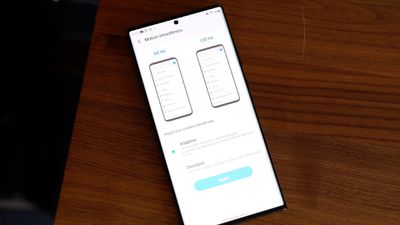
Samsung's Galaxy lineup, including the Galaxy Note20, is known for sharp, vibrant OLED displays with minimal bezels. The Note20, like some prior Samsung models, has a 120Hz refresh rate option that makes that super sharp ‌OLED‌ display even better. It's super smooth, as people who own an iPad Pro might be familiar with because Apple has had 120Hz maximum refresh rates on the ‌iPad Pro‌ for a couple years now.

note20120hz
Samsung hasn't quite perfected the higher refresh rate and it still presumably has a major impact on battery life, which is why it's limited to Full High Definition resolution (1080p) and does not work when the phone is set to the higher QHD+ resolution (1440p).

Apple is rumored to be working on 120Hz display technology for the iPhone, but as with Samsung's phones, battery life is a concern. There have been a lot of mixed rumors on whether the iPhone 12 lineup will support 120Hz ProMotion displays, but it may be a feature that Apple needs to wait to implement until there's more battery efficient LTPO display technology available. It's definitely a feature that's on the horizon, but we may not get it until 2021.

Wireless Powershare

For the past couple of years, Samsung devices have offered a Wireless Powershare feature, which is also included in the Note20. With Wireless Powershare toggled on, the Note20 becomes a Qi-based wireless charger and can provide power to other smartphones, headphones, smart watches, and more.
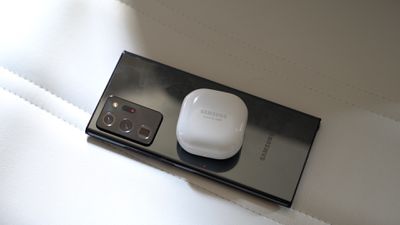
note20wirelesspowershare
It would be nice to have this feature in an iPhone for charging up the Apple Watch and the AirPods, or even sharing power with other iPhones. There were actually rumors in 2019 that suggested the iPhone 11 lineup would include bilateral charging functionality, but it's not something that Apple ended up implementing.

Apple analyst Ming-Chi Kuo speculated that the charging efficiency of the two-way charging feature might not have met Apple's requirements, leading to it being scrapped. Whether this is a feature that will pop up in a future iPhone remains to be seen, but we haven't heard it rumored for the iPhone 12.

Multitasking Windows

Samsung's Galaxy devices have long offered a version of split screen multitasking, allowing multiple apps to be used at once, and the Galaxy Note20 is no exception. It's a useful feature on the 6.7 to 6.9-inch displays offered in the Note20 and Note20 Ultra.
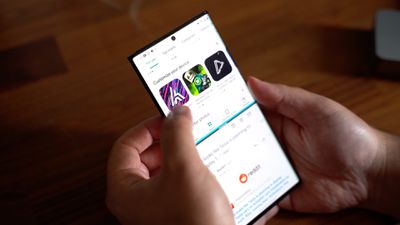
note20splitscreen
Apple has long had a split view multitasking feature on the iPad, but multiple app usage has never been brought to the iPhone. That made sense when iPhones were smaller, but now that iPhone displays are getting larger and larger, many iPhone users would likely prefer to be able to use two apps side by side.

In iOS 14, Apple did add Picture in Picture support so you can watch videos or make video calls while doing other things on the iPhone, but there's still no true multitasking functionality.

S-Pen

The S-Pen stylus that comes with the Galaxy Note has long been what differentiates the Note lineup from the standard Galaxy devices. The S-Pen is pretty much akin to an Apple Pencil for the ‌iPad‌, with super low latency and some useful note taking features.
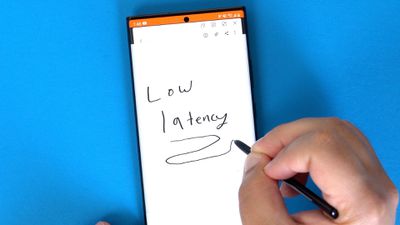
note20spen
The S-Pen attaches right to the Galaxy Note20, and popping it out lets you automatically start writing a note even when the display is off. The S-Pen also lets you do things like create a note, write on the screen, select elements on the display, translate selected text, and more.

There's been a rumor here and there over the years that Apple might add ‌Apple Pencil‌ support to the iPhone or develop an ‌Apple Pencil‌ specific to the iPhone, but there's never been any concrete suggestion that a stylus for the iPhone is the plan. It would be nice to have the option to use the ‌Apple Pencil‌ with the iPhone, though, for those who already have an ‌iPad‌ and an ‌Apple Pencil‌.

DEX

Samsung devices have this neat feature called DEX that lets you dock a smartphone to a PC or a Mac to turn the smartphone into the computer, allowing for direct control with a mouse and a keyboard.
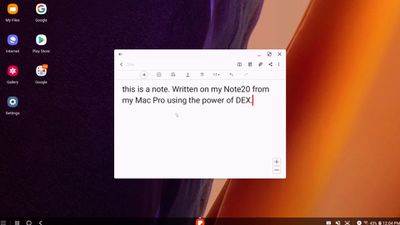
note20dex
Early versions of DEX required a dock and an external monitor and keyboard, but now you can just plug a smartphone like the Note20 into a computer and finish working on something that you started on the phone.

Apple has Handoff and Continuity features that work in much the same way if you have multiple Apple devices, letting you start something on one device and pick it up on another, but that's limited to Apple devices and it would be nice to just be able to plug in to access what you need without having to fuss with Continuity, or connect to an external monitor, keyboard, and mouse for a MacBook-like experience on the iPhone.

Would you like to see any of these Samsung features in the iPhone? What's your favorite Galaxy Note20 feature that you wish Apple would implement? Let us know in the comments.
Tag: Samsung

Popular Stories

iphone duo cover glass

Apple to Pay $250 Per iPhone Duo Foldable Display in Samsung Deal

Friday September 11, 2026 3:10 am PDT by
Samsung Display has signed a three-year exclusive supply agreement with Apple to provide foldable display panels for the iPhone Duo and future models, reports Chinese leaker Instant Digital. The iPhone Duo is the first device on the market to feature Samsung's M16 OLED material set, said to bring improvements to brightness, color performance, lifespan, and power efficiency over previous OLED...
iphone duo hero

Samsung Mocks iPhone Duo

Wednesday September 9, 2026 1:28 pm PDT by
Samsung took to social media today to mock the iPhone Duo while Apple announced the device. In a series of sarcastic posts that did not explicitly mention Apple or the iPhone Duo, Samsung made comments like "Let us know when you're done reheating our leftovers" and "Was it exciting? No. Did it happen? Yes." Samsung used an #ItsTimeToSwitch hashtag in some of its posts. Launching on...

iphone duo hero

iPhone Duo is Dust-Tight With IP68 Rating, Unlike Samsung's Galaxy Z Fold8

Wednesday September 9, 2026 5:46 pm PDT by
The iPhone Duo has an IP68 dust and water resistance rating, beating Samsung and tying Google. Samsung's latest Galaxy Z Fold8 models have an IP48 dust and water resistance rating, which means they aren't able to hold up to dust as well. Google's Pixel 11 Pro Fold also has an IP68 rating. IP6X for dust means the iPhone Duo is "dust-tight" and no dust is able to get in. The IPX8 rating for ...

Top Rated Comments

80 months ago

Apple doesn’t need any tips from Samsung.
This is the problem with Apple Fanboys. You can learn from anyone and good ideas are not monolithic. While I am a super duper happy Apple iPhone 11 Max user, I will never jump ship but I am willing to not bury my head in the sand and am willing to learn something.

Score: 34 Votes (Like | Disagree)
Fatyank Avatar
80 months ago
By far for me it would be the pencil/stylus. If you never used a Samsung note device you can’t understand how handy a stylus is. I have my own business and constantly speak with people whenI’m out and about. Grabbing phone numbers or addresses is so simple with a stylus especially now that you don’t even need to turn on the device to use it. I use a iPhone 11Pro Max and Bear Notes (Which works great and has watch app also) but it is stil quicker to pop out the stylus and jot down info from a contact/potential client.

I believe Apple could learn a thing or three from Samsung. Stylus, smaller bezels, customizable homescreens.
Score: 14 Votes (Like | Disagree)
80 months ago
Love

Apple doesn’t need any tips from Samsung.
TRIGGERED
Score: 13 Votes (Like | Disagree)
GtrDude Avatar
80 months ago
Apple needs to:
1. redesign the notification center. It's ridiculous.
2. add haptic feedback to the keyboard, and make it possible to customize different intensities to your heart's content. It's crazy that you have no feedback whatsoever if you're typing and have the phone on mute.Those who are concerned with battery can just turn it off.
3. make it possible to adjust volume for independent apps and settings and not this general thing they're doing, forcing you to do it while the thing is being played, such as separate volume control for keyboard volume, music volume, ring volume, system volume.
4. add suggestions from the address book when you're dialing a phone number. Common now Apple.
5. make it possible to customize the texting app in every conceivable way. Font size, bubble size shape color.
6. make it possible to schedule a message to be sent at a certain time/date.
7. make it possible to move the icons anywhere you want to.
8. Use an OS-wide clipboard and make it not expire. You should be able to copy text now and paste it tomorrow if you want to.
9. Give us an option to NOT go to the next email but back to inbox after deleting an email.
Score: 8 Votes (Like | Disagree)
pweicks Avatar
80 months ago
No, pls don’t adopt power share feature. The last thing I want is for family and friends to be coming up to me constantly asking if they can bum off of my phones charge.
Score: 8 Votes (Like | Disagree)
TheYayAreaLiving 🎗️ Avatar
80 months ago
Bring the 120HZ. Enough said.

This is good for competition. Samsung does offer alot of good features.
Score: 8 Votes (Like | Disagree)
Latest Stories
Amazon Just Knocked $900 Off Apple's Latest 16-Inch MacBook Pro
18 hours ago
Top Stories: Apple Leaks, Siri AI Settlement, and More
2 days ago
watchOS 27: 12 New Things To Check Out on Your Apple Watch
2 days ago
Banks and Credit Unions to Team Up Against Apple Pay Fees
3 days ago
Apple Finally Shares tvOS 27 Release Notes With List of New Features
3 days ago
Amazon's $199 Discount on Apple Watch Ultra 3 Returns to Help Clear Stock
3 days ago
MacRumors Giveaway: Win an Apple Watch Ultra 4 From Lululook
3 days ago
Apple Code Confirms iPad 12 Specs: A19, 8GB RAM, N1, C1X Modem
3 days ago
Some iPhone 18 Pro Max Users Experiencing AT&T Cellular Issues
3 days ago
Launch Week Deals Hit Latest Macs, Apple Watch Ultra 4, and Apple Accessories
3 days ago
The MacRumors Show: Tyler Stalman Talks iPhone 18 Pro's Camera
3 days ago
iPad Mini With A20 Pro, New HomePod Mini Colors, and New Apple TV 4K All Just Leaked
3 days ago
iPad Mini 8 Leaked: A20 Pro Chip, Landscape Camera, and More
3 days ago
Exclusive: First Look at HomePod Mini 2 in Three New Colors
3 days ago
New Apple TV 4K Leaked
3 days ago
Create a Custom Pass in the Wallet App on iPhone
3 days ago
How to Check Your Mac's Manufacture Date in macOS 27
3 days ago
What's Gone in macOS Golden Gate and What's Next in macOS 28
3 days ago
TestFlight App Gets New iOS 27 Features
3 days ago
Google Photos Wardrobe Feature Comes to iOS
4 days ago
Apple Music to Host Free Head Trip Festival Livestream
4 days ago
watchOS 27.2 Code Hints at iPhone-Style Screenshot Previews
4 days ago
Beats 360 Headphones Now Available in Apple Stores
4 days ago
Apple Shares New Video Promoting iOS 27 Parental Controls
4 days ago
Apple Has Announced 12 New Products in the Past Month
4 days ago
Apple Watch Ultra 2 vs. Ultra 4 Buyer's Guide: Should You Upgrade?
4 days ago
Here's When Apple TV is Airing Free 'Peanuts' Holiday Specials This Year
4 days ago
Square Announces Apple Business Integration
4 days ago
AirPods Pro 3 on Sale for $199 This Week on Amazon
4 days ago
Qualcomm Announces Renewed Agreement With Apple
4 days ago