macOS 'Big Sur' Unveiled With Updated Design, New Features for Safari and Messages, and More

Apple today previewed the latest version of macOS, called "Big Sur," and Apple is referring to this update as the biggest update since macOS X. Big Sur introduces a new redesign, new features for Safari, updates to Messages, and more.
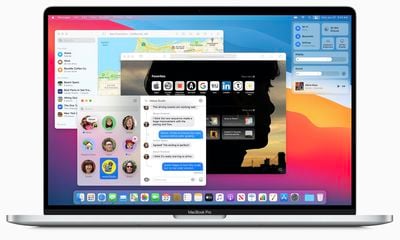
big sur macbook pro
Apple describes the new design as "spacious," that encourages easier navigation while putting more controls at the user's fingertips. Apple has refined everything from the curvature of window corners to the palette of colors and materials.

Dock icons were redesigned to be more consistent with icons across Apple's ecosystem, "while retaining their Mac personality." Overall, Apple says the new design reduces visual complexity and brings users' content front and center.
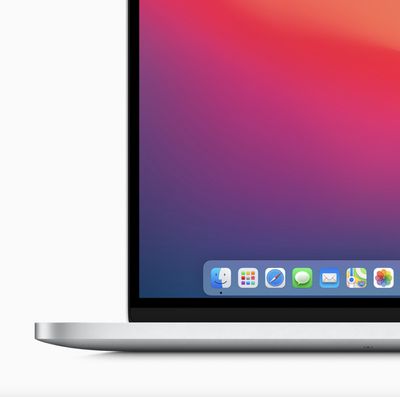
big sur close up
New to macOS is Control Center, which delivers quick access to controls right from the desktop. Notification Center has been updated with more interactive notifications and redesigned widgets in different sizes, matching the design of iOS 14.

For Safari, Apple is launching "the biggest update to Safari since its original launch in 2003." Tabs have been redesigned to make navigating Safari faster, with favicons displayed by default so it's easier to see where to click at a glance.

When opening Safari, users will browse a new start page. They can customize this area with a background image and sections like a Reading List and iCloud Tabs. While browsing Safari, foreign languages can be translated with built-in translation tools covering seven languages.

In terms of privacy, Safari now supports a new Privacy Report that delivers added visiblity into how Safari protects browsing activity across the web. Users will be able to choose when and which websites a Safari extension can work with.
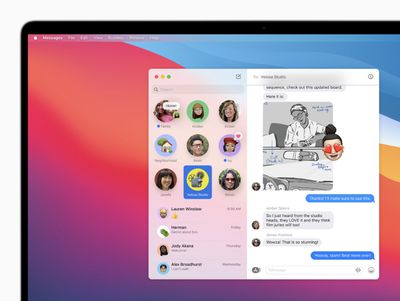
big sur messages
In Messages, Apple has introduced pinned conversations and a refined search function. Screen effects are finally supported on macOS, and users will be able to create and customize their Memoji on a Mac. In conversations, there will be a new photo picker and #images support, making it possible to share GIFs on the macOS Messages app without a third-party app.

Group messaging features streamline conversations with inline replies and @mentions, making it easy to directly address someone, or a specific text, amid a large group. They can also set a photo or an emoji for their group conversation that's shared with all members of the group.

macOS Big Sur will be available this fall as a free software update. Ahead of that date, it's available to Apple Developer Program members today and a public beta will launch in July.


Popular Stories

imac video apple feature

Apple Unveils First New Products of 2026

Monday January 26, 2026 1:55 pm PST by
Apple today introduced its first two physical products of 2026: a second-generation AirTag and the Black Unity Connection Braided Solo Loop for the Apple Watch. Read our coverage of each announcement to learn more:Apple Unveils New AirTag With Longer Range, Louder Speaker, and More Apple Introduces New Black Unity Apple Watch BandBoth the new AirTag and the Black Unity Connection Braided...
iPhone 5s

iPhone 5s Gets New Software Update 13 Years After Launch

Monday January 26, 2026 3:56 pm PST by
Alongside iOS 26.2.1, Apple today released an updated version of iOS 12 for devices that are still running that operating system update, eight years after the software was first released. iOS 12.5.8 is available for the iPhone 5s and the iPhone 6, meaning Apple is continuing to support these devices for 13 and 12 years after launch, respectively. The iPhone 5s came out in September 2013,...
Apple Creator Studio

Apple's Next Launch is Today

Tuesday January 27, 2026 2:39 pm PST by
Update: Apple Creator Studio is now available. Apple Creator Studio launches this Wednesday, January 28. The all-in-one subscription provides access to the Final Cut Pro, Logic Pro, Pixelmator Pro, Motion, Compressor, and MainStage apps, with U.S. pricing set at $12.99 per month or $129 per year. A subscription to Apple Creator Studio also unlocks "intelligent features" and "premium...
Second Generation AirTag Feature

Apple Unveils New AirTag With Longer Range, Louder Speaker, and More

Monday January 26, 2026 6:07 am PST by
Apple today introduced the second-generation AirTag, with key features including longer range for tracking items and a louder speaker. For those who are not familiar, the AirTag is a small accessory that you can attach to your backpack, keys, or other items. Then, you can track the location of those items in the Find My app on the iPhone, iPad, Mac, Apple Watch, and iCloud.com. The new...
Apple Logo Black

Apple Just Made Its Second-Biggest Acquisition Ever After Beats

Thursday January 29, 2026 10:07 am PST by
Apple today confirmed to Reuters that it has acquired Q.ai, an Israeli startup that is working on artificial intelligence technology for audio. Apple paid close to $2 billion for Q.ai, according to sources cited by the Financial Times. That would make this Apple's second-biggest acquisition ever, after it paid $3 billion for the popular headphone and audio brand Beats in 2014. Q.ai has...

Top Rated Comments

redheeler Avatar
73 months ago
The iOS icons on MacOS are kind of yucky.
Score: 29 Votes (Like | Disagree)
MacFather Avatar
73 months ago
Deleted.
Score: 27 Votes (Like | Disagree)
Feyl Avatar
73 months ago
Exactly what I expected. Horrible flat iOS look. They’re not even trying at this point.
Score: 21 Votes (Like | Disagree)
viettanium Avatar
73 months ago
iPadOS Pro :)
Score: 21 Votes (Like | Disagree)
Mythos99 Avatar
73 months ago
I dont know if i like MacOS looking more and more like iPadOS.
Score: 18 Votes (Like | Disagree)
zorinlynx Avatar
73 months ago
This trend to waste more and more screen area in the UI is really getting on my nerves.

Do they just want to sell bigger screens? It's maddening.
Score: 18 Votes (Like | Disagree)