Mobile Networks in Multiple Countries Display 'Stay Home' Message When Users Connect to Cellular Instead of WiFi
iPhone users in several countries who disconnect from WiFi on their devices will see a "Stay Home" message at the top of the Control Center where cellular network information is displayed.
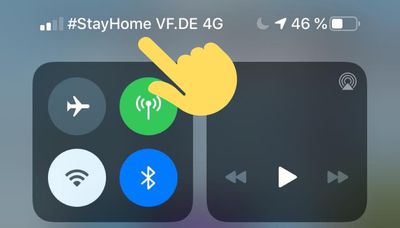
According to reports on Twitter, the status bar messages are showing up in countries that include Germany, Belgium, United Arab Emirates, Peru, Turkey, India, Luxembourg, Romania, Indonesia, Nigeria, and more.
The message appears when WiFi is toggled off in the Control Center, causing cellular network connectivity information to appear, but it would also show up without turning off WiFi when leaving an available WiFi network and transitioning to cellular. No U.S. networks appear to be showing the Stay Home wording this time.
Countries where the Stay Home message is showing up are encouraging residents to stay inside and practice social distancing to minimize the spread of the coronavirus, with the text serving as a reminder.
Popular Stories
Apple is releasing five new products this Friday, November 6, following pre-orders that opened last week, including its first touchscreen MacBook Pro models.
The following new products will be available from Friday:
iPad mini with OLED display and A20 Pro chip
iMac with M6 chip
14-inch MacBook Pro with M6 chip
14-inch MacBook Pro with OLED touchscreen
16-inch MacBook Pro with OLED...
In a memo shared with Apple Stores and Apple Authorized Service Providers this week, and later obtained by MacRumors, Apple provided technicians with guidance on how to diagnose and address the iPhone Duo's inner display cracking issue.
If a customer reports the issue, Apple advised technicians to inspect the iPhone Duo and repair or replace it in accordance with their standard procedures....
Apple's busiest season isn't over yet. Far from it. With two hardware launch dates still to come in November, plus software updates and new smart home accessories running into December, there's more on the way from Apple before the end of 2026, so be sure to stick around.
Below, we've rounded up what's still coming, along with one date in particular that's worth watching if you're a holiday...







/https://forums.macrumors.com/attachments/901057/)