Google Maps Gains New Navigation System, Crowd-Sourced Transit Info, and More - MacRumors
Skip to Content

Google Maps Gains New Navigation System, Crowd-Sourced Transit Info, and More

by

This week marks 15 years since Google Maps first launched, and Google is celebrating with some notable new features and updates for the mapping service app on iOS and Android.
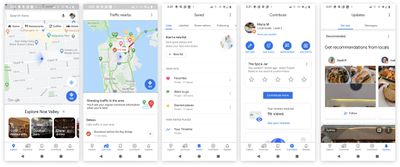
google maps updated feb 2020

The five tabs on the new Google Maps navigation screen

Starting today, the Google Maps will feature a new navigation system across the bottom of the interface including five icons, two of which are completely new: Saved, which is home to all the lists and locations you've bookmarked, and Contribute, which prompts you to add photos and reviews to places you may have visited.

The change means Google has gotten rid of the side-loading menu that was previously accessible from the search bar.

In the transit directions screen, Google has also brought in some new features crowdsourced from Maps users. These can include details shared by other passengers, like how crowded it is, how hot/cold it is, accessibility, women's-only carriages, the presence of security onboard, and how many cars a train is pulling.

There are also some notable changes to the AR-powered Live View that Google launched last year. The big blue directional arrows showing you where you're going have become optional, and Live View can now drop a big red pin on your destination and tell you how far away you are from it instead.

Lastly, the Google Maps app has a new icon – it's a four-color take on the location pin that the mapping service has used for years.

The new-look Google Maps update should be rolling out to iOS and Android users today, with the exception of the Live View changes that Google says are coming soon. Google Maps can be downloaded from the App Store for free. [Direct Link]


Top Rated Comments

Steve121178 Avatar
81 months ago

Real headline: Google updates navigation to obtain even more information about where u are and what ur doing.
Good, that's how it should work. If I don't tell the app where I am and where I am going then how can it give me accurate data and routes to and from work/home etc and to-the-minute traffic info?
Score: 9 Votes (Like | Disagree)
81 months ago

Real headline: Google updates navigation to obtain even more information about where u are and what ur doing.
Exactly why Google is succeeding and us Apple users still complain about Maps & Siri even after several years.
Score: 8 Votes (Like | Disagree)
sulpfiction Avatar
81 months ago
Real headline: Google updates navigation to obtain even more information about where u are and what ur doing.
Score: 7 Votes (Like | Disagree)
81 months ago

Real headline: Google updates navigation to obtain even more information about where u are and what ur doing.
I'm fine with that, it helps them let me know how busy a store is so I know when to go. Just wish it worked in plazas, they should send out Bluetooth beacons to install by the door inside since they can't seem to track it if places are too close together.

They've also paid me $4.19 so far this month just asking me questions about stores I've gone to.
Score: 6 Votes (Like | Disagree)
thisisnotmyname Avatar
81 months ago
works great until an artist with 99 phones in a shopping cart makes it appear that random slowdowns are occurring and reroutes the entire system.

(that actually happened)
Score: 4 Votes (Like | Disagree)
Wide opeN Avatar
81 months ago
Google Maps > Apple Maps FTW
Score: 3 Votes (Like | Disagree)

Popular Stories

Gmail General

Don't Like Your Gmail Email Address? You Can Finally Change It

Tuesday March 31, 2026 7:31 am PDT by
Google today announced that you can finally change the Google Account email address that you use for Gmail, Google Calendar, Google Photos, Google Drive, and more, but this ability is only rolling out to U.S. accounts for now. The company did not indicate if or when this functionality will be available in other countries. You can switch to any available @gmail.com address, and your previous...
google chrome vertical tabs

Google Brings Vertical Tabs and Improved Reading Mode to Chrome

Tuesday April 7, 2026 1:27 pm PDT by
Google today updated its Chrome browser with support for vertical tabs, which are displayed in a sidebar instead of at the top of the browser. The tab layout can be changed by right clicking on any Chrome window and choosing the "Show Tabs Vertically" option. Sidebar tabs feature full page titles and make it simple to organize tab groups. Google has also added a new full-page interface...
Chrome Feature 22

Gemini in Google Chrome Gets a Skills Library for Saving Custom AI Prompts

Tuesday April 14, 2026 10:00 am PDT by
Chrome has been updated today with a Skills library that's designed to let Chrome users turn AI tasks into repeatable skills that can be used on any website. Useful prompts you create for Gemini in Chrome can be saved as a Skill that can be accessed later with a single click. If you're shopping for skincare and ask Gemini about the ingredients in a product, for example, you can save the...