Apple Seeds Third Beta of tvOS 13.3 Update to Developers

Apple today seeded the third beta of an upcoming tvOS 13.3 update to developers, one week after seeding the second beta and three weeks after releasing the tvOS 13.2 update.

Designed for the fourth and fifth-generation Apple TV models, the new tvOS 13.3 developer beta can be downloaded onto the ‌‌Apple TV‌‌ via a profile that's installed using Xcode.
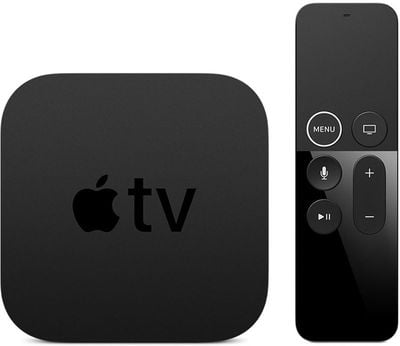
appletv4k2
tvOS updates (aside from major releases) have historically been minor in scale, focusing on under-the-hood bug fixes and improvements rather than major outward-facing changes. Apple provides little to no information on what's included in tvOS beta updates, so we may not discover any major changes after installing the software.

The update does, however, include a useful new setting that's designed to let you change the main banner interface in the TV+ app from What to Watch to Up Next, which shows content from shows that you're already watching instead of show suggestions.

The option can be accessed by going to the Settings app, choosing Apps, and selecting the TV app. From there, select Home Screen and choose "Up Next" in the "Top Shelf" section.

While we don't often know full details about what's new in tvOS during the beta testing process, we let MacRumors readers know when new updates are available so those who are developers can download it upon release.


Related Roundup: Apple TV
Buyer's Guide: Apple TV (Don't Buy)

Popular Stories

iOS 26

iOS 26.2 Coming Soon With These 8 New Features on Your iPhone

Thursday December 11, 2025 8:49 am PST by
Apple seeded the second iOS 26.2 Release Candidate to developers earlier this week, meaning the update will be released to the general public very soon. Apple confirmed iOS 26.2 would be released in December, but it did not provide a specific date. We expect the update to be released by early next week. iOS 26.2 includes a handful of new features and changes on the iPhone, such as a new...
Google maps feaure

Google Maps Quietly Added This Long-Overdue Feature for Drivers

Wednesday December 10, 2025 2:52 am PST by
Google Maps on iOS quietly gained a new feature recently that automatically recognizes where you've parked your vehicle and saves the location for you. Announced on LinkedIn by Rio Akasaka, Google Maps' senior product manager, the new feature auto-detects your parked location even if you don't use the parking pin function, saves it for up to 48 hours, and then automatically removes it once...
Foldable iPhone 2023 Feature 1

Apple to Make More Foldable iPhones Than Expected [Updated]

Tuesday December 9, 2025 9:59 am PST by
Apple has ordered 22 million OLED panels from Samsung Display for the first foldable iPhone, signaling a significantly larger production target than the display industry had previously anticipated, ET News reports. In the now-seemingly deleted report, ET News claimed that Samsung plans to mass-produce 11 million inward-folding OLED displays for Apple next year, as well as 11 million...
iOS 26

15 New Things Your iPhone Can Do in iOS 26.2

Friday December 5, 2025 9:40 am PST by
Apple is about to release iOS 26.2, the second major point update for iPhones since iOS 26 was rolled out in September, and there are at least 15 notable changes and improvements worth checking out. We've rounded them up below. Apple is expected to roll out iOS 26.2 to compatible devices sometime between December 8 and December 16. When the update drops, you can check Apple's servers for the ...
AirPods Pro Firmware Feature

Apple Releases New Firmware for AirPods Pro 2 and AirPods Pro 3

Thursday December 11, 2025 11:28 am PST by
Apple today released new firmware designed for the AirPods Pro 3 and the prior-generation AirPods Pro 2. The AirPods Pro 3 firmware is 8B30, up from 8B25, while the AirPods Pro 2 firmware is 8B28, up from 8B21. There's no word on what's include in the updated firmware, but the AirPods Pro 2 and AirPods Pro 3 are getting expanded support for Live Translation in the European Union in iOS...
AirTag 2 Mock Feature

Apple AirTag 2: Four New Features Found in iOS 26 Code

Thursday December 11, 2025 10:31 am PST by
The AirTag 2 will include a handful of new features that will improve tracking capabilities, according to a new report from Macworld. The site says that it was able to access an internal build of iOS 26, which includes references to multiple unreleased products. Here's what's supposedly coming: An improved pairing process, though no details were provided. AirTag pairing is already...
iOS 26

Apple Seeds Second iOS 26.2 Release Candidate to Developers and Public Beta Testers

Monday December 8, 2025 10:18 am PST by
Apple today seeded the second release candidate version of iOS 26.2 to developers and public beta testers, with the software coming one week after Apple seeded the first RC. The release candidate represents the final version iOS 26.2 that will be provided to the public if no further bugs are found. Registered developers and public beta testers can download the betas from the Settings app on...
iPhone 14 Pro Dynamic Island

iPhone 18 Pro Leak Adds New Evidence for Under-Display Face ID

Monday December 8, 2025 4:54 am PST by
Apple is actively testing under-screen Face ID for next year's iPhone 18 Pro models using a special "spliced micro-transparent glass" window built into the display, claims a Chinese leaker. According to "Smart Pikachu," a Weibo account that has previously shared accurate supply-chain details on Chinese Android hardware, Apple is testing the special glass as a way to let the TrueDepth...
ipad blue prime day

iPad 12 Rumored to Get iPhone 17's A19 Chip, Breaking Apple Tradition

Wednesday December 10, 2025 12:22 pm PST by
The next-generation low-cost iPad will use Apple's A19 chip, according to a report from Macworld. Macworld claims to have seen an "internal Apple code document" with information about the 2026 iPad lineup. Prior documentation discovered by MacRumors suggested that the iPad 12 would be equipped with an A18 chip, not an A19 chip. The A19 chip was just released this year in the iPhone 17, and...
studio display purple

Apple Studio Display 2 Code Hints at 120Hz ProMotion, HDR, A19 Chip

Thursday December 11, 2025 4:19 am PST by
Apple's next-generation Studio Display is expected to arrive early next year, and a new report allegedly provides a couple more details on the external monitor's capabilities. According to internal Apple code seen by Macworld, the new external display will feature a variable refresh rate capable of up to 120Hz – aka ProMotion – as well as support for HDR content. The current Studio...

Top Rated Comments

BWhaler Avatar
79 months ago
New beta has option to get read of ads on home screen, aka previews. This is most welcome.

Now Apple needs to give us the power to filter out ads, aka suggested shows, which are littered across the AppleTV app itself. So tacky. The appletv has more ads than content we have access to. Heck, it’s worse than that. It has ads for channels you already subscribe to. We’re not android users.

Once upon a time, Apple mocked the payola crapware that ships on PCs. Where is the discerning taste today? Cut the ads or give us an option to do so for the AppleTV app. Or put the ads in a separate tab, call it “discover” like music.
Score: 6 Votes (Like | Disagree)
AllergyDoc Avatar
79 months ago
I’m happy to report that the lagging, picture-degrading, and pausing spinning wheel performance of our ATV 4 that started with the release of tvOS 13 has finally ended with the release of this beta.

Edit to add: We watched 2 shows last night with no lagging or pauses at all. Fingers crossed it's fixed for good.
Score: 3 Votes (Like | Disagree)
ouimetnick Avatar
79 months ago
You mean that you pay $149-$199 and are still bombarded with advertisements when on the home screen? If it was $20 or even $40 I would be okay with the subsidized cost with ads, but not at $200
Score: 2 Votes (Like | Disagree)
sos47 Avatar
79 months ago
I want a clean screen when starting apple tv. no ads. no apple tv previews. it should be configurabable what one see on the start screen. the best for me would be the screensaver at startup.
when playing apple music it should also be configurabable if lyrics are on or not. mostly i want no lyrics.
Score: 1 Votes (Like | Disagree)