MacStories Releases 300 Custom Shortcuts Icons for iPhone and iPad - MacRumors
Skip to Content

MacStories Releases 300 Custom Shortcuts Icons for iPhone and iPad

by

MacStories today released a set of 300 custom icons for use when adding Shortcuts to the home screen on iPhone and iPad.
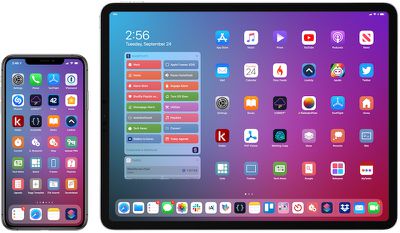
iphone ipad macstories shortcuts icons
Apple already provides many default glyphs for Shortcuts icons, but the MacStories set provides users with hundreds of extra options across dozens of categories, ranging from documents and clipboard to media and task management.

MacStories editor-in-chief and Shortcuts power user Federico Viticci:

MacStories Shortcuts Icons were designed by our longtime designer Silvia Gatta in collaboration with me. After years of covering Workflow, then Shortcuts, and following the launch of the MacStories Shortcuts Archive, I decided it was time to provide a custom icon set for Shortcuts as well.

MacStories Shortcuts Icons were designed with the needs of Shortcuts users in mind. They're not just a random icon set: each icon was specifically created for a potential use case in the Shortcuts app.

Viticci adds:

We created the set to complement Apple's default glyphs and offer more options for Shortcuts power users. I personally went through my list in the MacStories Shortcuts Archive, as well as popular shortcuts from Reddit and the community, and tried to come up with icons that would better represent each shortcut. The icons were designed with a modern, rounded look and subtle drop shadows.

For the icons to work properly, iOS 13.1 or iPadOS 13.1 is required. In those latest software versions, you can now use custom glyphs such as the MacStories icons and still keep the original colors of your shortcut icons.
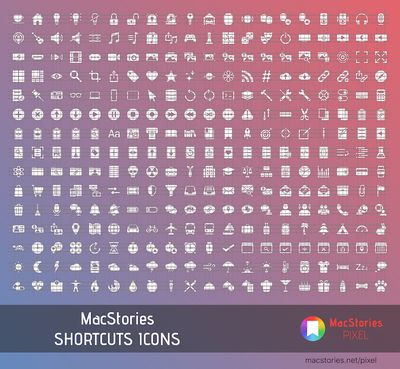
macstories shortcuts icons preview
How to use the custom icons:

  • Download the MacStories icon set directly on an iPhone or iPad and unzip the folder in the Files app

  • Open the Shortcuts app

  • Tap on the circle with three dots on a Shortcut

  • Tap on the circle with three dots in the top-right corner

  • Tap on "Add to Home Screen"

  • Tap on the icon outlined in blue and select "Choose File"

  • Choose a MacStories icon and save to the Home screen

The icon set is available today for $14.99 on the MacStories website. For a limited time, MacStories is offering MacRumors readers a 15 percent discount with promo code MACRUMORS15 at checkout.


Top Rated Comments

Joe Rossignol Avatar
86 months ago

$15 for icons? Paid post?
This isn't a paid or sponsored post and MacRumors is not receiving any sort of commission on purchases.
Just a typical press release emailed to us by MacStories in which they offered MacRumors readers a discount code.
Score: 5 Votes (Like | Disagree)
Jeremy1026 Avatar
86 months ago
$15 for an icon set, that seems a bit steep. Especially when free icon sets are readily available on the web.
Score: 3 Votes (Like | Disagree)
JosephAW Avatar
86 months ago
$15? Why not just have a subscription?
Score: 2 Votes (Like | Disagree)
86 months ago

Awesome! Now if someone could tell me how to download and install one of their custom shortcuts - I always get the message that my settings only allow shortcuts from trustworthy sources - but when I go to the shortcuts settings, there's no switch to change those settings...
I had the same issue. I created 1 random shortcut with 1 action and downloaded 1 official shortcut from in the app. Then went to settings and it was there.
Score: 2 Votes (Like | Disagree)
FloatingBones Avatar
86 months ago

They are just images, one example would be these ('https://tympanus.net/codrops/2014/10/10/freebie-helium-icon-set/') that would work.
Helium is 112 icons not specifically related to iOS and certainly not related to automation. The interesting thing about Federico's offering is his multi-year experience with shortcuts and extensive hands-on work with this release.

The operative word was "comparable". Can you explain why you think this particular set is comparable to the curated set that MacStories is offering? Are there any gaps in Helium's offering?

Did you really vet this alternative in detail?
Score: 1 Votes (Like | Disagree)
FaustsHausUK Avatar
86 months ago

$15 for icons? Paid post?
This web site is dedicated to expensive computing hardware, and it's the $15 icon set that triggers the paid post alarm? Ha!
Score: 1 Votes (Like | Disagree)

Popular Stories

shortcuts

iOS 27 Shortcuts App May Write Custom Actions for You Using AI

Tuesday March 31, 2026 6:22 am PDT by
Apple continues to develop a new feature for its Shortcuts app that will let users generate unique actions using Apple Intelligence models, based on backend code discovered by Nicolás Alvarez and confirmed by MacRumors. For those unfamiliar with the Shortcuts app, the tool lets users create elaborate custom workflows or actions – called shortcuts – to perform tasks automatically or with...
macOS 27 on MacBook Pro

macOS 27 Will Mark the End of an Era

Saturday April 18, 2026 6:45 am PDT by
During its Platforms State of the Union segment at WWDC 2025, Apple revealed that macOS 26 Tahoe is the final major macOS version for Intel-based Macs. The upcoming macOS 27 release will be compatible with Apple silicon Macs only, meaning that you will need a Mac with an M-series chip or a MacBook Neo with an A18 Pro chip in order to install the software update. macOS 27 should be available...
macworld iphone 18 pro colors

iPhone 18 Pro's Four Rumored Colors Revealed, Including 'Dark Cherry'

Friday April 17, 2026 3:50 am PDT by
A source said to be familiar with Apple's supply chain today revealed the color options Apple is planning for the iPhone 18 Pro, iPhone 18 Pro Max, and the upcoming foldable iPhone. Image via Macworld. The information comes from Macworld, which says the signature new color for this year's Pro models will be Dark Cherry, a deep wine-like red. While other sources had previously reported on a...