Apple Considering Less Disruptive Siri Behavior in Future Version of iPadOS

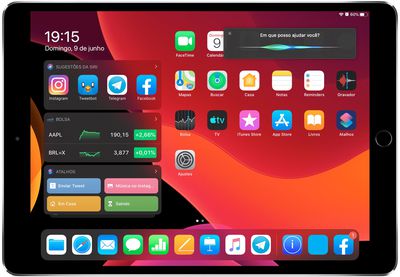
Say "Hey Siri" when using an iPad, and Apple's virtual assistant will take over the entire display, obscuring whatever you were doing on the device. Say the same thing to your Mac, however, and ‌Siri‌ responds in a more multitasking-friendly way by appearing in a small window in the corner of the screen, allowing you to drag and drop retrieved items from it.
Conceito de Siri no iPadOS

‌iPad‌ concept of improved ‌Siri‌ behavior (image via iHelp BR)

This less disruptive, more functional implementation of ‌Siri‌ in macOS may well be coming to ‌iPad‌, although it's unlikely to appear in the first version of iPadOS, which is due to be released this fall. The possibility was hinted at by Craig Federighi, Apple's VP of software engineering, in response to an email sent to him by Apple user Juliano Rossi.

Responding to Rossi's request that ‌Siri‌ on iPadOS behaves like on the Mac, without filling the entire screen, Federighi wrote:

"Hi Juliano,

Thanks for the note. Really glad that you enjoyed the keynote.

What you describe is certainly valid feedback. Unfortunately, it's not something we can add in at the last minute, but we will certainly consider it for the future.

Thanks for caring!

- craig"


As Federighi's response suggests, adding this less intrusive ‌Siri‌ behavior would require some significant changes to the OS, so it's not something that could be included at this late stage in software testing. But as Portuguese tech blog iHelp BR notes, it's at least good to know that Apple is aware of the legitimate request, which would bring iPadOS even closer to the macOS experience.

Apple often considers user feedback, but sometimes takes a while to act on it. For instance, the company eventually responded to multiple user requests that it change the volume level indicator in iOS. When pressing the volume buttons on iPhone or ‌iPad‌ running iOS 12 or earlier, the volume indicator displays in the center of the screen, obscuring content. As of iOS 13, coming this fall, the indicator is smaller and appears at the side of the display in a less intrusive manner.

Unveiled last week during Apple's WWDC keynote, iPadOS is designed to bring more desktop-class functionality to iPads with bigger screens. iPadOS will incorporate several features that recognize the tablet's function as a potential computer replacement, including a new Home screen, an updated Split View to enhance multitasking, and improved Apple Pencil support.


Related Forum: iOS 13

Popular Stories

iphone 17 models

No iPhone 18 Launch This Year, Reports Suggest

Thursday January 1, 2026 8:43 am PST by
Apple is not expected to release a standard iPhone 18 model this year, according to a growing number of reports that suggest the company is planning a significant change to its long-standing annual iPhone launch cycle. Despite the immense success of the iPhone 17 in 2025, the iPhone 18 is not expected to arrive until the spring of 2027, leaving the iPhone 17 in the lineup as the latest...
apple intelligence black

Report: Apple's AI Strategy Could Finally Pay Off in 2026

Tuesday December 30, 2025 9:01 am PST by
Apple's restrained artificial intelligence strategy may pay off in 2026 amid the arrival of a revamped Siri and concerns around the AI market "bubble" bursting, The Information argues. The speculative report notes that Apple has taken a restrained approach with AI innovations compared with peers such as OpenAI, Google, and Meta, which are investing hundreds of billions of dollars in data...
Clicks Communicator Feature

'Clicks Communicator' Unveiled — Will You Carry This With Your iPhone?

Friday January 2, 2026 6:35 am PST by
The company behind the BlackBerry-like Clicks Keyboard accessory for the iPhone today unveiled a new Android 16 smartphone called the Clicks Communicator. The purpose-built device is designed to be used as a second phone alongside your iPhone, with the intended focus being communication over content consumption. It runs a custom Android launcher that offers a curated selection of messaging...
apple fitness 2026 1

Apple Teases 'Something Big' Coming Soon to Apple Fitness+

Tuesday December 30, 2025 2:11 pm PST by
The Apple Fitness+ Instagram account today teased that the service has "big plans" for 2026. In a video, several Apple Fitness+ trainers are shown holding up newspapers with headlines related to Apple Fitness+. What's Apple Fitness+ Planning for the New Year? Something Big is Coming to Apple Fitness+ The Countdown Begins. Apple Fitness+ 2026 is Almost Here 2026 Plans Still Under ...
Mac Pro Feature Blue

What's Happening With the Mac Pro?

Wednesday December 31, 2025 9:59 am PST by
Apple hasn't updated the Mac Pro since 2023, and according to recent rumors, there's no update coming in the near future. In fact, Apple might be finished with the Mac Pro. Bloomberg recently said that the Mac Pro is "on the back burner" and has been "largely written off" by Apple. Apple apparently views the more compact Mac Studio as the ideal high-end pro-level desktop, and it has almost...
macbook air march 2020

Apple Says Final Intel MacBook Air and Apple Watch Series 5 Now 'Vintage'

Wednesday December 31, 2025 8:39 am PST by
Apple today added the final 13-inch MacBook Air powered by Intel processors, the Apple Watch Series 5, and additional products to its vintage products list. The iPhone 11 Pro was also added to the list after the iPhone 11 Pro Max was added back in September. The full list of products added to Apple's vintage and obsolete list today: MacBook Air (Retina, 13-inch, 2020) iPhone 8 Plus 128GB ...
Apple Fitness Plus hero

Apple Announces New Fitness+ Workout Programs, Strava Challenge, and More

Friday January 2, 2026 6:43 am PST by
Apple today announced a number of updates to Apple Fitness+ and activity with the Apple Watch. The key announcements include: New Year limited-edition award: Users can win the award by closing all three Activity Rings for seven days in a row in January. "Quit Quitting" Strava challenge: Available in Strava throughout January, users who log 12 workouts anytime in the month will win an ...
iphone 17 pro dark blue 1

iPhone 17 Pro and Pro Max Users Report Static Speaker Noise While Charging

Tuesday December 30, 2025 10:39 am PST by
iPhone 17 Pro and Pro Max owners are having trouble with the speakers of their devices, and have complained about a static or hissing noise that occurs when the iPhone is charging. There are multiple discussions about the issue on Reddit, the MacRumors forums, and Apple's Support Community, where affected users say there is a noticeable static noise "like an old radio." Some people report...

Top Rated Comments

RosOne Avatar
86 months ago
This is how Siri should look on all devices
https://i.imgur.com/Dy7EiQQ.jpg
Score: 23 Votes (Like | Disagree)
JimmyBanks6 Avatar
86 months ago
They probably want to rethink some other things, not just moving it to a smaller window.
For instance, it would allow for a concept where Siri could pop in as an assistent (without getting summoned by you) to tell you something.
Likely they will do the same on the iPhone and move the screen-filling-call-pick-up screens to a smaller window as well.
Score: 20 Votes (Like | Disagree)
bigcstyle4 Avatar
86 months ago
They should do the same thing for incoming phone calls on iPhone.
Score: 16 Votes (Like | Disagree)
lars666 Avatar
86 months ago
Though I don't doubt that Apple will improve the Siri experience on iPad, making a story out of a standard "We'll consider this in the future" reply (which in most case simply is a polite way of companies to answer to customer wishes like these) seems questionable to me even as a "rumor" ...
Score: 14 Votes (Like | Disagree)
allenvanhellen Avatar
86 months ago
iPhone too, please. Sometimes I want to ask Siri something based on what I’m looking at, but can’t remember all the details and then can’t read them anymore once I’ve summoned her.
Score: 10 Votes (Like | Disagree)
jclardy Avatar
86 months ago
Siri and phone calls should both be downgraded to “notification” size UIs. There is no reason Siri should take up the entirety of a 12.9” screen - it is a voice based interface, it should work out of the way of whatever you are doing.
Score: 10 Votes (Like | Disagree)