Skip to Content

Facebook Messenger 'Dark Mode' How to and Tips

by

Over the weekend we noted that Facebook had added a "hidden" setting in Facebook Messenger that allows you to turn on a long-awaited Dark mode. The new mode was found by several sites and users and remains hidden for now.
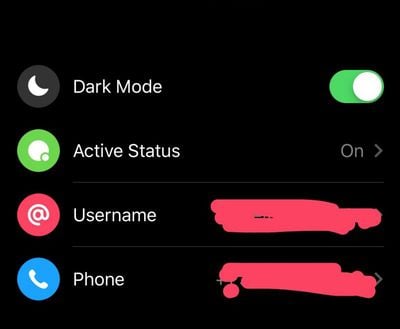
facebook dark mode

How to Turn on Dark Mode in Facebook Messenger

  1. Send just the 🌙 emoji to anyone (or even yourself).
  2. Tap on the moon emoji in the chat after you send it.
  3. A pop up should appear saying you found dark mode.
  4. Go to settings and you should see it here.
  5. You may have to force quit the Facebook Messenger app and relaunch it before tapping on the Moon emoji will work.

Facebook acknowledged the Dark mode setting in a blog post.

As many may have discovered, dark mode can be accessed through a hidden, limited-time only experience. Simply send a crescent moon emoji – 🌙 – in any Messenger chat to unlock the setting and prompt to turn on dark mode.

Facebook promises that the feature will be deployed our to everyone in a matter of weeks. The secret method to enable dark mode works in both Android and iOS.

The new mode works particularly well with Facebook's color/gradient option. If you tap on the name of the person you are chatting with, you can choose a custom color for that chat. The gradients work well against the new dark background.

Apple is widely rumored to be adding a dark mode in iOS 13 which is expected to be debuted at WWDC 2019.

(Thanks, Nathan!)

Related Forum: iOS 13

Top Rated Comments

FairlyKors Avatar
92 months ago
The most satisfying way to enter dark mode is to simply hold down the fb icon until it wiggles and then press that “secret” X that appears.
Score: 32 Votes (Like | Disagree)
keysofanxiety Avatar
92 months ago
Pretty sure FB messenger always had a hidden dark mode, with any messages or photos sent directly to Zucc for his strange gratification.
Score: 21 Votes (Like | Disagree)
BWhaler Avatar
92 months ago
Facebook. Gross.
Score: 13 Votes (Like | Disagree)
podycust Avatar
92 months ago
not working for me

edit: after sending I force quit messenger then tapped on the moon in the chat and it worked!
Score: 10 Votes (Like | Disagree)
squizzler Avatar
92 months ago
I’ve quit Messenger and Facebook altogether. Never felt better.
Score: 8 Votes (Like | Disagree)
92 months ago
Facebook is not spelt with an uppercase b...
Score: 5 Votes (Like | Disagree)

Popular Stories

MacBook Neo Feature Pastel 1

First MacBook Neo Benchmarks Are In: Here's How It Compares to the M1 MacBook Air

Thursday March 5, 2026 4:07 pm PST by
Benchmarks for the new MacBook Neo surfaced today, and unsurprisingly, CPU performance is almost identical to the iPhone 16 Pro. The MacBook Neo uses the same 6-core A18 Pro chip that was first introduced in the iPhone 16 Pro, but it has one fewer GPU core. The MacBook Neo earned a single-core score of 3461 and a multi-core score of 8668, along with a Metal score of 31286. Here's how the...
MacBook Neo Feature Pastel 1

Apple Announces $599 'MacBook Neo' With A18 Pro Chip

Wednesday March 4, 2026 6:15 am PST by
Apple today announced the "MacBook Neo," an all-new kind of low-cost Mac featuring the A18 Pro chip for $599. The MacBook Neo is the first Mac to be powered by an iPhone chip; the A18 Pro debuted in 2024's iPhone 16 Pro models. Apple says it is up to 50% faster for everyday tasks than the bestselling PC with the latest shipping Intel Core Ultra 5, up to 3x faster for on-device AI workloads,...
Multicolored Low Cost A18 Pro MacBook Feature

Apple Accidentally Leaks 'MacBook Neo'

Tuesday March 3, 2026 7:00 am PST by
Apple appears to have prematurely revealed the name of its rumored lower-cost MacBook model, which is expected to be announced this Wednesday. A regulatory document for a "MacBook Neo" (Model A3404) has appeared on Apple's website. Unfortunately, there are no further details or images available yet. While the PDF file does not contain the "MacBook Neo" name, it briefly appeared in a link...