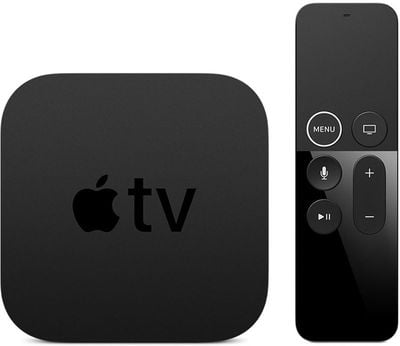
The tvOS 12.2 public beta can be obtained by going to the Settings app on the Apple TV and navigating to the Software Updates section under "System." "Get Public Beta Updates" will need to be toggled on, and once it is, the Apple TV will download the beta software.
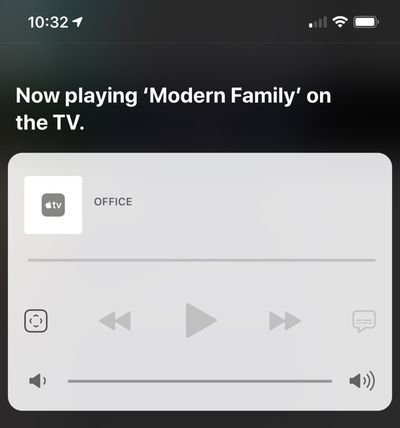
tvOS 12.2, paired with iOS 12.2, lets users ask Siri to play specific media on an Apple TV from an iOS device. You can, for example, ask Siri to play Modern Family on the TV in the living room. This works for music and TV content.
No other new features were discovered in the tvOS 12.2 beta as of yet, and it's often difficult to determine what's new because Apple does not provide release notes letting us know what's changed.
Saturday April 11, 2026 9:14 am PDT by Joe Rossignol
Last year, Apple launched CarPlay Ultra, the long-awaited next-generation version of its CarPlay software system for vehicles. Nearly a year later, CarPlay Ultra is still limited to Aston Martin's latest luxury vehicles, but that should change fairly soon.
In May 2025, Apple said many other vehicle brands planned to offer CarPlay Ultra, including Hyundai, Kia, and Genesis.
CarPlay Ultra...
As we wait for WWDC to kick off next Monday, Apple today announced the winners of its annual Apple Design Awards, recognizing apps and games for their innovation, ingenuity, and technical achievement.
The 2025 Apple Design Award winners are listed below, with one app and one game selected per category:
Delight and Fun - CapWords (App) and Balatro (Game)
Innovation - Play (App) and PBJ -...
Saturday April 11, 2026 9:07 am PDT by Joe Rossignol
While the AirPods Max 2 received more attention, Apple also released a second pair of headphones last month: Nike Powerbeats Pro 2.
Nike Powerbeats Pro 2 are the same as the regular Powerbeats Pro 2, except they have a two-tone design consisting of black and Nike's signature Volt neon green-yellow color. The headphones were released on March 20 in the U.S., Canada, Australia, the U.K., and a ...
Wednesday March 25, 2026 3:33 pm PDT by Joe Rossignol
Apple this week released tvOS 26.4, and the software update includes a handful of new features and changes for the Apple TV.
tvOS 26.4 is compatible with all Apple TV 4K and Apple TV HD models released since 2015. To update your Apple TV, open the Settings app on the device, navigate to System → Software Updates, and select Update Software.
Below, we have recapped what is new in tvOS...
Apple today provided developers with the second betas of upcoming watchOS 26.5, tvOS 26.5, and visionOS 26.5 betas for testing purposes. The software comes two weeks after Apple released the first betas for each platform.
The software updates are available through the Settings app on each device, and because these are developer betas, a free developer account is required.
There's no word ...
We're long overdue for an Apple TV update, and there have been rumors about an imminent refresh since late last year. It's now sounding like we're not going to get a new version for several months because of Siri delays. If you're holding out for a new model, here's a recap on what to expect when it eventually comes out so you can decide whether to continue to wait, or buy now.
Design
Apple ...
I didn't know our AVRs didn't already do the decoding! So it's done on the Apple TV box? I have my sound output sent to Multi-channel. Always thought my AVR did the decoding...
That's correct. At least for now/temporarily. Happened sometime around tvOS 11.3, I believe.
I'll use my receiver as an example. When I play a Dolby Atmos movie from my UHD BD player, my receiver displays "D.Atmos." Pretty straight forward; the player is passing the audio to my receiver to be decoded, which reads it as Dolby Atmos (because it's seeing the Dolby Atmos container).
The Apple TV 4K, however, does the decoding itself. It decodes Dolby Atmos first, and then sends that audio on as an uncompressed LPCM stream. As a result, my receiver displays "Multi" when I'm playing a Dolby Atmos movie from Apple TV 4K since the audio is being read as LPCM.
That's correct. At least for now/temporarily. Happened sometime around tvOS 11.3, I believe.
I'll use my receiver as an example. When I play a Dolby Atmos movie from my UHD BD player, my receiver displays "D.Atmos." Pretty straight forward; the player is passing the audio to my receiver to be decoded, which reads it as Dolby Atmos (because it's seeing the Dolby Atmos container).
The Apple TV 4K, however, does the decoding itself. It decodes Dolby Atmos first, and then sends that audio on as an uncompressed LPCM stream. As a result, my receiver displays "Multi" when I'm playing a Dolby Atmos movie from Apple TV 4K since the audio is being read as LPCM.
Hey There,
I do notice on my Yamaha receiver when playing a film with Dolby Atmos from apple tv 4k:
1)Receiver lights up with "DTHD" 2) Then " Decoder" 3)Then finally ends on "ATMOS/PCM"
I did read its some type of newer ( or older) dolby container. But yes, at the end of it: the Apple tv is doing the decoding and my Yamaha ( thank goodness ) lights up "ATMOS/PCM" and its does sound pretty damn good ( most of the time) in case anyone is interested the receiver is a YAMAHA RX-A770