Google Maps Begins Rolling Out Support for Driver Speed Limits and Speed Traps - MacRumors
Skip to Content

Google Maps Begins Rolling Out Support for Driver Speed Limits and Speed Traps

by

Google is currently rolling out support for road speed limits and speed traps in its navigation app, Google Maps.

When drivers are using the app, the speed limit feature shows the speed limit of the road they are driving on in the lower left of the screen.
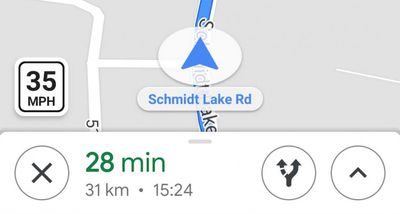
google maps speed limits

Image via Android Police

Speed traps are indicated with a small camera icon and shown on the visible map area. According to Android Police, Google Maps also gives drivers an audio warning as they approach a speed trap.

Up until now, Google restricted testing of its speed limit feature in the last couple of years to the San Francisco Bay Area in California and Rio de Janeiro in Brazil.
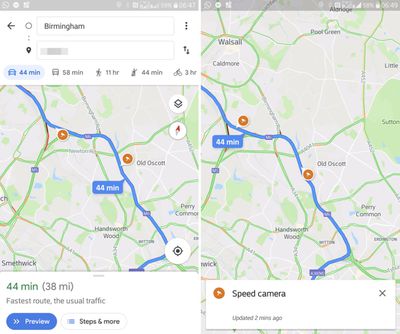
google maps speed traps

Image via Mashable

However, Android Police was recently tipped about speed limit sightings in New York City and Los Angeles, all but confirming the rollout has already begun in the U.S.

The speed limit feature is initially limited to users in the United Kingdom, Denmark, and the United States, while the speed camera icons should soon start appearing for users in several additional countries including Australia, Brazil, Canada, India, Indonesia, Mexico, and Russia.

(Via Mashable.)

Top Rated Comments

twistedpixel8 Avatar
94 months ago
I don't speed... doing 55 in a 50.
Pretty sure that’s speeding lol
Score: 12 Votes (Like | Disagree)
hybroid Avatar
94 months ago
Wonder if this is part of their plan to bring across WAZE functionality then shelve it.
Score: 7 Votes (Like | Disagree)
94 months ago
This is great. I use Waze all the time for this.

I don't speed but it's nice to know if there's a cop short of quota who wants to pull me over for doing 55 in a 50.

Also, Waze saved my ass from hitting a mattress in the road once.
Score: 4 Votes (Like | Disagree)
youknome Avatar
94 months ago
Can confirm this is available in the UK too, I found out whilst using it on the M6 last week.

Randomly warned me about speed cameras, very useful.
Score: 3 Votes (Like | Disagree)
94 months ago
Its good to see Google catching up to Apple Maps on the speed limit feature, its so nice.

Waze (which Google owns but probably shouldn't because of Google Maps overwhelming marketshare) has had these features going way back (I always wondered why they didn't bring Waze's features over to Google Maps en masse way back when they bought it).
Score: 2 Votes (Like | Disagree)
Pezboy Avatar
94 months ago
Most shocking of all, apple maps has had speed limits for quite some time. It’s the only reason that I use apple maps instead of google maps. It odd for apple to be first on something.
Score: 2 Votes (Like | Disagree)

Popular Stories

iOS 26

iOS 26.4 Adds Two New Features to CarPlay

Tuesday March 24, 2026 1:55 pm PDT by
iOS 26.4 was released today, and it includes a couple of new features for CarPlay: an Ambient Music widget and support for voice-based chatbot apps. To update your iPhone 11 or newer to iOS 26.4, open the Settings app and tap on General → Software Update. CarPlay will automatically offer the new features so long as the iPhone connected to your vehicle is running iOS 26.4 or later....
AirPods Pro Firmware Feature

Apple Releases New Firmware for AirPods Pro 3, AirPods Pro 2 and AirPods 4

Tuesday March 24, 2026 12:31 pm PDT by
Apple today released new firmware for the AirPods Pro 2, AirPods Pro 3, and the AirPods 4. The firmware has a version number of 8B39, up from 8B34 on the AirPods Pro 3, 8B28 on the AirPods Pro 2, and 8B21 on the AirPods 4. There is no word on what's included in the firmware, but Apple has a support document with limited notes. Most updates are limited to bug fixes and performance...
apple tv 4k new orange

tvOS 26.4 Adds These New Features to Your Apple TV

Wednesday March 25, 2026 3:33 pm PDT by
Apple this week released tvOS 26.4, and the software update includes a handful of new features and changes for the Apple TV. tvOS 26.4 is compatible with all Apple TV 4K and Apple TV HD models released since 2015. To update your Apple TV, open the Settings app on the device, navigate to System → Software Updates, and select Update Software. Below, we have recapped what is new in tvOS...