Instagram Gains Status Dots to Let You Know When Friends Are Online - MacRumors
Skip to Content

Instagram Gains Status Dots to Let You Know When Friends Are Online

by

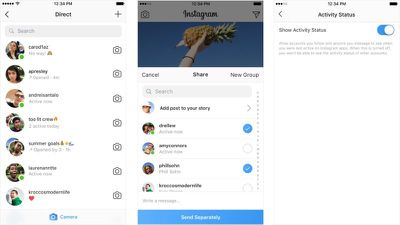
Instagram today announced the launch of a new feature that's designed to let you know when your friends are active on the social network. When a friend is online, their profile picture will be accented with a green dot in various places within the app.

You'll see the green dot in the Direct inbox and in your friends list when you share a post from the feed. Dots will be displayed for friends who follow you or people you have previously spoken to in Direct.
instagramstatusdots
If desired, you can hide your own status and turn off the ability to see when your friends are active in the settings section of the Instagram app.

Instagram says this new update is meant to make it easier to connect with friends over direct messages for more realtime conversations. The dots are rolling out to Instagram users today.

Instagram can be downloaded from the App Store for free. [Direct Link]

Top Rated Comments

riverfreak Avatar
100 months ago

...
Instagram says this new update is meant to make it easier to connect with friends over direct messages for more realtime conversations. The dots are rolling out to Instagram users today.
... (https://www.macrumors.com/2018/07/19/instagram-online-status-indicator/)
Uh, right. No, it’s meant to increase user engagement and the opportunity for more ad placements by feeding a generalized sense of anxiety and FOMO.
Score: 3 Votes (Like | Disagree)
100 months ago
How to turn off this?
It literally tells you in the article.
Score: 3 Votes (Like | Disagree)
100 months ago
imagine paying a cto, president of engineering, vp of engineering, a bunch of product managers and engineers to build and deliver..... a colored status indicator.
Score: 1 Votes (Like | Disagree)
haruhiko Avatar
100 months ago
How to turn off this?

Edit: just found out that I have already turned off the 'feature', thanks.
Score: 1 Votes (Like | Disagree)
100 months ago
I’ve had this all year. I turned it off though, they were annoying.
Score: 1 Votes (Like | Disagree)

Popular Stories

iOS 26

iOS 26.4 Adds Two New Features to CarPlay

Tuesday March 24, 2026 1:55 pm PDT by
iOS 26.4 was released today, and it includes a couple of new features for CarPlay: an Ambient Music widget and support for voice-based chatbot apps. To update your iPhone 11 or newer to iOS 26.4, open the Settings app and tap on General → Software Update. CarPlay will automatically offer the new features so long as the iPhone connected to your vehicle is running iOS 26.4 or later....
AirPods Pro Firmware Feature

Apple Releases New Firmware for AirPods Pro 3, AirPods Pro 2 and AirPods 4

Tuesday March 24, 2026 12:31 pm PDT by
Apple today released new firmware for the AirPods Pro 2, AirPods Pro 3, and the AirPods 4. The firmware has a version number of 8B39, up from 8B34 on the AirPods Pro 3, 8B28 on the AirPods Pro 2, and 8B21 on the AirPods 4. There is no word on what's included in the firmware, but Apple has a support document with limited notes. Most updates are limited to bug fixes and performance...
apple tv 4k new orange

tvOS 26.4 Adds These New Features to Your Apple TV

Wednesday March 25, 2026 3:33 pm PDT by
Apple this week released tvOS 26.4, and the software update includes a handful of new features and changes for the Apple TV. tvOS 26.4 is compatible with all Apple TV 4K and Apple TV HD models released since 2015. To update your Apple TV, open the Settings app on the device, navigate to System → Software Updates, and select Update Software. Below, we have recapped what is new in tvOS...