

Snapchat Introduces Ability to Delete Messages Even After You've Sent Them - MacRumors
Skip to Content

Snapchat Introduces Ability to Delete Messages Even After You've Sent Them

by

Snapchat today announced a new feature called "Clear Chats," which lets you delete any message you've sent to another person on Snapchat, whether in individual or group chat. This encompasses text chats, stickers, audio and voice notes, and any photo and video snaps sent from Memories.

To delete a chat message you can press and hold on the message or media in question and select the new "Delete" option. Snapchat warns that after this the recipient will be alerted in the conversation that a message was deleted. Anyone can still screenshot message contents as well.
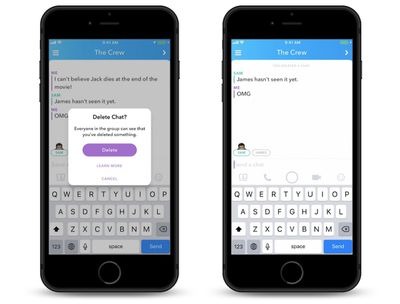
snapchat message delete
Clear Chat will not be affected by direct snaps, however, so if you open Snapchat, take a picture with the camera, and send it to someone, the snap will not be deletable. Instead, any photo or video snap sent from Memories (swiping up on the camera screen) can now be deleted after it's been sent, in addition to basic text deleting options.

Additionally, the social media company is today launching the second generation Spectacles on Amazon in the United States, United Kingdom, and Canada, after first being available only on Snapchat.com. In the coming weeks, Amazon storefronts in France, Germany, Italy, and Spain will also gain Spectacles 2.0.

On Amazon, Spectacles will be available in Onyx Moonlight, Sapphire Twilight, and Ruby Daybreak, and the glasses will run for $150 in the United States. Snapchat chose to launch the new Spectacles only on its own website at first in a bid to ensure that supply and demand was more balanced this time around, and now the company is prepared for a wider rollout.

Message deleting will roll out to Snapchat users across the world over the next few weeks.

Top Rated Comments

Vjosullivan Avatar
108 months ago
So now you can post insults, delete them and deny everything?
Score: 2 Votes (Like | Disagree)
machumors90 Avatar
108 months ago
So now you can post insults, delete them and deny everything?
No. If you read the article, it clearly says "Anyone can still screenshot message contents as well."
Plausible deniability cannot be ensured.
Score: 1 Votes (Like | Disagree)
OldSchoolMacGuy Avatar
108 months ago
When you send that naked picture and then have second thoughts.

Score: 1 Votes (Like | Disagree)
slimtastic Avatar
108 months ago
Not sure I've ever thought I needed this, but I guess it's nice to have nonetheless.

Score: 1 Votes (Like | Disagree)

Popular Stories

iphone duo

Apple Announces Foldable 'iPhone Duo'

Wednesday September 9, 2026 10:56 am PDT by
Apple today announced the "iPhone Duo," a new kind of iPhone featuring two screens and a foldable inner display. The two halves of the iPhone Duo connect into a single continuous frame with the same aspect ratio across both displays, and Apple said the transition between open and closed is designed to feel fluid. When fully open, Apple says it is the thinnest iPhone ever made, with an...
Surprise and Shine Live Coverage Article

Apple Event Live Blog: iPhone Duo, iPhone 18 Pro, and More Expected

Wednesday September 9, 2026 9:10 am PDT by
Apple's "Surprise and Shine" event kicks off today at 10:00 a.m. Pacific Time, where we're expecting to see the foldable iPhone Duo, the iPhone 18 Pro and Pro Max, Apple Watch Series 12 and Ultra 4 models, new AirPods 5 earphones, and perhaps some other announcements. Apple is providing a live video stream on its website, on YouTube, and in the company's TV app across various platforms. We...
apple surprise and shine event

Apple Event Today: iPhone 18 Pro and iPhone Duo Cheat Sheet

Tuesday September 8, 2026 10:24 am PDT by
Apple's biggest event of the year is almost here, and all eyes are on Cupertino. With the first foldable iPhone expected to headline Apple's "Surprise and Shine" event on Wednesday, September 9, at 10:00 a.m. Pacific Time, the rumor mill has been running full throttle, fuelled by the biggest single design change in the life of the iPhone. To get you up to speed, here's a quick reference...










































